What is a product film and how does it differ from a demo or explainer video

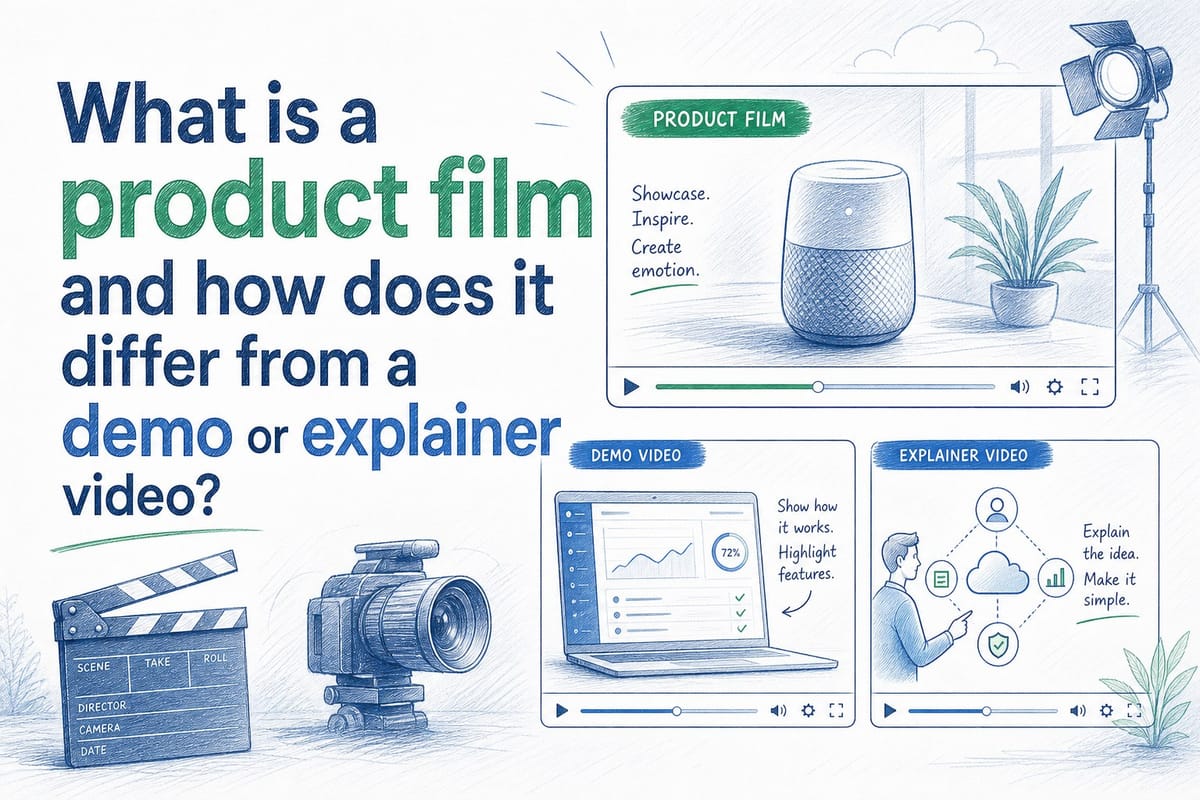
Table of contents
1. What is a product film, exactly
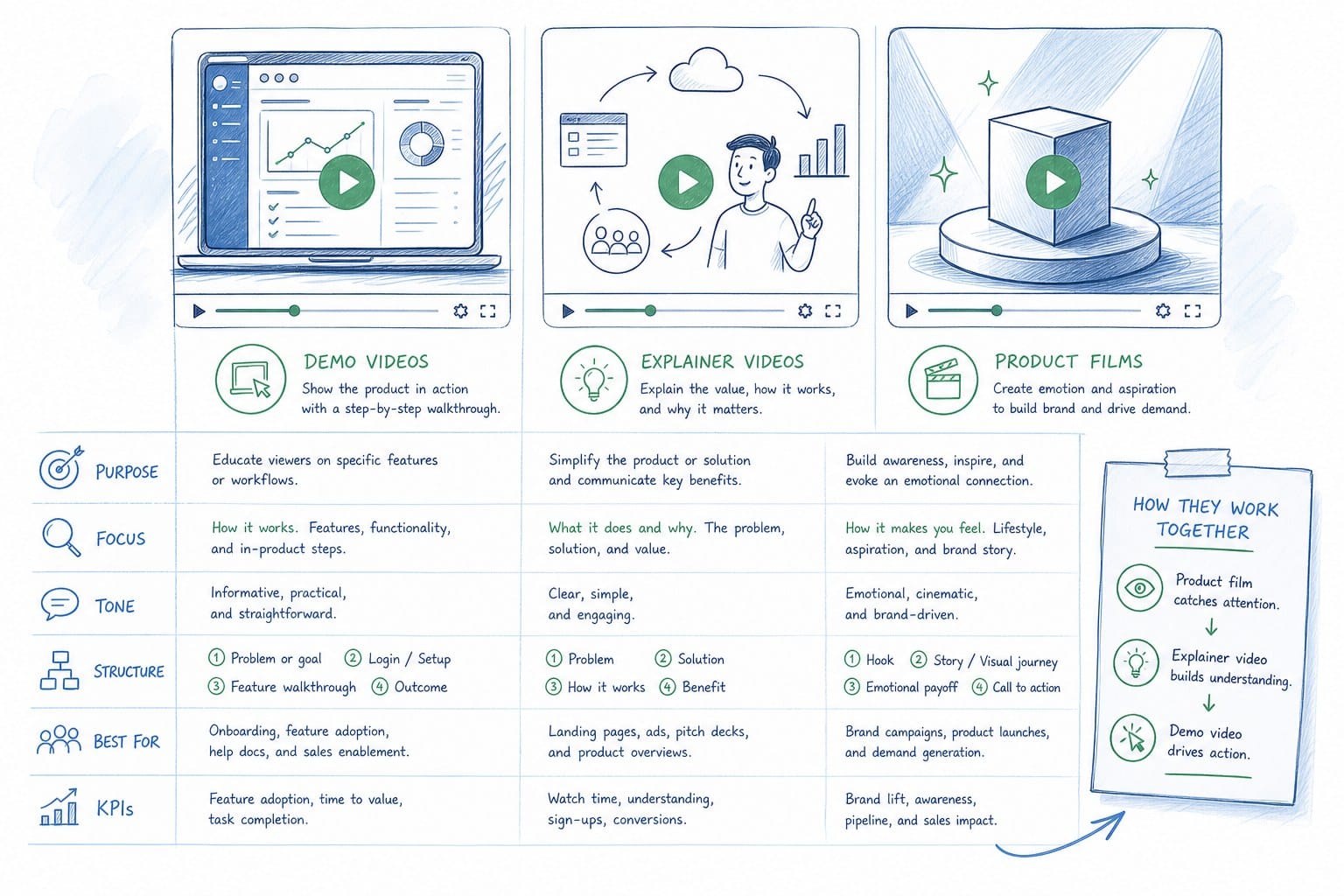
2. How demo videos and explainer videos differ from a product film
3. When to use a product film and how to keep it current
If you have spent any time in B2B SaaS marketing, you have probably heard the terms product film, demo video, and explainer video used almost interchangeably. That habit costs teams real money. Each format does a different job at a different moment in the funnel, and putting the wrong one in the wrong place is one of the most common reasons a video asset produces no measurable result. In this article I define each format precisely, show exactly where each one earns its budget, and explain why product films in particular have become the default first-impression asset for fast-moving SaaS teams.
What is a product film, exactly
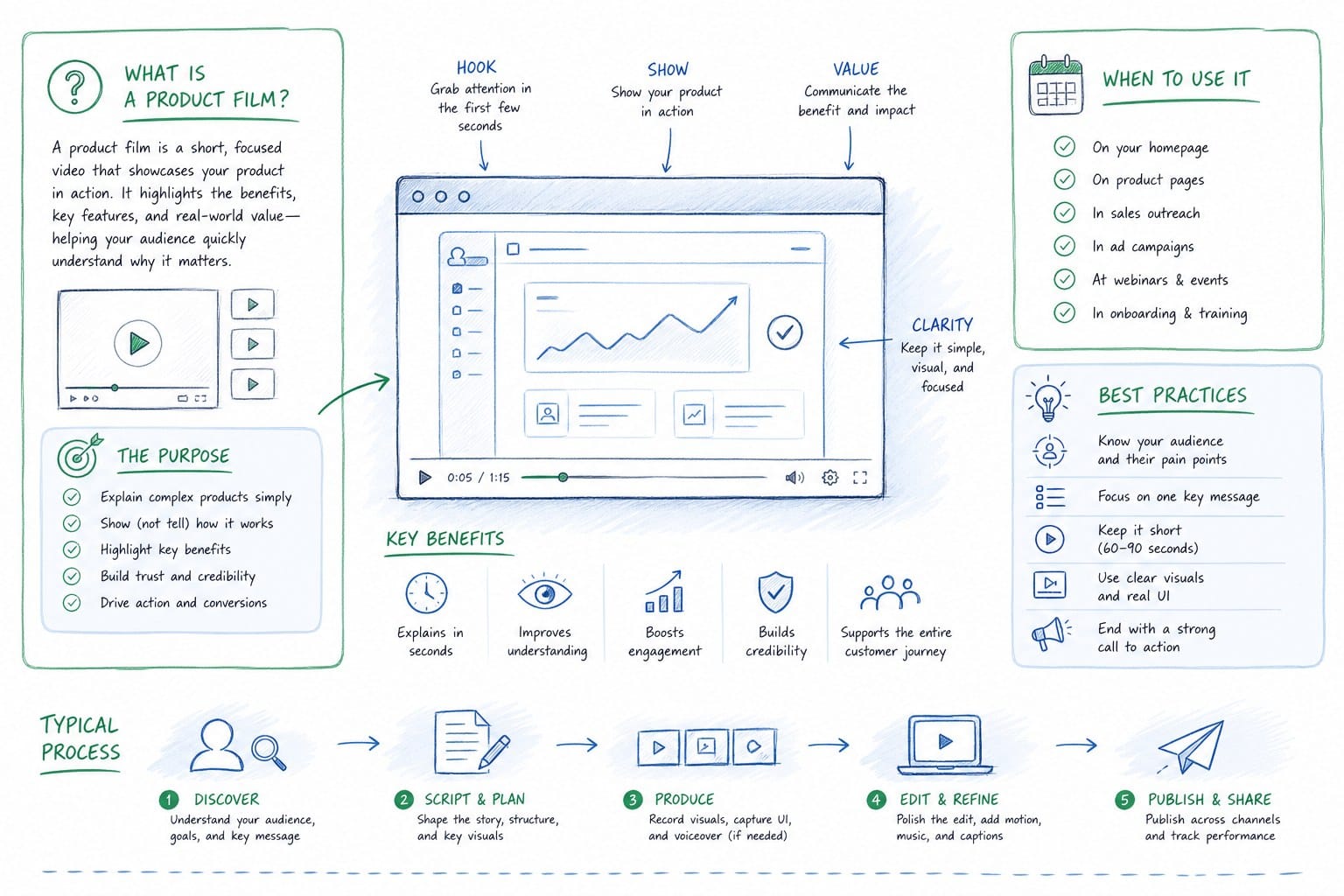
A product film is a short, polished video that shows your product working in a realistic context. It is not a tutorial. It is not a sales pitch built around slides. It is a cinematic-style look at the software doing its actual job, narrated just enough to orient the viewer, and paced to hold attention rather than to teach a workflow step by step.
The easiest analogy is a car commercial. The ad does not walk you through the infotainment system or explain what the engine displacement means. It shows the car moving through a compelling landscape, it communicates a feeling, and it leaves you with a clear sense of what owning that car would be like. A product film does the same thing for software. It lets a prospect picture themselves using the product before they ever book a demo call or start a free trial.
The core goal of a product film is impression, not instruction. It answers the question "what does this product feel like to use" rather than "how do I complete a specific task inside it." That single distinction shapes everything downstream: the pacing, the narration style, the specific screens you choose to show, and the final runtime.
Most product films run between sixty seconds and three minutes. They move at a confident pace. They skip over loading states and minor UI interactions that would bore a cold viewer. They focus on moments that produce a recognizable, satisfying outcome. A project management tool might show a task moving from open to closed, a Slack notification landing in a teammate's channel, and a dashboard lighting up with completion data. Each scene is brief. Each scene is purposeful. The viewer never feels like they are watching a screen recording.
For B2B SaaS teams, the product film has become the default homepage hero video. It sits above the fold, it plays on loop or on click, and it does the first job of any marketing asset: it keeps the visitor on the page long enough to want more. That is a fundamentally different job from what a demo video or an explainer video does, and understanding that difference is what makes budget decisions easier.
The maintenance problem is where product films get complicated. SaaS products change constantly. A UI update ships in one sprint. A feature gets renamed in the next. A new dashboard layout replaces the old one a month after that. Suddenly the beautifully produced video on your homepage shows a product that no longer exists. Visitors who sign up after watching that video open the product and immediately see a mismatch. That erodes trust at exactly the moment when you need to build it.
This is not a hypothetical edge case. It is the operational reality for any SaaS team shipping on a two-week cycle. A product film produced by a traditional video agency six months ago has a reasonable chance of being visually inaccurate today. That is one of the core reasons AI-powered tools like Product Frames have gained traction with pre-Series B teams who need to keep their product film current without rebuilding it from scratch after every release cycle.
If you want to go deeper on the budget side of this decision, the guide on how pre-Series B SaaS teams can create polished product videos on a lean budget covers the tradeoffs between agency production, in-house tooling, and AI-assisted generation honestly. The short version is that the cost of keeping a product film current is often higher than the cost of producing it the first time, and teams that do not plan for that maintenance cycle usually end up with an outdated asset doing active harm on their homepage.
Let me now define the two formats a product film is most often confused with, because the differences are sharper than most teams realize.
Before moving on, it is worth being specific about what a product film is not. It is not a product tour, which is interactive and lives inside the product or on a dedicated landing page as a clickable walkthrough. It is not a founder story video, which focuses on why the company exists rather than what the product does. It is not a customer testimonial video, which centers a user's voice rather than the product itself. Each of those formats has value. None of them is a substitute for a product film, and a product film is not a substitute for any of them.
A product film is specifically a passive, polished, short video that communicates the experience of using the product to someone who has not yet signed up. That is its entire job description. Keep that definition in mind as we look at the two formats teams most commonly mix it up with.
How demo videos and explainer videos differ from a product film
Once you understand what a product film is trying to do, the differences between it and the other two formats become straightforward. Let me take them one at a time.
A demo video is built around instruction. Its job is to show a viewer how to accomplish something specific inside the product. A demo video assumes the viewer has already decided they are interested. They want to see the exact clicks, the exact screens, the exact workflow. They may have a specific use case in mind, and they want to verify that the product handles it the way they need it to.
Demo videos are long enough to be thorough. A good one might run anywhere from five to twenty minutes depending on the complexity of the workflow being shown. It pauses on important steps. It often includes a talking-head presenter or a voiceover that narrates each action as it happens. The viewer is expected to follow along actively, possibly with the product open in another window. The goal is not to impress. The goal is to inform and to remove doubt.
Demo videos are powerful tools for the later stages of a sales cycle. A sales rep sends one after an initial discovery call to keep momentum alive between conversations. A customer success team uses one to walk a new customer through a specific workflow before their first onboarding session. In both cases, the audience is already warm. They know what the product is. They have already decided it might be relevant to them. They just want to see it handle their specific scenario.
Putting a demo video on your homepage is a mistake almost every time. A cold visitor who found you through a search or a LinkedIn post is not ready to watch fifteen minutes of detailed workflow instruction. They have not yet decided the product is relevant to them. Asking them to sit through a full demo before they have any emotional investment in the outcome is how you lose them in the first thirty seconds.
An explainer video is different again. It is built around concept rather than product screens. An explainer answers the question of what problem this product solves and why that problem matters. It typically uses animation, illustrated characters, or motion graphics rather than actual product footage. The voiceover explains a recognizable pain point, introduces the idea of a solution, and positions the product as the answer. The product itself may barely appear.
Explainer videos work best at the awareness stage, when the prospect does not yet know what category of tool you are, let alone your specific product. They meet the viewer where they are and walk them from problem recognition to product category in under two minutes. They are particularly effective in content marketing contexts, in paid social campaigns targeting cold audiences, and as the first video someone encounters when they land on a category landing page.
The problem with explainer videos is that they do not show the product. They describe the idea of the product. That is exactly right for an audience at the awareness stage, but it is the wrong answer for an audience that has already recognized the problem and is now evaluating specific tools. Sending a prospect an animated explainer after they have already asked for a comparison with your competitors is a step backward in the conversation.
Here is a clean way to map all three formats to a buyer journey:
A prospect who has never heard of you watches an explainer to understand what problem you solve and why it matters. A prospect who now understands the category and is curious about your specific product watches a product film to feel what using it would be like. A prospect who is actively evaluating you against alternatives watches a demo video to verify that the product does what they need it to do for their specific workflow.
That progression is not just conceptual. It maps directly to placement decisions. The explainer belongs in cold paid social, top-of-funnel content, and category landing pages. The product film belongs on the homepage hero, in email campaigns to warm lists, in LinkedIn feed posts, and at the start of a free trial onboarding flow. The demo video belongs in sales follow-up sequences, in the sales deck as a leave-behind, and in the customer success onboarding library.
Violating those placements is expensive. A homepage that leads with a fifteen-minute demo video tells cold visitors that you do not understand where they are in the decision process. An email campaign that sends an animated explainer to a list of prospects who already attended a webinar about your category treats warm prospects like strangers. A sales sequence that skips straight to a product film without ever letting the prospect understand why the problem matters assumes a level of awareness that many buyers do not have yet.
Demo videos and explainer videos each face a version of the maintenance problem that product films face, but the stakes are different in each case. An outdated explainer is an annoyance because it references positioning or messaging you have moved away from. An outdated demo video is a sales risk because it shows a UI that does not match what the prospect will see when they log in for the first time. An outdated product film is a brand problem because it is sitting on your homepage, in front of every cold visitor, telling a story that is no longer accurate.
For teams shipping updates on a regular cycle, the question of which video format to invest in is partly a question of which maintenance burden you can actually sustain. A demo video can sometimes be updated with a partial re-record if only one workflow changed. An explainer can often be refreshed with a script update and a new voiceover if the core animation still holds. A product film that shows specific UI needs to be regenerated whenever that UI changes materially.
The article on best product walkthrough video tools for B2B SaaS teams covers the tooling landscape for managing exactly this problem across all three formats. It is worth reading alongside this one if you are trying to build a sustainable video production workflow rather than just producing a one-time asset.
One more distinction worth drawing: audience intent. A viewer who clicks play on a homepage product film is curious but uncommitted. They will give you sixty to ninety seconds before they decide whether to keep watching or close the tab. A viewer who downloads and watches a twenty-minute demo video has already invested significant attention and is actively building a case internally to buy or not buy. Treating those two viewers the same way wastes the attention of both. The product film earns the right for the demo video to exist. The demo video earns the right for the sales call to happen. The sequence matters.
When to use a product film and how to keep it current
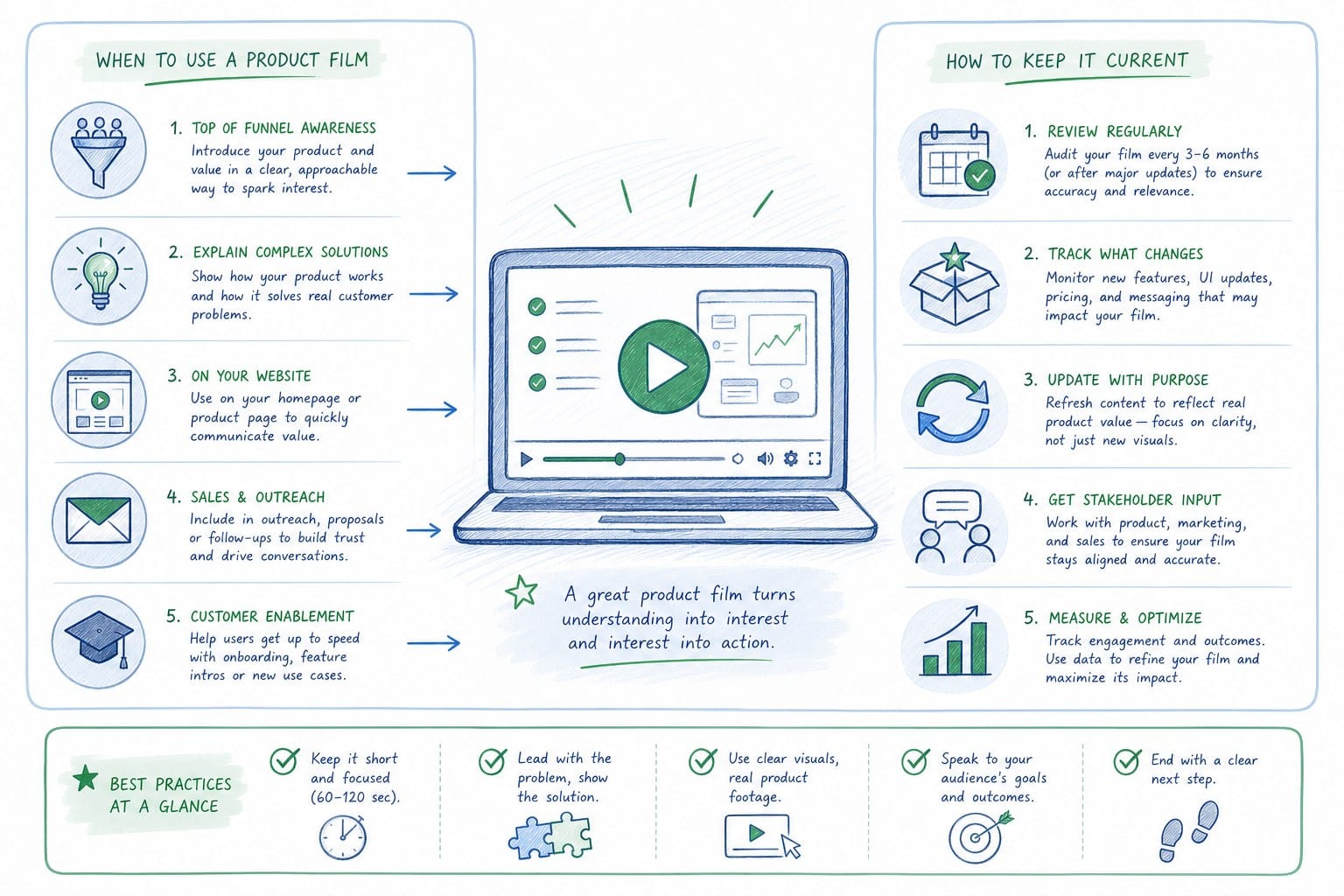
Now that the formats are clearly defined, the practical questions are when a product film is the right investment and how you keep it accurate after your product ships updates.
The clearest signal that you need a product film is a homepage that relies on static screenshots or a generic stock-photo hero image. Screenshots do not move. They do not show flow or outcome. They do not communicate what it actually feels like to use the product. If your homepage hero is a static image of a dashboard, you are asking every cold visitor to do a significant amount of imagination work that a sixty-second product film would do automatically. Some visitors will do that work. Most will not.
Studies on homepage video engagement consistently show that pages with a video hero hold visitor attention longer than pages with static images. The specific numbers vary by product category and audience, but the directional finding is consistent. Video communicates experience in a way that screenshots cannot. For a software product where the experience is the product, that gap matters.
The second clear signal is that your sales team is describing the product verbally on calls without a leave-behind that shows it working. A well-structured product film closes that gap. The rep finishes a discovery call, sends the film in the follow-up email, and the prospect watches it on their own time with their colleagues in the room. That is a fundamentally better experience than a static deck with screenshots, and it does not require the rep to be present. The film scales the conversation.
The third signal is that you are running paid social campaigns and your creative is entirely text-based or static. LinkedIn and other B2B-focused platforms consistently give video content more organic reach than static posts. A product film cut for square and vertical formats gives your growth team actual video creative to test against static alternatives. If you do not have a product film, you are competing in paid social with one hand behind your back.
For each of these situations, the product film earns its budget by doing a specific job at a specific moment in the funnel. But none of those situations stays static for long. Products change. Features get renamed. Dashboards get redesigned. Navigation moves. Brand colors update.
If you produced a product film six months ago with a traditional video agency, there is a real chance it already shows UI that does not match your current product. That mismatch is a problem your sales team knows about but may not have escalated. Prospects who watch the film and then log in to the product for the first time experience a moment of confusion. They are expecting one interface and finding another. That gap, even if small, creates friction at exactly the moment when you most need a new user to feel confident.
The operational answer that fast-moving SaaS teams are landing on is regenerable video. Instead of producing a product film once and treating it as a permanently finished asset, they want a system where they can feed in updated product footage or a current product URL and get a refreshed film output without starting the production process from scratch. That is the specific problem Product Frames is built to solve. It takes a product URL or existing footage, generates a narrated video composition, and makes it editable and regenerable so that when a sprint ships a UI change, the team can refresh the film without a new agency cycle.
This matters most for a few specific roles. A product marketing manager who owns the homepage hero video should not have to file a project request with a video agency every time the product ships a meaningful UI update. A customer success team that uses onboarding videos to walk new users through the product should not be sending users videos that reference screens that no longer exist. A sales team that sends product films as follow-up leave-behinds should not be sending a film that shows a version of the product from three months ago.
For CS teams, the maintenance problem is particularly acute because onboarding is where confusion does the most damage. A new user who watches an onboarding video and then cannot find the screen it just showed them is a user who is likely to abandon the workflow or file a support ticket. Multiply that by every new user in a given month and you have a meaningful support cost that traces directly back to an outdated video. The guide on how to make a SaaS onboarding video that stays current after every release covers the specific workflow for keeping those videos accurate across release cycles.
Format is also worth addressing directly here. A single product film version is rarely sufficient for a modern SaaS marketing operation. You typically need at minimum three cuts of the same content: a 16:9 landscape version for the homepage and video hosting platforms, a 1:1 square version for LinkedIn feed posts and email embeds, and a 9:16 vertical version for LinkedIn Stories or any short-form vertical surface you distribute on. Historically, cutting those three formats from a single original required three separate edit passes in a video editing tool, each one a manual project. When your video generation is automated and parameterized, producing multiple aspect ratios from a single composition becomes part of the same workflow rather than a separate downstream project.
The cost model also changes materially when video generation is automated. Traditional agency production charges by the day or by the project. A thirty-second product film from a mid-tier boutique agency can cost several thousand dollars in production and post-production time. If you need to refresh it every quarter because your product ships significant UI changes on that cadence, you are looking at a recurring production budget just to keep one asset current. A credit-based or subscription-based system where cost scales with output length makes the cost of a refresh proportional to what you are producing rather than to the labor involved in rebuilding the project from scratch. For a pre-Series B team watching budget carefully across a full marketing stack, that is a meaningful structural difference.
It is also worth being direct about what a product film cannot do. It is not a substitute for a sales conversation. It does not replace the discovery call where a rep learns what a specific prospect actually needs. It does not replace the customer success conversation where a CSM understands where a user is getting stuck. What it does is scale the credibility-building and product storytelling that would otherwise require a human to deliver every time. It lets one well-constructed product story reach hundreds or thousands of prospects without requiring a person to be present for each viewing.
For founders running lean go-to-market teams at the pre-Series B stage, that leverage is particularly valuable. You typically do not have a bench of sales reps who can each deliver a polished, consistent product story. You have a small group of people covering sales, marketing, and customer success simultaneously, often the same three or four people wearing multiple hats. A product film that stays current and can be distributed across every channel and format gives that small team an asset that does credibility work at scale.
To pull this together: the decision of when to use a product film is not really a difficult one. You need one if your homepage does not already show the product moving. You need one if your sales team is describing the product verbally without a visual leave-behind. You need one if you are running paid social and have no video creative. And once you have one, the ongoing question is not whether to keep it current but how to do so without treating it as a major production project every time a sprint ships.
The format decisions, the maintenance workflow, and the distribution strategy all follow logically from understanding what a product film actually is and what specific job it is hired to do. It is not a demo. It is not an explainer. It is a cinematic product story, short enough to hold the attention of a cold visitor, polished enough to build immediate credibility, and specific enough to the actual product that it moves a viewer from passive curiosity to genuine interest in taking a next step.
Ready to take the next step?
If you are ready to create a product film that stays accurate through every product update, Product Frames lets you generate, edit, and regenerate narrated product videos directly from your product URL or existing footage without filing a single agency request.