Best product walkthrough video tools for B2B SaaS teams

Table of contents
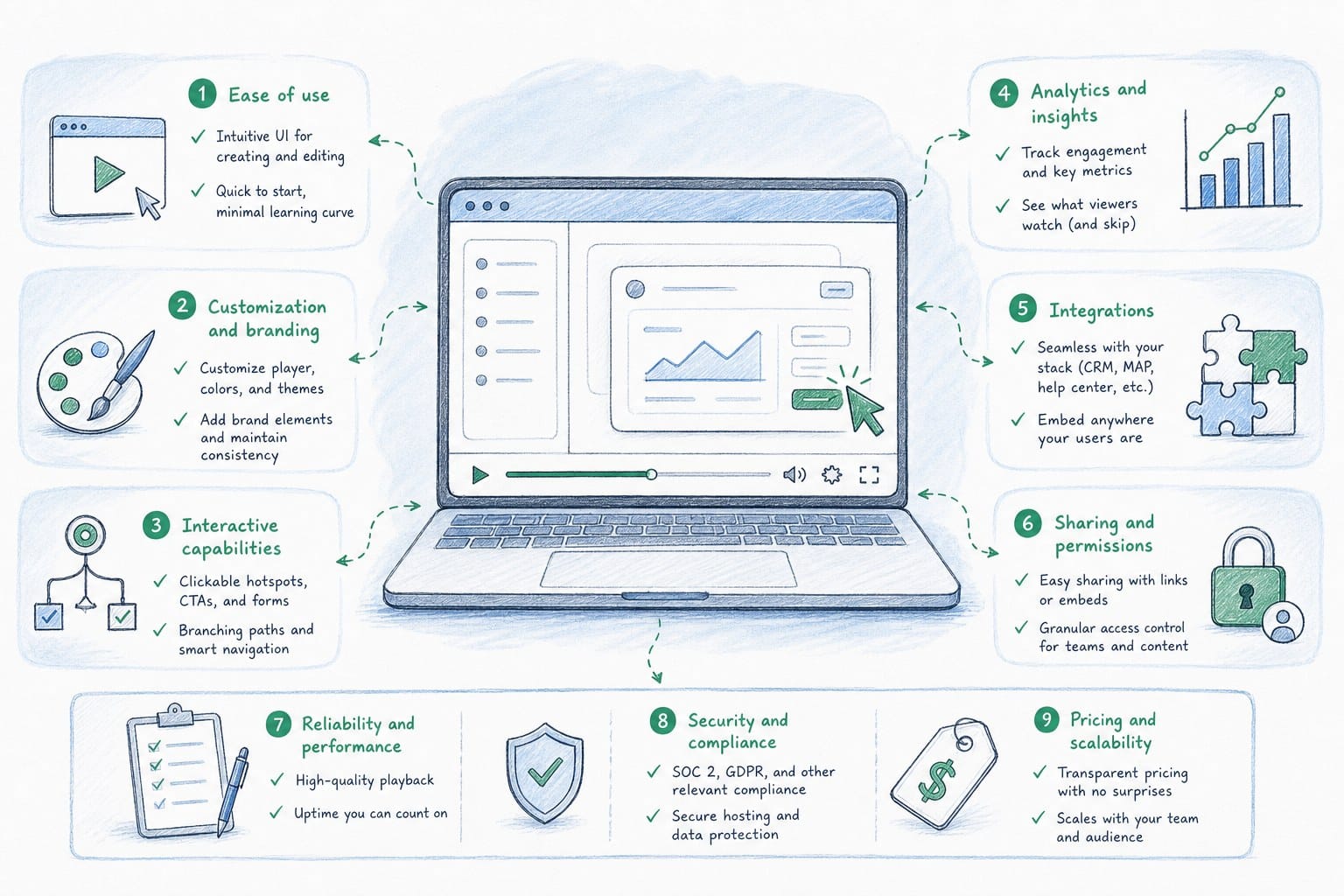
1. What to look for in product walkthrough video tools before you commit
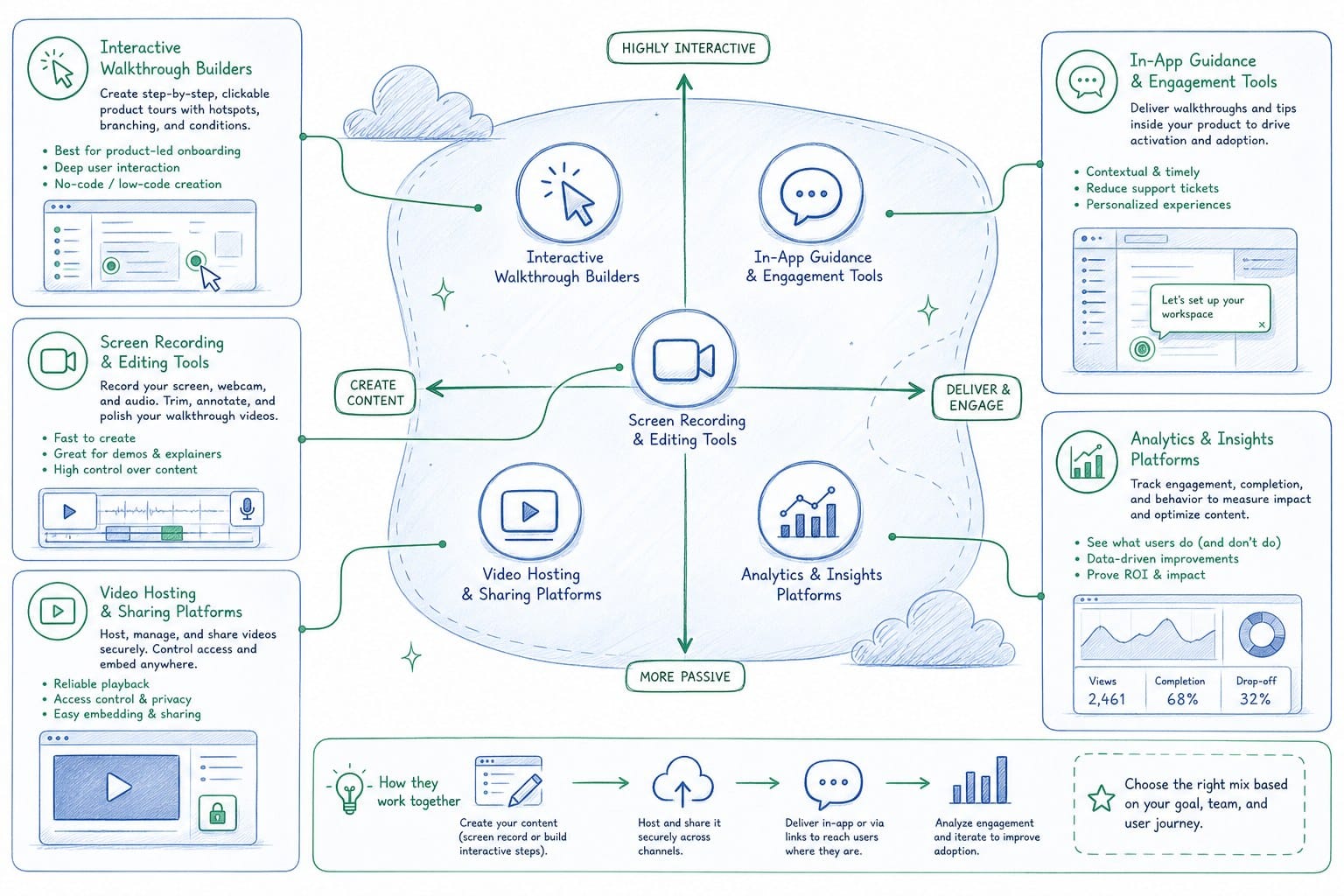
2. The main categories of product walkthrough video tools and where each one fits
3. How to evaluate and build a product walkthrough video workflow that actually holds up
If you run marketing, product, or customer success at a pre-Series B B2B SaaS company, you already know the problem. You ship a feature, your product walkthrough video is instantly out of date, and nobody has time to re-record it. The sales team keeps using the old version. New users watch an onboarding video that shows a UI that no longer exists. Your homepage hero video still promotes a workflow you deprecated two sprints ago. Picking the right product walkthrough video tools is not just about which one looks prettiest in a demo. It is about which one fits how fast your product actually moves and how lean your team actually is. In this article, I walk through the main categories of tools available, what each one is actually good at, and what to think about when you are making a choice for a team that needs to stay current without hiring a full video production crew.
What to look for in product walkthrough video tools before you commit
Before you start trialing tools, it helps to get clear on what a product walkthrough video actually needs to do for your team. A walkthrough video is not just a screen recording with some music on top. It is a narrated, structured explanation of how your product works, aimed at a specific audience: a prospective buyer, a new user, or a sales prospect evaluating you against a competitor. The bar is higher than a quick Loom clip, and the use cases are more durable.
Here are the core things worth evaluating before you pick a tool.
How fast does your product change?
If you ship every two weeks, a video you made in January is probably wrong by March. Some tools are built for one-time production. You record, you export, you move on. That works fine if your product is stable. But for most early-stage SaaS teams, the product is not stable. Features change, UI elements shift, onboarding flows get redesigned. A tool that requires you to re-record from scratch every time a button moves is going to create debt fast.
Look for tools that let you edit or regenerate specific sections without rebuilding the whole video. Even better, look for tools that can pull from a live product URL so that when the product changes, the source material for your video changes with it.
Who is actually going to make the videos?
This matters more than most teams admit. If your plan is for a PMM to produce all the videos, you need a tool a PMM can use without a video editing background. If a founder is doing it, it needs to be even simpler. Professional video editors can work with any tool, but they cost time and budget that early-stage teams rarely have in surplus.
Tools that abstract away timeline editing, voiceover recording, and visual assembly are worth paying more for if they mean the job actually gets done instead of sitting in a backlog.
What outputs do you need?
A walkthrough video for your homepage hero has different requirements than one for a sales deck or a LinkedIn post. Aspect ratio matters. Length matters. Some teams need a 90-second 16:9 video for the website and a 30-second vertical cut for social. If a tool only exports in one format, you are either doing extra work downstream or leaving some channels without content.
Also consider whether you need narration built in. A silent screen recording with callout boxes is technically a walkthrough, but a narrated video with a clear voiceover explaining what is happening performs better in almost every context I have seen. Buyers do not always watch with sound on, but when they do, narration dramatically increases comprehension and retention.
How does the tool handle updates?
This is the question most teams skip, and it is the one that causes the most pain six months later. Ask yourself: if your product UI changes next sprint, what does it take to update the video? Do you re-record everything? Edit the timeline manually? Replace screenshots? Or does the tool give you a faster path?
For teams shipping continuously, the update workflow is not a nice-to-have. It is the core feature. A video that is easy to make but hard to keep current is going to become a liability. You end up with a growing library of outdated content that nobody trusts, and eventually people stop using the videos altogether.
I go into more depth on this problem in the context of onboarding content in how to make a SaaS onboarding video that stays current after every release, but the same logic applies to any product walkthrough video you plan to use for more than a few weeks.
Cost structure and team size
Some tools charge per seat, some charge per export, some charge based on the length of video you produce. For a small team making a handful of videos per quarter, per-seat pricing is often fine. For a team that needs to refresh multiple videos across multiple use cases after every sprint, a credit-based or usage-based model can scale better because you are paying for what you actually produce.
Get specific about how many videos you expect to make in a month and how long each one will be. Then run the math on each pricing model before you commit. The cheapest tool per month is not always the cheapest tool per video produced.
The main categories of product walkthrough video tools and where each one fits
The market for product walkthrough video tools breaks into a few distinct categories. Each one has genuine strengths and genuine tradeoffs. I want to be honest about both because the right choice depends on what you actually need, not on which tool has the best marketing.
Screen recording tools
Screen recording tools are the starting point for most teams. You open the software, record your screen while you walk through the product, add some basic edits, and export. They are fast to start and have a low learning curve.
The strengths are obvious: low cost, immediate output, no production experience required. If you need a rough walkthrough for internal use or a quick sales follow-up, a screen recording tool gets the job done in under an hour.
The limitations become clear when you need something polished or durable. The video quality depends heavily on how good the recording session goes. If you stumble over a word or click the wrong button, you either re-record or edit around it. The output looks like what it is: someone's screen with a voiceover. For a homepage hero video or a polished sales asset, that aesthetic often underdelivers.
Updates are also manual. If the UI changes, you record again. There is no shortcut.
Slide-based and presentation tools with video export
Some teams use presentation tools to build product walkthroughs by importing screenshots and adding narration or text overlays. This gives you more visual control than a raw screen recording, and you can update individual slides without rebuilding the whole thing.
The tradeoff is that it looks like a presentation. For some internal use cases, that is fine. For a homepage video or a high-stakes sales asset, buyers can tell the difference between a real product walkthrough and a slide deck with screenshots.
Updating these videos when the product changes is faster than re-recording, but it still requires someone to go back into the file, replace screenshots, re-check the narration, and re-export. For teams releasing every two weeks, that process adds up.
AI-powered video generation tools
This is the newer category, and it is where the most interesting development is happening for B2B SaaS teams specifically. AI-powered tools can take a product URL or existing footage and automatically generate a narrated, structured video composition. The output is editable and, in some cases, regenerable, meaning you can refresh the video after a product update without starting from scratch.
For pre-Series B SaaS teams, this category is worth taking seriously. The value proposition is not just speed of first production. It is the ability to stay current. If the tool can re-generate video sections based on changes to the live product, you dramatically reduce the ongoing maintenance burden that kills most video programs at growing companies.
Product Frames sits in this category. It takes a product URL or existing footage and turns it into an editable, narrated video composition. Teams can regenerate videos after product updates without manual re-editing, and the credit system means you pay based on the length of finished video you produce, which scales cleanly as your library grows.
For teams that need to keep walkthrough videos current across sprints, this model solves a real operational problem. I cover the sprint-level update challenge in more detail in keeping demo videos updated across sprints in B2B SaaS.
Professional video production services
At the high end, some SaaS companies hire agencies or freelance video producers to create polished product walkthrough videos. The output quality is typically excellent. The limitations are cost, turnaround time, and inflexibility.
A professionally produced video for a homepage or a major product launch can cost several thousand dollars and take weeks to produce. When the product changes, you go back to the agency, pay again, and wait again. For a pre-Series B team shipping continuously, that cycle is not sustainable as a primary strategy.
Professional production still makes sense for high-stakes one-time uses: a major launch video, a conference presentation, or a brand film. But it is not a realistic solution for the ongoing need to keep product walkthroughs current across a fast-moving product.
Hybrid approaches
Many teams end up mixing categories. They use an AI-powered tool for their standard product walkthroughs, use a screen recording tool for quick internal clips, and bring in professional production for one or two anchor assets per year. That combination can work well as long as you are deliberate about which tool handles which job.
The mistake I see teams make is using a professional production workflow for everything, which creates a bottleneck, or using screen recordings for everything, which produces assets that are not polished enough to perform well on the homepage or in a sales deck.
Matching the tool to the use case
Here is a simple way to think about it. If you need a video once and the product will not change, production quality is the primary variable. Use whatever gets you the best-looking output within your budget.
If you need a video that will be watched repeatedly over months, and your product will ship updates in that window, the ability to update the video cheaply and quickly becomes the primary variable. That is where AI-powered generation tools have a clear advantage.
If you are deciding between an interactive demo and a video for your homepage, that is a different question worth exploring separately. The answer depends on where your buyers are in the funnel and what action you want them to take. I look at that tradeoff directly in interactive demo vs product video: which converts better on your homepage.
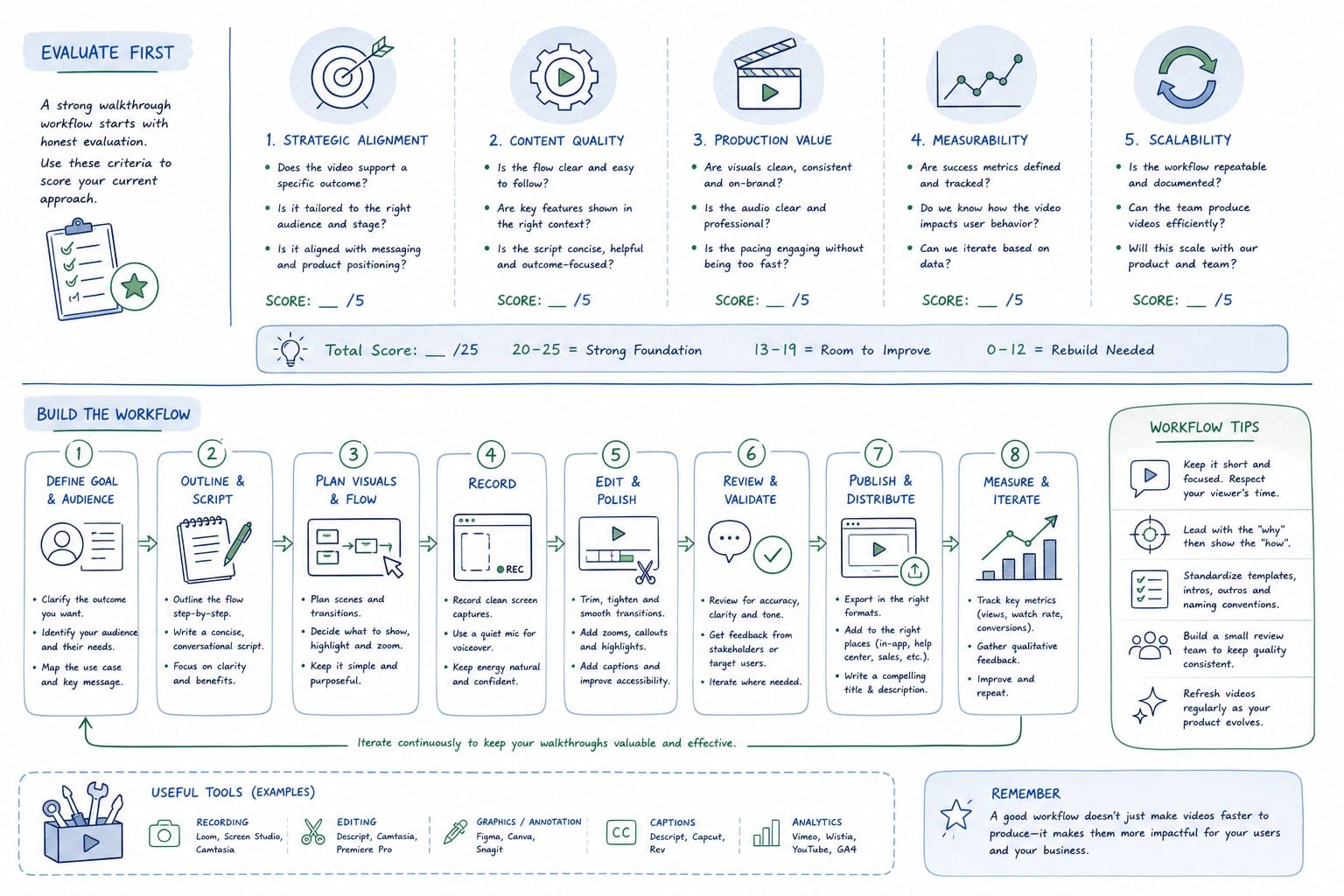
How to evaluate and build a product walkthrough video workflow that actually holds up
Choosing a tool is only half the work. The other half is building a workflow around it that your team will actually use consistently. A lot of video programs at SaaS companies start strong and then drift because nobody owns the process of keeping videos current.
Here is how I think about building a workflow that holds up as your product and team grow.
Start by mapping your video use cases
Before you pick a tool or set up a process, list every place your team currently uses or wants to use product walkthrough videos. Common ones at pre-Series B SaaS companies include:
Homepage hero video. This is the most high-value placement because it is the first thing most prospects see. It needs to be polished, accurate, and ideally under two minutes.
Sales deck asset. Salespeople often share a short walkthrough video early in a deal cycle to give prospects a product preview before a live demo. This video needs to stay current across the length of a sales cycle, which can be weeks or months.
Onboarding sequence. New users who see a walkthrough that does not match the actual product get confused and frustrated. This video has direct impact on activation and churn, which makes it important to keep current after every meaningful UI change.
LinkedIn and social distribution. Short clips showing specific features or workflows are increasingly common for B2B SaaS on social. These need to be the right aspect ratio and short enough to capture attention in a feed.
Once you have the list, you can see which use cases demand the most update frequency and which ones are more stable. That tells you where a regeneration-capable tool matters most versus where a simpler tool will do.
Assign clear ownership
Video content at most SaaS companies lives in a gray area between product marketing, product management, and customer success. Nobody wants to own it because keeping it current feels like a never-ending maintenance task.
The cleaner approach is to assign ownership by use case rather than by department. The PMM owns the homepage hero and the sales deck asset. The CS team owns the onboarding sequence. Growth owns the social clips. Each owner is responsible for flagging when their video is out of date and triggering a refresh.
For this to work, the refresh process needs to be fast enough that it does not feel like a burden. If updating a video takes four hours of manual editing, nobody is going to do it after every sprint. If it takes twenty minutes because the tool supports regeneration, it is a realistic ask.
Build the refresh trigger into your release process
The most reliable way to keep videos current is to make the refresh check a standard part of your release process. When a sprint closes and features ship, whoever owns each video gets a notification or a task in whatever system your team uses. They check whether the video is still accurate. If it is not, they trigger a refresh.
This does not have to be complicated. Even a simple checklist in your project management tool works. The key is that the check happens automatically as part of shipping, not retroactively when someone notices the video is wrong.
For teams using AI-powered generation tools, the refresh can be triggered directly from the tool by pointing it at the updated product URL or uploading the new footage. The tool handles the regeneration, and the owner reviews and approves the output. That workflow is fast enough to be sustainable.
Think about format from the start
One of the most common workflow mistakes is producing videos in a single format and then scrambling to create variations later. A 16:9 video for your website will not work for a vertical LinkedIn post. A two-minute walkthrough is too long for a sales email attachment but might be right for an onboarding sequence.
If your tool supports multiple aspect ratio exports, build that into your production process from the start. When you create a new walkthrough, produce the 16:9 version and the 9:16 version at the same time. Store both. That way you always have the right format ready when someone on the growth team asks for a social clip.
Keep a living video inventory
As your video library grows, it becomes hard to track which videos are current and which ones are outdated. A simple shared document or spreadsheet that lists every video, where it is used, when it was last updated, and who owns it goes a long way.
Include a field for the last major UI change that affected that video. If your product shipped a navigation redesign in March and a video was last updated in February, that is a flag. The owner should review it.
This kind of inventory feels like overhead when you have two videos. It becomes essential when you have twenty.
Measure whether the videos are working
Product walkthrough videos should be producing measurable outcomes: higher engagement on the homepage, more prospects requesting demos after watching a sales asset, better activation rates in onboarding. If you are not measuring, you do not know whether the investment is paying off.
Basic metrics to track: watch completion rate, click-through from the video player to a next action, and whether contacts who watched a video convert at a higher rate than those who did not. Most video hosting platforms provide completion rate data. CRM integrations can help you connect video views to pipeline outcomes.
If a video is not performing, that is information. Maybe the length is wrong. Maybe the narration is not clear. Maybe the use case it is covering is not the one buyers actually care about. Use the data to improve rather than just re-producing the same thing.
Practical advice for teams just getting started
If your team has not made a product walkthrough video before, start with one use case and one video. Pick the highest-leverage placement, which for most B2B SaaS companies is the homepage hero. Get one video made, get it live, and measure what happens.
From there, expand to the next use case. Build the process as you go rather than trying to build a full video program before you have made a single video. The workflow issues that matter most will only become visible once you are actually producing and updating content.
For teams already producing videos but struggling to keep them current, the priority is fixing the update workflow before adding more videos to the library. More outdated videos is not an improvement over fewer outdated videos. Get the refresh process working reliably for your existing assets first, then scale the library.
The teams that build durable video programs are the ones that treat video like any other piece of product content: version-controlled, owned, kept current, and measured. That mindset, combined with the right tool for your update frequency, is what separates teams that have a video strategy from teams that have a video folder full of content nobody trusts.
Ready to take the next step?
If you are evaluating product walkthrough video tools for a B2B SaaS team that ships continuously, the question worth asking is not just which tool makes the best-looking video today. It is which tool makes it realistic to keep that video current six months from now. Product Frames is built specifically for that problem. It turns your product URL or existing footage into an editable, narrated video composition that you can regenerate after every release. Visit productframes.com to see how it works and whether it fits the way your team ships.