How pre-Series B SaaS teams can create polished product videos on a lean budget

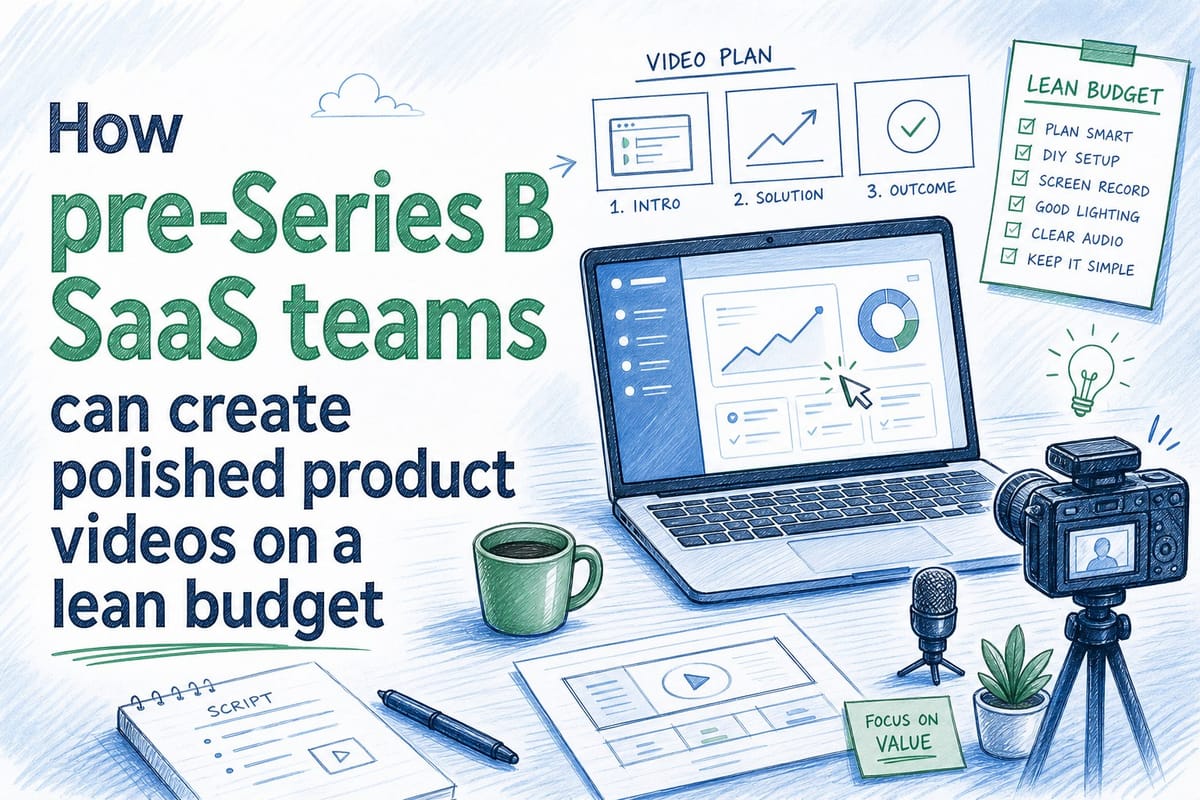
Table of contents
1. Why video production breaks down for early-stage SaaS teams
2. Building a lean video motion that keeps pace with your product
3. Where to use your videos and how to measure whether they are working
If you run a pre-Series B B2B SaaS company, you already know the tension well. Your product ships fast, your team is small, and every dollar has to justify itself twice. Yet your homepage hero, your sales deck, and your onboarding library all need video that looks polished, stays accurate, and actually reflects the product people will log into after they sign up. A saas product video pre-series b startup produces is not a luxury item anymore. Buyers watch product videos before they book demos, investors scan them before they read decks, and new users rely on them during the first hours of onboarding. The problem is that traditional video production does not fit the rhythm of a startup that deploys code twice a week. A single agency shoot can cost tens of thousands of dollars and take four to six weeks, and the footage is already outdated by the time the final cut lands in your inbox. This article walks through how lean SaaS teams can build a repeatable video motion that produces polished output without blowing the budget, keeping content current through every sprint, and scaling from founder-recorded clips all the way to a full library of sales, onboarding, and marketing assets.
Why video production breaks down for early-stage SaaS teams
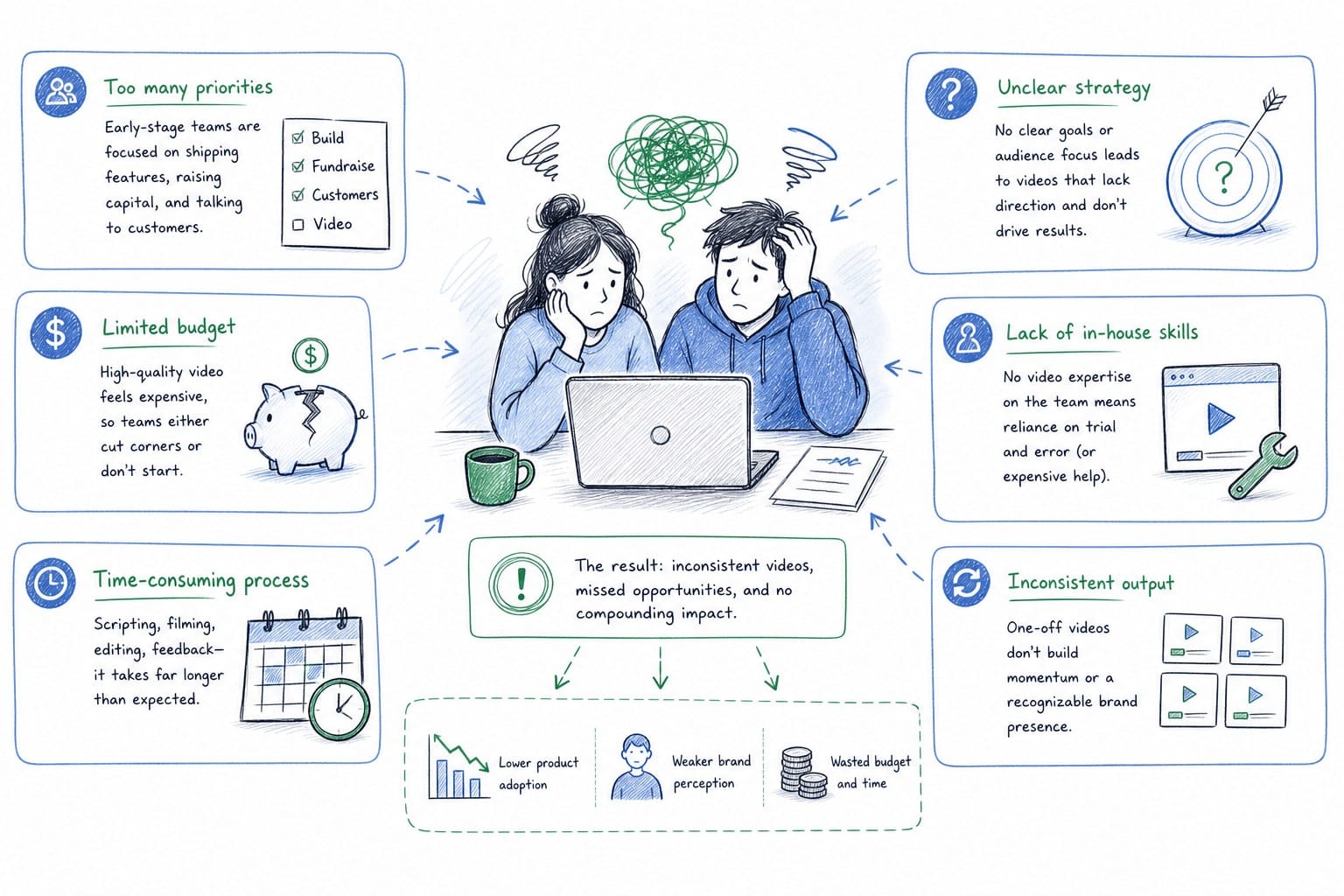
Most pre-Series B SaaS companies sit in an awkward middle ground when it comes to video. They have moved past the stage where a shaky Loom recording feels credible, but they have not yet raised enough to justify a dedicated video producer on staff or a monthly agency retainer.
The result is a familiar pattern. The founder records a screen capture walkthrough that looks fine in month one. By month three, the UI has changed, the feature set has grown, and three separate buttons now live somewhere different from where the video shows them. The sales team quietly stops sharing the link. The CS manager makes a mental note to re-record it but never finds the time. The homepage hero starts converting at a lower rate, and nobody can point to exactly why.
This is not a willpower problem. It is a structural problem. Traditional video production is built around a single production event: you script, you record, you edit, you publish. That workflow assumes your product is stable. For a SaaS team shipping continuous updates, the assumption breaks almost immediately.
There is also a cost structure problem. Agency rates for a professional product walkthrough video typically range from several thousand dollars on the low end to well above twenty thousand dollars for a polished hero film with voiceover, motion graphics, and multiple rounds of revision. Those numbers are hard to defend when you are pre-Series B and every line item on the P&L is scrutinized.
In-house recording tools solve the cost problem but introduce a quality and maintenance problem. Screen recording software captures your current UI, but editing the footage into something that looks intentional and on-brand requires skills most PMMs and founders do not have time to develop. And every time the product changes, the editing work starts over.
The third option, which is where most teams end up, is to simply not have good video. They rely on static screenshots in the deck, a text-heavy homepage, and a live demo call as the first real product experience the prospect encounters. That is a conversion problem at the top of the funnel and an onboarding problem the moment someone actually signs up.
Understanding why video production breaks down is the first step to fixing it. The solution is not to spend more money on the same workflow. It is to change the workflow so that video becomes something you can create quickly, update cheaply, and distribute confidently across every channel that matters.
If you want to understand which tools actually fit this workflow for B2B SaaS teams, the breakdown in Best product walkthrough video tools for B2B SaaS teams is a useful place to start before you commit to any particular platform.
The core insight is this: for a pre-Series B SaaS team, video quality is not just about how good the footage looks. It is about how fast you can keep it accurate. A slightly simpler video that reflects the real product today is worth more than a cinematic piece that shows a UI from six months ago. Buyers notice the mismatch. Users are confused by it. And your credibility takes a quiet hit every time someone sees a discrepancy between the video and the product they are actually trying to use.
Let me explain what a lean video motion actually looks like in practice, and how you can build one without hiring a producer or spending weeks in post-production.
Building a lean video motion that keeps pace with your product
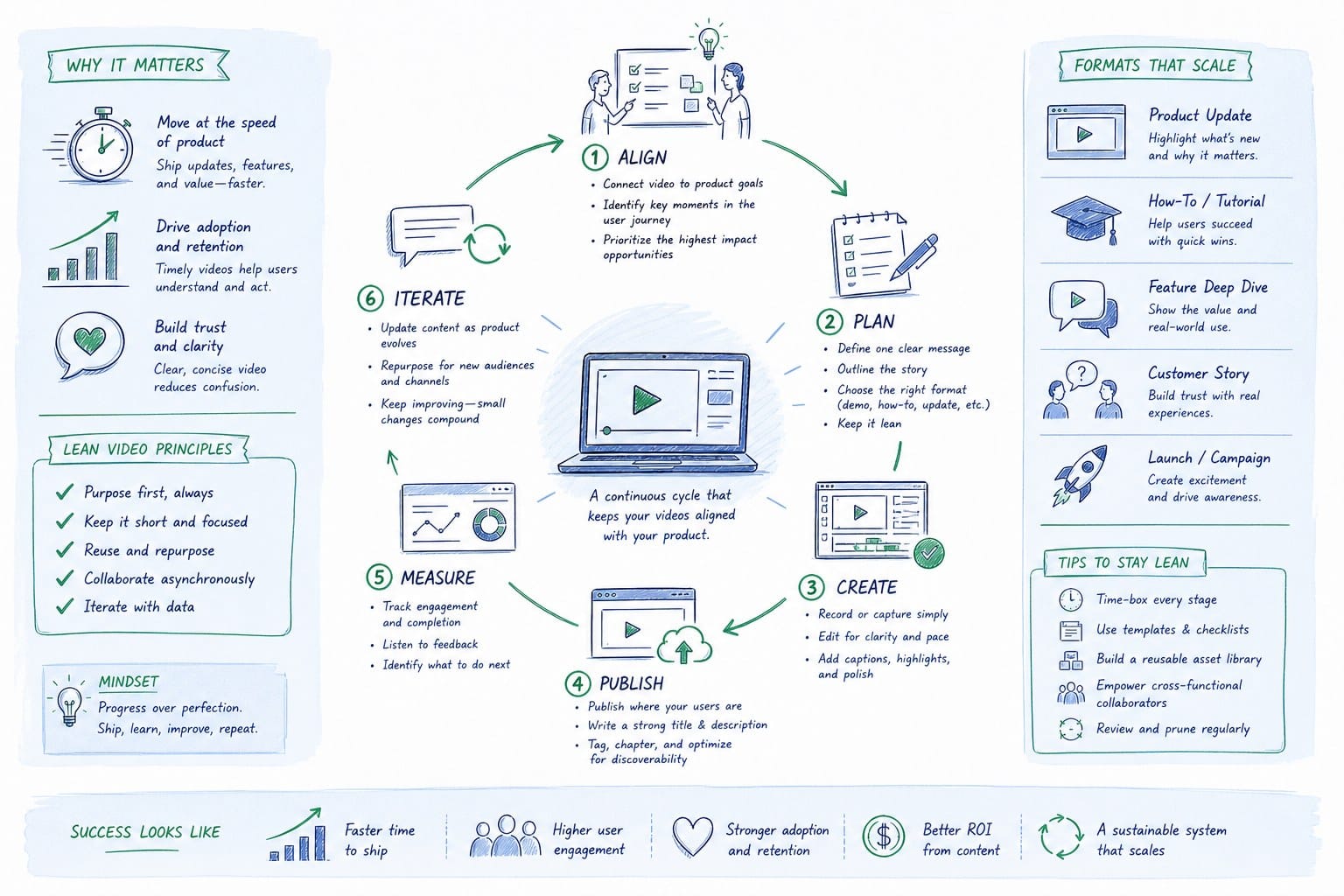
A lean video motion is not about cutting corners. It is about building a system where creating and updating video is a normal part of the product release cycle rather than a separate, expensive project that happens once a year.
The starting point is deciding what videos you actually need. Most pre-Series B SaaS teams need four core assets, and you should prioritize them in roughly this order.
First is the homepage hero video. This is the highest-leverage piece of content your marketing team controls. It runs on the page where most of your traffic lands, and it needs to make someone understand your product in under ninety seconds. It also needs to reflect your actual current UI, because skeptical buyers will open a trial immediately after watching it to check whether what they saw was real.
Second is the sales walkthrough video. This is what your AEs attach to proposals, what SDRs share after a cold call, and what the champion in a buying committee uses to explain your product to the stakeholders who did not attend the demo. It needs to be specific enough to be credible and current enough to not embarrass your team when a prospect asks about a feature that has moved.
Third is the onboarding video set. These are the short clips that live inside your product, in your knowledge base, or in your welcome email sequence. They show new users exactly how to complete the first few tasks that matter most. They are the highest-stakes content from a retention standpoint, because a confused new user who cannot find their footing in the first week is a churned customer by week four.
Fourth is the social distribution set. This means cut-down versions of your core videos optimized for LinkedIn and other channels where your buyers are actually spending time. Vertical clips, square crops, and short-form versions of longer walkthroughs all fall into this category.
Once you know what you need, the next question is how to produce it without a production team. The honest answer is that the production workflow has changed significantly in the last two years. AI-powered platforms can now take a product URL or existing screen footage and turn it into an editable, narrated video composition with motion, voiceover, and structure already applied. That means the heavy lifting of editing, timing, and narration writing does not have to happen manually anymore.
The workflow that works best for lean SaaS teams looks like this. You start with a recording of your current product, either a screen capture or footage you already have. You feed that into a platform that generates a narrated composition from it. You review the output, make edits to the narration or the structure, and publish. When your product updates, you regenerate rather than re-edit. The finished video is built from a credit system where you are essentially paying per second of polished output, which means you are not paying for the hours of manual editing time that would otherwise sit between you and a finished asset.
This kind of approach is what Product Frames is built around. The platform takes your product URL or existing footage and produces an editable, regenerable narrated video composition. When your UI changes, you refresh the video without starting from scratch. For a team shipping fast, that is the difference between a video library that stays current and one that becomes a liability.
The important thing to understand about the credit model is that it aligns cost with actual output. You are not paying a flat monthly retainer whether you produce anything or not. You are paying for finished seconds of video, which means a short social clip costs less than a full hero film, and refreshing a video after a minor UI change costs a fraction of what a full re-record would.
Beyond the tooling, the process discipline matters too. The teams that get the most out of a lean video motion treat video refreshes the way they treat release notes. Every time you ship a meaningful update, you flag whether any existing video needs to be regenerated. You assign that task to one person, usually the PMM or a CS lead, and you give them a clear timeline tied to the release. The video does not need to be perfect before the feature ships. It needs to be accurate within a sprint or two.
This also changes how you script and plan videos from the start. If you know you are going to be regenerating content regularly, you stop writing scripts that are hyper-specific to a particular button label or menu structure. You write scripts that explain the outcome the user is trying to achieve, with the specific UI details filled in by the current footage rather than the narration. That makes your videos more durable across updates even before you account for the regeneration workflow.
For onboarding specifically, the stakes are high enough that it is worth reading about the full strategy in How to make a SaaS onboarding video that stays current after every release. The short version is that your onboarding videos need to be modular, short, and tied to specific tasks rather than to a general product tour. That structure makes them easier to update and easier for users to navigate when they have a specific question rather than needing a complete walkthrough.
Where to use your videos and how to measure whether they are working
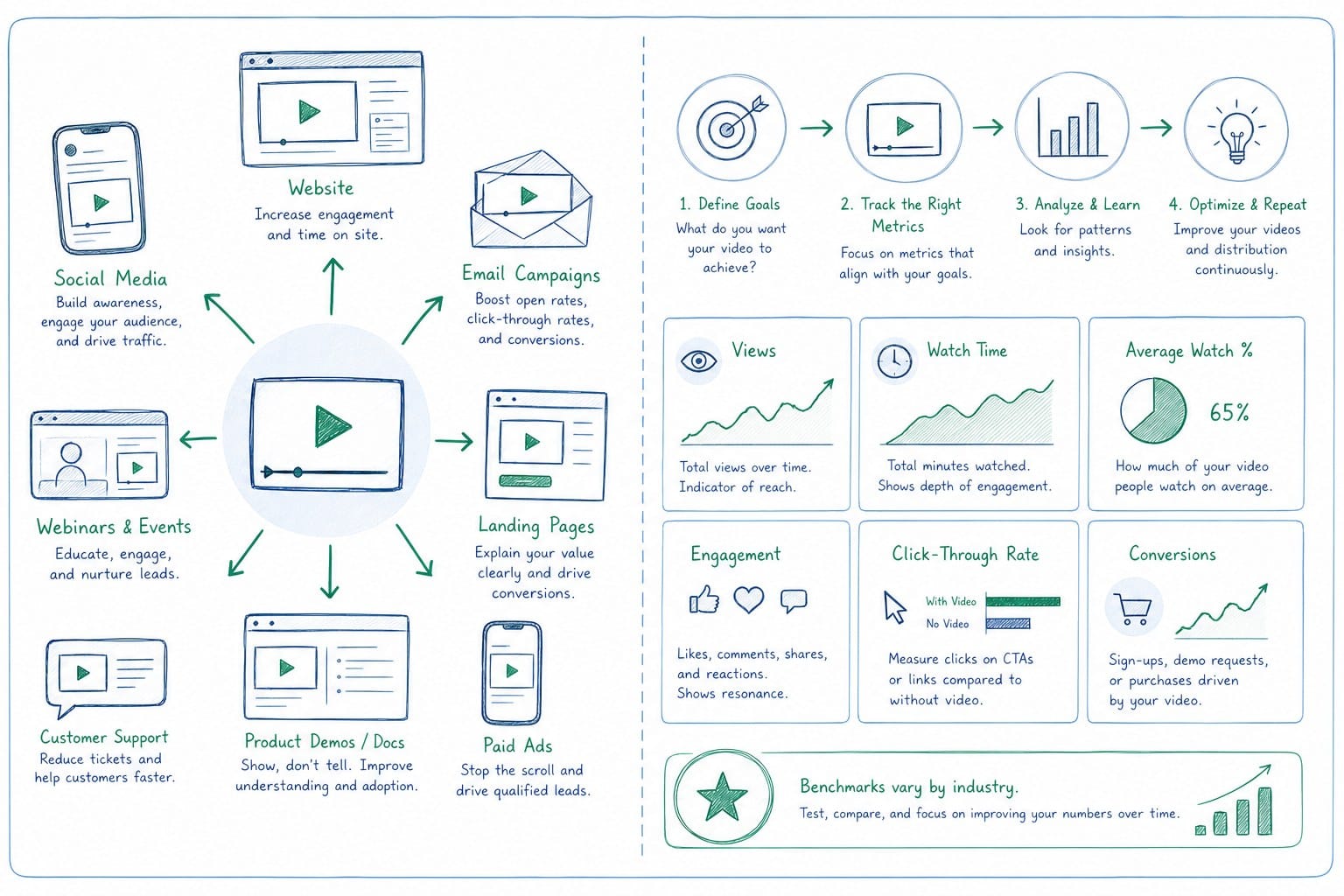
Producing the video is only half the job. A polished walkthrough that sits in a shared drive and never gets embedded anywhere is not helping your conversion rate or your retention numbers. For a pre-Series B SaaS team with limited resources, you need to be intentional about where each video lives and what signal you are using to decide whether it is doing its job.
Let me walk through the main distribution points and what to look for at each one.
The homepage hero is the most visible placement and often the first one teams think about. Your hero video should answer three questions in order: what does this product do, who is it for, and what happens when I sign up. It should not be a full feature tour. It should be a confidence builder. The goal is to make a qualified visitor feel like they understand enough to take the next step, whether that is signing up for a trial, booking a demo, or clicking into a case study.
For the homepage specifically, the debate between video and interactive demo is worth thinking through carefully. The Interactive demo vs product video: which converts better on your homepage breakdown covers this in depth, but the short version is that video wins in most contexts where you need to control the narrative and set context before the prospect interacts with anything. Interactive demos work better when your prospect is already sold on the category and wants to explore your specific approach.
To measure whether your homepage video is working, track the engagement rate on the video itself alongside your overall trial signup or demo request conversion rate. If people are watching more than sixty percent of the video and your conversion rate is not improving, the problem is downstream of the video, in your call-to-action, your pricing page, or your signup flow. If people are dropping off in the first fifteen seconds, the video is not earning attention fast enough at the start.
For sales, the key distribution points are email follow-up sequences and shared proposal links. Your AEs should be attaching a relevant walkthrough video to every follow-up email after an initial call, not a generic hero video but a version that reflects the use case the prospect described. That is one of the reasons why having a library of shorter, use-case-specific videos matters more than having one perfect general-purpose film. A sixty-second clip that speaks directly to the pain the prospect mentioned in the discovery call will outperform a four-minute comprehensive tour almost every time.
To measure sales video effectiveness, track whether proposals that include a video link have a higher close rate than those that do not. Most sales teams using this approach see a meaningful improvement in engagement from the champion within the buying committee, which in turn improves how well your product is explained to the stakeholders who were not on the demo call.
For onboarding, the distribution points are your in-product tooltip system, your knowledge base, and your welcome email sequence. Short task-specific videos of sixty to ninety seconds each tend to perform better than long general walkthroughs for new user activation. The reason is simple: a new user who is stuck trying to complete a specific task does not want to watch a ten-minute overview of everything the product can do. They want to see exactly how to do the thing they are trying to do right now.
To measure onboarding video performance, look at activation rates for the specific features your videos cover. If you have a video for setting up your first integration and you are not seeing an improvement in how many users complete that integration within the first week, either the video is not being watched or it is not clear enough to be useful. Both are fixable, and the regeneration workflow means you can iterate quickly.
For social distribution, the main channel for most B2B SaaS teams is LinkedIn. Short clips of thirty to sixty seconds, cropped to square or vertical formats, and focused on a single feature or outcome tend to get the most engagement. The goal on social is not to close a deal. It is to create familiarity. When a buyer who has seen your product mentioned on LinkedIn finally lands on your homepage, the video there feels like confirmation of something they already half know about, which lowers friction significantly.
A quick note on aspect ratios: if you are distributing across your homepage, LinkedIn, and a sales deck, you need at minimum a sixteen-by-nine version for the web and a one-by-one or nine-by-sixteen version for social. Planning for multiple aspect ratios from the start of your production process saves you from having to re-crop and re-edit footage later. Platforms that handle aspect ratio output as part of the generation process are worth prioritizing for this reason.
Finally, for investor communications, a short product video embedded in your deck or in your data room can do meaningful work. Investors who review dozens of decks a week respond well to video that makes the product feel real quickly. A ninety-second narrated walkthrough shows that the product exists, that it works, and that your team can communicate what it does clearly. That last point, the communication clarity, is actually a signal investors use to assess how well you understand your own value proposition.
The measurement framework across all of these placements comes down to two questions. Is the video being watched? And is the behavior downstream of the video changing in the direction you want? If the answer to the first question is no, the problem is placement or discoverability. If the answer to the second question is no, the problem is the content itself, either the clarity of the message or the accuracy of the product being shown. Both are solvable, and both are easier to solve when you have a workflow that lets you iterate on video the same way you iterate on your product.
The teams that build this kind of motion before Series B arrive at their raise with a content library that demonstrates GTM sophistication. They have a homepage that converts, a sales team that shares assets confidently, an onboarding experience that activates users, and a social presence that builds familiarity over time. That is not just a marketing win. It is evidence that the team knows how to move fast, communicate clearly, and build systems that scale.
Ready to take the next step?
If you are ready to stop treating product video as a one-time production event and start treating it as part of your regular release cycle, Product Frames is built for exactly that. You can turn a product URL or existing footage into an editable, narrated video composition and regenerate it every time your product ships something new. No agency retainer, no manual re-editing, and no more hero videos that show a UI from six months ago.