
What a credit-based video platform means for SaaS teams


Table of contents
1. How the credit model works and why it matters for SaaS velocity
2. What credit-based video production actually changes for each role on a SaaS team
3. Planning your credit spend so video stays current without wasting budget
If you have ever shipped a product update on a Tuesday and spent the rest of the week watching your homepage hero video quietly go out of date, you already understand the core problem a credit-based video platform is designed to solve. Traditional video production treats every new video as a one-time project with a fixed cost, a fixed timeline, and a fixed output. That model made sense when products changed slowly. It does not make sense for a pre-Series B SaaS team shipping every two to four weeks.
A credit-based video platform for SaaS changes the economic relationship between your team and your video output. Instead of paying for a finished artifact, you pay for finished seconds of video, and you can spend those seconds whenever and however your product roadmap demands. That single shift in the unit of measurement changes how founders budget, how product marketers plan content, and how customer success teams think about onboarding accuracy.
This article walks through what the credit model actually means in practice, how it changes the way each role on a SaaS team works with video, and how to plan your credit spend so you get the most value from every release cycle without burning budget on production overhead.
How the credit model works and why it matters for SaaS velocity
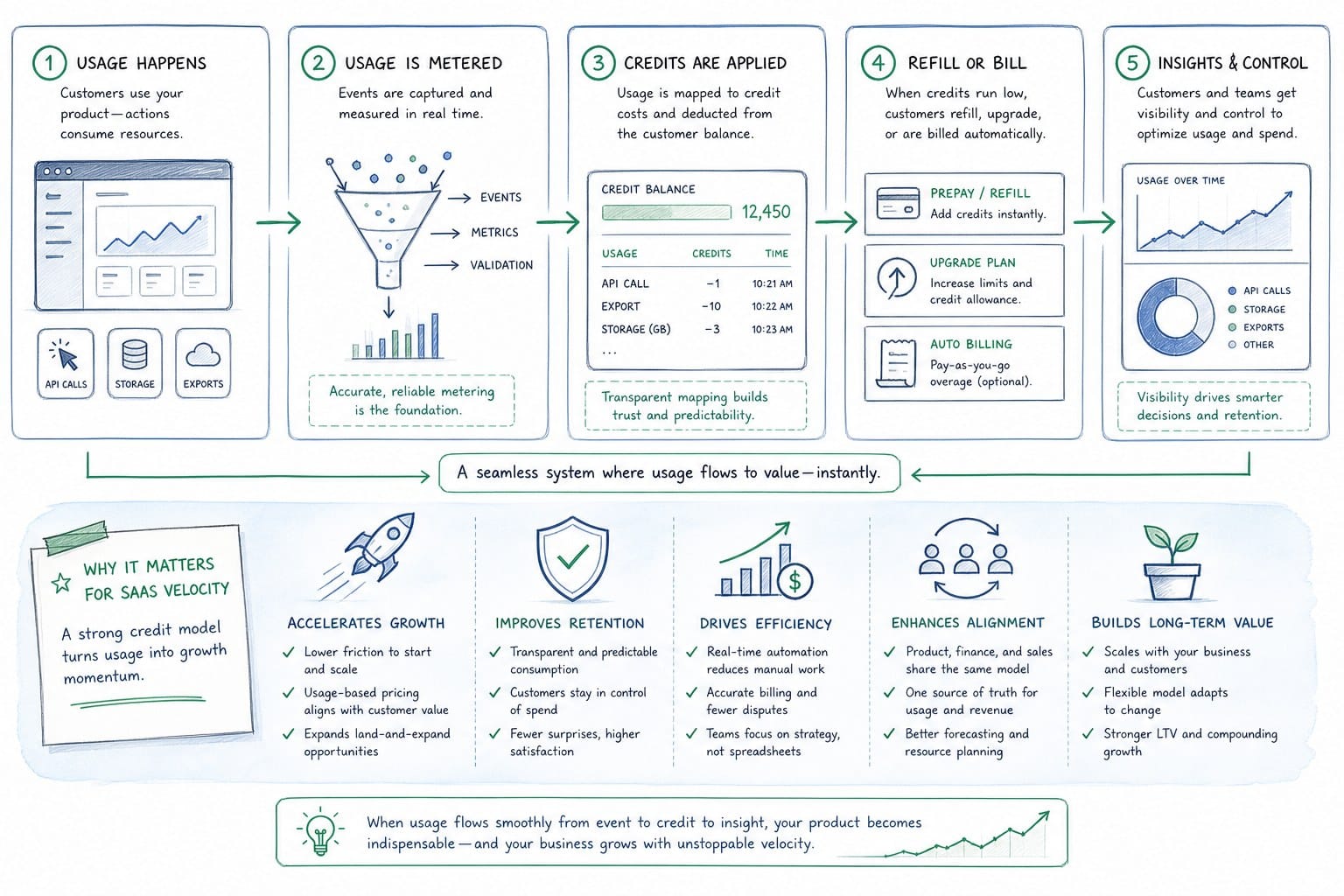
A credit-based video platform for SaaS ties your spending directly to output, not to hours of human labor, annual seat licenses, or opaque agency retainers. The simplest version of the model is the one Product Frames uses: one credit equals one second of finished video. That unit of measurement is concrete and deliberately unglamorous. A 60-second product walkthrough costs 60 credits. A 30-second LinkedIn cut of the same walkthrough costs 30 credits. You are not paying for a revision cycle, a render queue, or a creative brief meeting. You are paying for seconds of finished, narrated, editable video.
That specificity matters for SaaS teams for several reasons that compound quickly once you account for a real release cadence.
First, it makes budgeting predictable in a way that agency retainers and freelance day rates never quite are. You know exactly how many seconds of video you can produce from your current credit balance, and you can plan your content calendar around that number. There is no invoice that arrives 20 percent higher than the estimate because the revision round took longer than expected. There is no negotiation about whether a UI-copy change counts as a new scope item. Credits are credits.
Second, the credit model removes the psychological cost of revision. With traditional production, every change request feels like an expense because it usually is one. The moment a founder or a product marketer knows that asking for a change means reopening a scope-of-work document, they start making quiet compromises. They leave the old button label in the video because the new one is not worth the friction. They keep the deprecated flow in the onboarding sequence because updating it requires a production conversation they do not have time for this sprint. Those compromises accumulate. Six months after launch, your video assets are a graveyard of product decisions that no longer reflect what the product does.
With a credit-based system, refreshing a video after a UI change is just spending the credits for the new seconds. The decision to update is as lightweight as the decision to update a help article. That is not a minor convenience. It is a structural change in how your team relates to video as a living asset rather than a finished artifact.
Third, the model scales with your actual usage patterns rather than a predicted seat count. A team that ships three major releases in a quarter and needs three refreshes of a two-minute product film has completely different needs from a team that ships once a month and only needs a short social cut each time. Credit-based platforms let both teams pay for what they actually use. Most subscription tools charge per seat or per project regardless of how many videos you actually produce in a given period. That pricing logic made sense for tools built around individual users consuming content. It does not make sense for a small team producing video in bursts that track a product roadmap.
One practical detail worth understanding before you build a credit plan is how credits interact with video length and format. If your platform produces videos in multiple aspect ratios from the same underlying composition, each ratio is a separate output and each second of that output costs credits. A 60-second landscape video and a 60-second vertical cut of the same product story together cost 120 credits, not 60. That is still straightforward arithmetic, but it matters if you routinely distribute across a website hero, a LinkedIn feed, and a sales deck. Knowing the cost per format in advance lets you make intentional decisions about which cuts are worth producing for a given release versus which ones can wait for the next cycle.
For example, if a release only touches a secondary feature that does not appear in your homepage hero, you might produce only a short square cut for social and skip the full landscape refresh until the next release touches the primary workflow. That kind of triage is only possible when you understand the unit cost. When video is priced as a project, every decision to produce anything feels like a big commitment. When video is priced in seconds, the decision feels proportional to the output.
The deeper shift the credit model enables is reframing video from a capital expenditure into an operational one. When video is a project, it lives outside the sprint. It requires its own kickoff, its own approval chain, and its own delivery date. When video is a credit spend, it can sit inside the sprint alongside the feature work it is documenting. A product marketer can add a video refresh to the sprint board the same way they add a release note or an email update. That is the rhythm pre-Series B SaaS teams need. Not a quarterly video production cycle that is perpetually out of sync with the product, but a video workflow that moves at the same speed as the product itself.
None of this requires a large team. A single product marketer or a founder with access to screen footage and a credit balance can produce a narrated, polished product video without a designer, a voiceover artist, or a production agency. The credits fund the output. The team owns the narrative. That combination is what makes the model worth understanding before you commit to a more traditional production approach.
What credit-based video production actually changes for each role on a SaaS team
The credit model does not just change how you pay for video. It changes how each role on your team thinks about video as a resource and who feels empowered to use it. The teams that get the most value from a credit-based platform are the ones that distribute video ownership across roles rather than centralizing it in a single production function. Here is what that looks like in practice for the roles that feel it most directly.
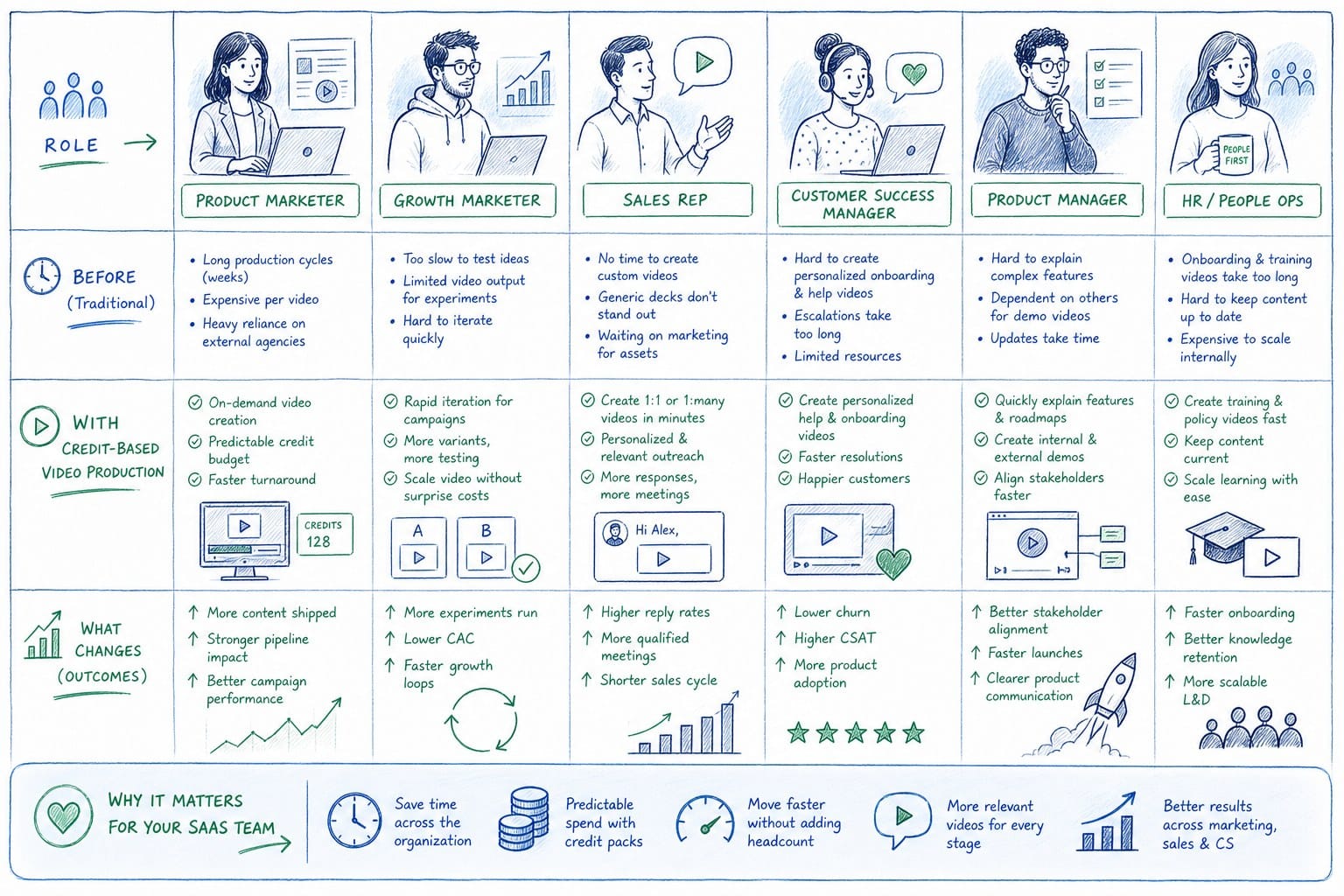
Founders and GTM leads
For founders and GTM leads, the most immediate change is ownership of the product narrative. Many early-stage founders rely on an agency or a contractor for their homepage hero video because they do not have the in-house production skill to make something that looks credible to a buyer. That dependency creates a lag between what the product can do and what the homepage says it can do. A feature ships. The hero video stays the same. Prospects land on a page that describes a product from three months ago.
A credit-based AI video platform lets a founder point the system at a product URL or existing screen footage and get back a narrated, editable video composition without waiting for a creative team to become available. The founder stays in the narrative driver's seat. They do not have to translate product changes into a creative brief and then wait to see whether the output matches what they meant. They produce the output directly and spend credits on exactly the seconds they need.
This matters beyond tactical convenience. When a founder outsources the homepage video to an agency, they also outsource some degree of narrative control. The agency makes choices about pacing, emphasis, and framing that the founder may not fully review until the final cut. When a founder can produce and revise video directly, those choices stay internal. The narrative stays precise. If you want to think through why that matters at the early-stage specifically, the post on why founders should own their product video narrative before hiring an agency covers the reasoning in detail.
Product marketing managers
For product marketing managers, the central pain point is sprint-to-sprint drift. A PMM at a product-led SaaS company might produce a solid sales walkthrough video in January. By March, three features have been renamed, two flows have been redesigned, and one entire screen has been retired. The January video is now a liability in the sales process because it shows prospects a product that does not quite match what they will actually get. The PMM knows this. They can see exactly which frames are wrong. But they have no fast path to fix it without going back to the agency or contractor who made the original, renegotiating timeline and cost, and waiting two to four weeks for a revised cut.
The result is that most PMMs let the outdated video stay live far longer than they should, hedging with verbal disclaimers in sales calls or adding a note to the video page that says the interface has been updated since recording. Those workarounds erode credibility in small but measurable ways.
A credit-based platform where regeneration is a credit spend rather than a full production restart changes that calculus. The PMM can treat a video refresh as a normal part of the sprint retrospective, not as a special project requiring its own budget approval. They spend the credits for the updated seconds, replace the asset, and move on. The cadence of video updates starts to match the cadence of product updates because the cost of each update is proportional to its size.
Customer success and enablement teams
For customer success and enablement teams, the problem is onboarding accuracy. An onboarding video that shows an outdated UI creates friction at exactly the moment you most need trust, which is when a new user is deciding whether your product is worth learning. If the video shows a navigation menu that no longer exists or a button that has moved to a different part of the interface, the new user either assumes they are doing something wrong or assumes the product is inconsistent. Neither conclusion is helpful.
CS teams usually have the product knowledge to know exactly what needs to change in an onboarding video after a release. What they lack is a fast path to making that change without involving design or production resources that are prioritized elsewhere. When the cost of a refresh is measured in credits rather than in creative-team hours, CS leads can own that refresh themselves. They can treat video maintenance the way they treat updating a help article: as a normal part of keeping documentation current rather than as a production project requiring external coordination.
That shift in ownership is significant for team dynamics as well. When video production requires a designer or an external vendor, CS teams learn not to ask for it unless the need is urgent. They self-censor. They let outdated videos stay in the onboarding flow because the ask feels too big relative to the friction it would create. When CS leads can produce or refresh video directly within a credit budget they control, they start treating video as a standard documentation format rather than a special one.
Sales teams
For sales teams, the issue is deck-ready accuracy between call stages. A demo video that was accurate during the discovery call may show a flow that has been updated by the time the proposal lands in the prospect's inbox. That gap is usually small but it creates subtle credibility problems. The prospect noticed the difference. They do not say anything, but they file it away as a sign that the company's materials are not quite current, which is a short step from wondering whether the company's product is not quite finished.
A credit-based platform that lets sales ops or the enablement lead regenerate a short demo cut after a UI change keeps the video asset current without requiring the account executive to rebuild the demo from scratch or ask engineering to record a new one. The AE knows the video in their deck is accurate. They do not have to add verbal caveats during the call. The proposal looks polished because it is actually current.
Growth and marketing teams
For growth and marketing teams, the credit model solves the multi-format problem in a way that traditional production never could at early-stage budgets. A product video that needs to live on the homepage, on LinkedIn, and inside a paid ad campaign needs to exist in at least three aspect ratios: landscape for the website, square or vertical for social, and potentially widescreen for a webinar recording. Producing three formats from a traditional production workflow means three times the cost or a significant compromise in quality for the non-primary format. Most early-stage teams produce the landscape version and then crop it aggressively for social, which looks exactly as rough as it sounds.
With credits, you produce the seconds you need in each format and spend proportionally. The planning process for that is closer to planning a social content calendar than planning a video shoot. You know the cost per second per format, you know which formats your distribution channels require, and you produce accordingly. That is the right mental model for a growth team operating at sprint cadence.
Across all of these roles, the common thread is that the credit model removes the production bottleneck that currently sits between knowing what needs to change and having a current, accurate video that reflects the change. That bottleneck does not just slow down content production. It quietly erodes the quality of every customer-facing touchpoint that depends on video to communicate what the product does and how it works. Removing it does not require hiring a video team. It requires changing the pricing model under which video gets produced.
Planning your credit spend so video stays current without wasting budget
Understanding the credit model is one thing. Using it well across a real release cadence is another. If you treat your credit balance the way most teams treat their video budget, which is to say you spend it all on one large production at the start of the quarter and then wait, you will miss most of the value the model offers. The point of a credit-based platform is that you can distribute your spending across the release cycle rather than concentrating it at one arbitrary point. That requires a different kind of planning than most teams are used to.
Here is a practical way to build that plan.
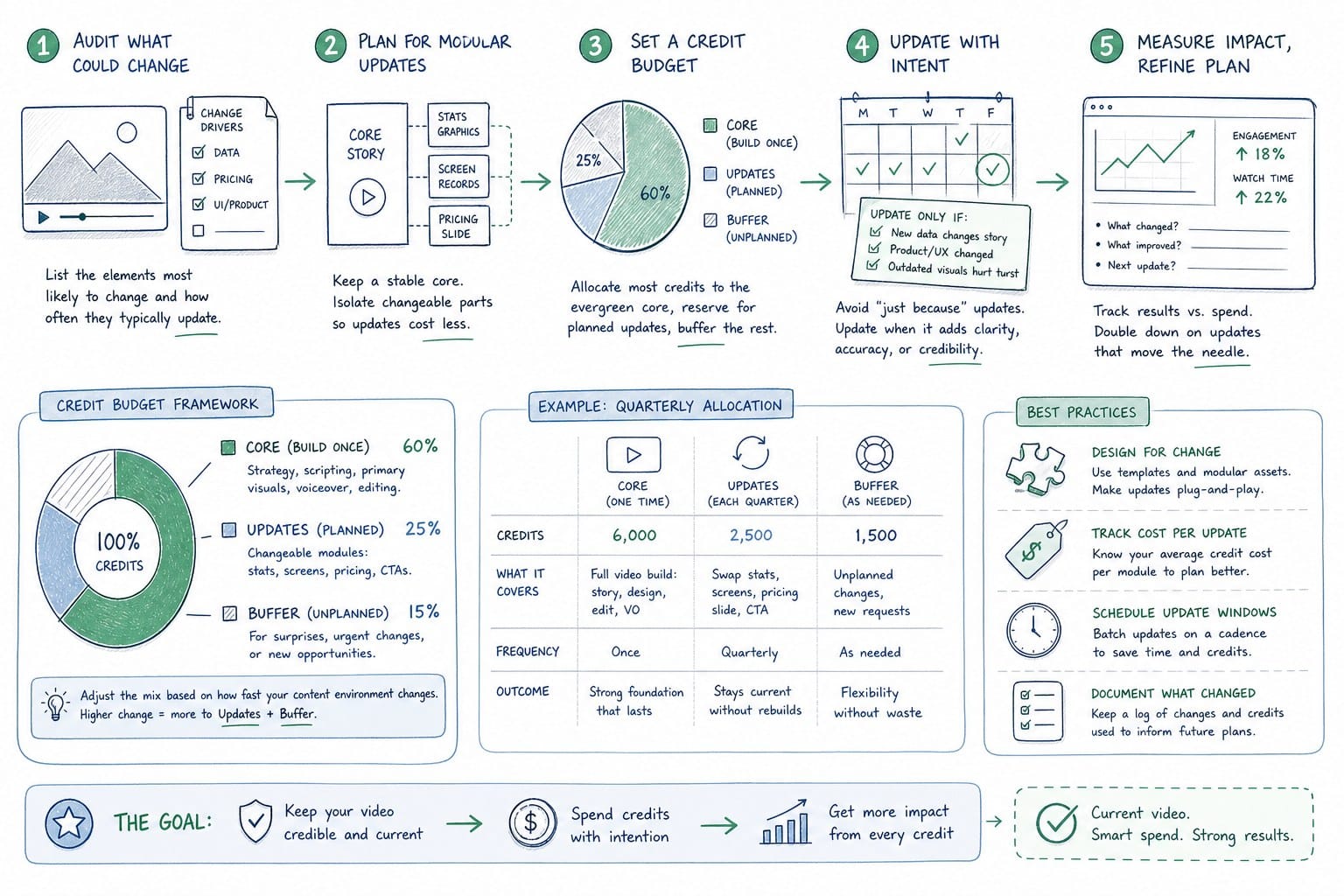
Start with a video asset audit
Before you think about credit volumes or refresh frequency, audit the video assets your team actually uses in customer-facing contexts right now. That list typically includes a homepage hero, one or two product walkthrough or demo videos, at least one onboarding sequence, and some kind of social or distribution cut. For each asset, ask two questions: how often does this asset show something that changes between major releases, and what is the cost in customer trust or sales friction when it shows something out of date?
The answers tell you two things. They tell you how often each asset needs to be refreshed. And they tell you how much priority that refresh deserves relative to other credit uses. A homepage hero that shows your core value proposition workflow needs to be current after every release that touches that workflow. An onboarding video for a secondary feature can tolerate a longer refresh cycle because users who reach that feature are already committed enough to tolerate a minor discrepancy. A social cut that focuses on outcomes rather than specific UI elements may not need to change at all between minor releases.
This triage logic is only possible if you have done the audit. Without it, every release feels like it might require a full refresh of everything, which leads either to overspending or to paralysis where nothing gets updated because the scope feels too large.
Map credit use to your release cadence
Once you have the audit, build a credit budget that maps to your release cadence rather than to a quarterly production schedule. If your team ships every two weeks and your most critical assets total three minutes of video across formats, you are looking at a ceiling of roughly 180 seconds of potential output per release cycle. You will not always need all of that. Some releases will not touch the flows your hero video shows. Some releases only affect a settings page that no video covers. But knowing the ceiling helps you right-size your credit plan so you are not either under-resourced for a heavy release or sitting on unused credits during a quiet one.
A useful way to think about it: treat your credit balance the way a growth team treats an ad budget. You have a monthly or quarterly allocation. You distribute it based on priority. High-impact assets that are customer-facing and frequently updated get first claim. Lower-traffic assets that change less often get refreshed on a slower cycle. You track what you spent and what changed, and you adjust the next cycle based on what you learned.
Invest in the storyboard before you spend a credit
The storyboard is the part of the planning process that teams consistently underestimate, especially teams new to video production. If you walk into a video generation session without a clear structure for what the video needs to show and in what order, you will spend more credits finding the right composition through iteration than you would have if you had planned it upfront. That is not a knock on iteration. Iteration is useful. But unplanned iteration on video is expensive in both credits and time.
A good storyboard does not need to be elaborate. It does not need to be a designed document with fancy annotations. It just needs to define the sequence of product moments, the narrative arc, and the key screen states you want to capture. For a two-minute product walkthrough, that might be eight to ten frames with a one-sentence description of what each frame shows and what the narration covers. That is twenty minutes of work that saves you from producing three drafts of a video before you land on the right structure.
If your team has not built a video storyboard before, the guide on how to build a video storyboard for a SaaS product in under an hour walks through the process specifically for product-led companies. The core principle is the same regardless of tool: lock the structure before you spend anything on production.
Track credit spend against product changes over time
One of the habits that separates teams that get compounding value from a credit-based platform from teams that treat it like any other production budget is tracking. Keep a simple log, even just a shared spreadsheet, of which videos you refreshed, when you refreshed them, what changed in the product that prompted the refresh, and how many credits it cost. That log does not need to be elaborate. Four columns and a row per refresh is enough.
Over three to six months, that log will show you patterns. You will see which assets drive the most revision activity. You will see which releases consistently trigger a full hero refresh versus which ones only require a short social cut. You will see whether your credit plan is consistently running low before the end of a cycle, which means you are under-resourced for your actual output pace, or consistently carrying a large unused balance, which means you are over-purchasing for your current cadence.
That data is also useful when you need to justify the credit plan internally. Instead of making the case for video production budget based on general arguments about brand quality, you can show exactly how many customer-facing assets were kept current across how many releases and how that compares to what the same work would have cost through traditional production. The math usually makes a clear case on its own.
Position video in your broader content stack
Credit-based video production does not replace every other content format your team uses. Most SaaS teams already use some combination of screen recording tools, interactive demo platforms, and slide-based walkthroughs alongside video. Each of those formats serves different use cases, and knowing where video belongs in your stack matters as much as knowing how to produce it efficiently.
The comparison worth doing explicitly is between video and interactive demo tools, which have become common in product-led SaaS stacks over the last few years. The post on Arcade vs Loom for SaaS product video covers that question for B2B teams and can help you think through where polished narrated video adds more value than a clickable demo and where the reverse is true. The short version: video is better for asynchronous situations where you control the pacing and the narrative, like a homepage hero or an outbound email. Interactive demos are better for situations where the prospect wants to explore at their own pace. Both belong in a well-resourced stack. They are not competitors.
The compound effect of current video across the funnel
The last planning consideration is also the most important one to communicate internally when you are making the case for a credit-based platform. The value is not just the video you produce in any single sprint. It is the compound effect of having always-current video across every stage of your funnel at the same time.
When your homepage hero accurately reflects your current product, your demo video matches what prospects see on the homepage, and your onboarding video matches what new users see on their first login, you remove an entire category of trust gap that most SaaS teams never fully close. Each of those gaps costs something real. Homepage drift costs bounce rate. Demo inaccuracy costs sales cycle length. Onboarding inaccuracy costs time-to-value and early churn.
Those costs are hard to measure precisely because you rarely know exactly which deals were slowed by a prospect noticing that the demo showed an outdated interface. But they are not hypothetical. Any founder who has been on a sales call where a prospect pointed out that the video on the pricing page showed a different UI than the live product understands what that moment costs. It costs credibility at exactly the point in the conversation where credibility is most expensive to lose.
The credit model does not fix those problems by itself. You still need to produce good video, plan your storyboards carefully, and build the refresh habit into your sprint rhythm. But it removes the production constraint that prevents teams from keeping video current often enough to close those gaps. When the cost of a refresh is proportional to its size and the decision to refresh is lightweight enough to make in a sprint planning meeting, teams actually do it. That consistency, maintained across a year of shipping, is worth significantly more than any single polished video produced on an annual production schedule.
Ready to take the next step?
If your team is shipping product updates faster than your videos can keep up, Product Frames is built for exactly that problem. You can take a product URL or existing screen footage and turn it into a narrated, editable video composition that you can refresh with every release. Visit productframes.com to see how the credit system works and start producing video that stays current with your product.