
Video aspect ratios for SaaS marketing: website, LinkedIn, and sales decks


Table of contents
1. Why video aspect ratio matters more in SaaS marketing than in other industries
2. Matching aspect ratios to your three most important SaaS marketing surfaces
3. Building a multi-ratio video workflow that stays current after every product update
If you have ever exported a product video and watched it get cropped, pillarboxed, or stretched the moment it lands somewhere other than where you built it for, you already know the problem. Video aspect ratio is one of those details that sounds technical but has a real impact on whether your content looks polished or amateur. For SaaS marketing teams juggling a homepage hero, a LinkedIn feed post, and a sales deck all at once, getting the ratio right for each surface is not optional. It is the difference between a video that makes buyers lean in and one that gets scrolled past. In this article I want to walk through the most important placements for video in B2B SaaS marketing, explain which aspect ratios actually work in each context, and show you how to build a workflow that does not require re-editing every time your product UI changes.
Why video aspect ratio matters more in SaaS marketing than in other industries
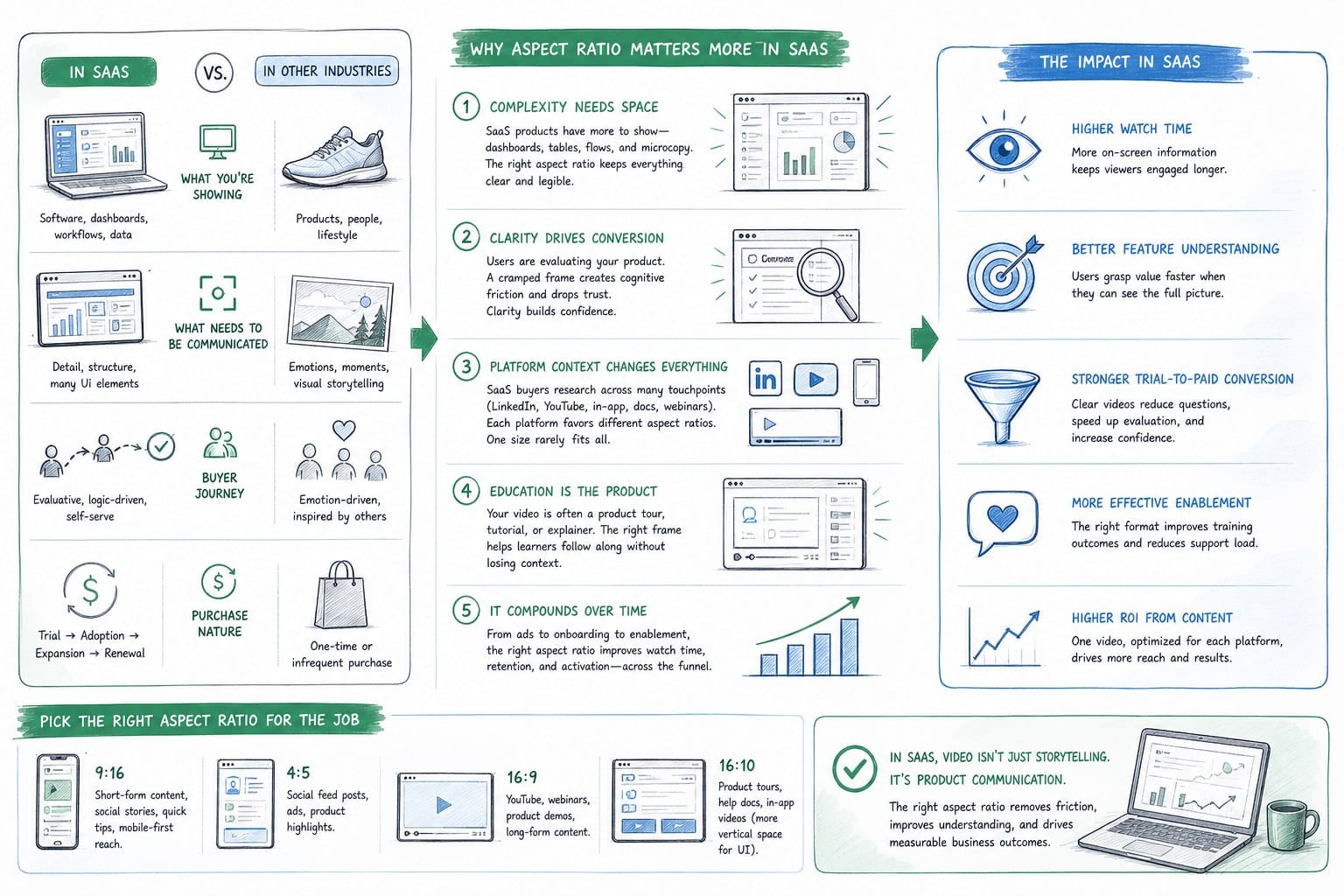
SaaS marketing is heavy on screen recordings, product walkthroughs, and UI demonstrations. That makes aspect ratio decisions more consequential than they are for, say, a consumer lifestyle brand shooting on a camera. When your video subject is a software interface, the wrong ratio does not just look off. It actually hides product functionality, cuts off navigation elements, and makes the UI look broken.
Let me give you a concrete example. A product tour recorded at 1920x1080 pixels, which is standard 16:9 widescreen, looks great on a desktop website hero. But if you drop that same file into a LinkedIn post without reformatting it, LinkedIn will letterbox it with black bars on the sides or crop it depending on the upload settings. Neither outcome is what you want when you are trying to show off a clean, modern SaaS interface.
The core reason video aspect ratio for SaaS marketing requires deliberate planning is that B2B SaaS content gets distributed across surfaces with very different technical requirements. Your website hero, your LinkedIn feed, your outbound sales deck, and your customer success onboarding portal are all different environments. Each one has different viewport dimensions, different player behaviors, and different audience contexts.
Here is a quick overview of the four main ratios you will encounter:
16:9 (widescreen) is the standard for desktop web, YouTube embeds, and most presentation software. At 1920x1080 or scaled versions like 1280x720, it is the default for screen recordings and is what most screen capture tools produce automatically.
1:1 (square) performs well in social feeds on both desktop and mobile because it takes up more vertical space in the feed than 16:9 does without requiring the viewer to go full screen.
9:16 (vertical) is the native format for mobile-first surfaces including LinkedIn Stories, Instagram Reels, and TikTok. It is becoming more common in B2B contexts than many people expect, particularly for mobile LinkedIn users who make up a significant share of feed traffic.
4:5 is a middle ground ratio used heavily on Instagram and occasionally on LinkedIn. It takes up more feed real estate than 16:9 without going fully vertical, which makes it a useful compromise for teams that want social performance without reshooting everything in portrait mode.
For most pre-Series B SaaS teams I talk to, the practical starting point is producing master content at 16:9 and then adapting down for social and sales use cases. The challenge is that adaptation usually means manual re-editing, which most small GTM teams do not have bandwidth for. I will come back to that problem later in this article.
One more thing worth flagging here: aspect ratio is not the same as resolution. You can have a 16:9 video at 720p or at 4K. Resolution affects sharpness. Aspect ratio affects shape. Both matter, but they are separate decisions. For most SaaS web and sales contexts, 1080p at the correct ratio is the practical standard. Going higher than that adds file size without visible benefit in most player environments, and going lower starts to look soft on retina displays.
The underlying principle for video aspect ratio in SaaS marketing is this: plan your distribution surfaces before you record or generate your video, not after. Retrofitting ratio is painful. Building for multiple ratios from the start is increasingly the smarter move, especially if you are using a platform that can output the same content in multiple formats without re-recording.
Matching aspect ratios to your three most important SaaS marketing surfaces
Let me walk through the three surfaces where I see SaaS teams most frequently get aspect ratio wrong: the website hero, LinkedIn, and sales decks. Each one has specific technical requirements and, more importantly, specific audience behaviors that should inform your ratio choice.
Website hero videos
The homepage hero is typically the highest-stakes placement for a B2B SaaS product video. It is often the first moving content a prospect sees, and it needs to communicate product value within the first few seconds before the visitor scrolls or bounces.
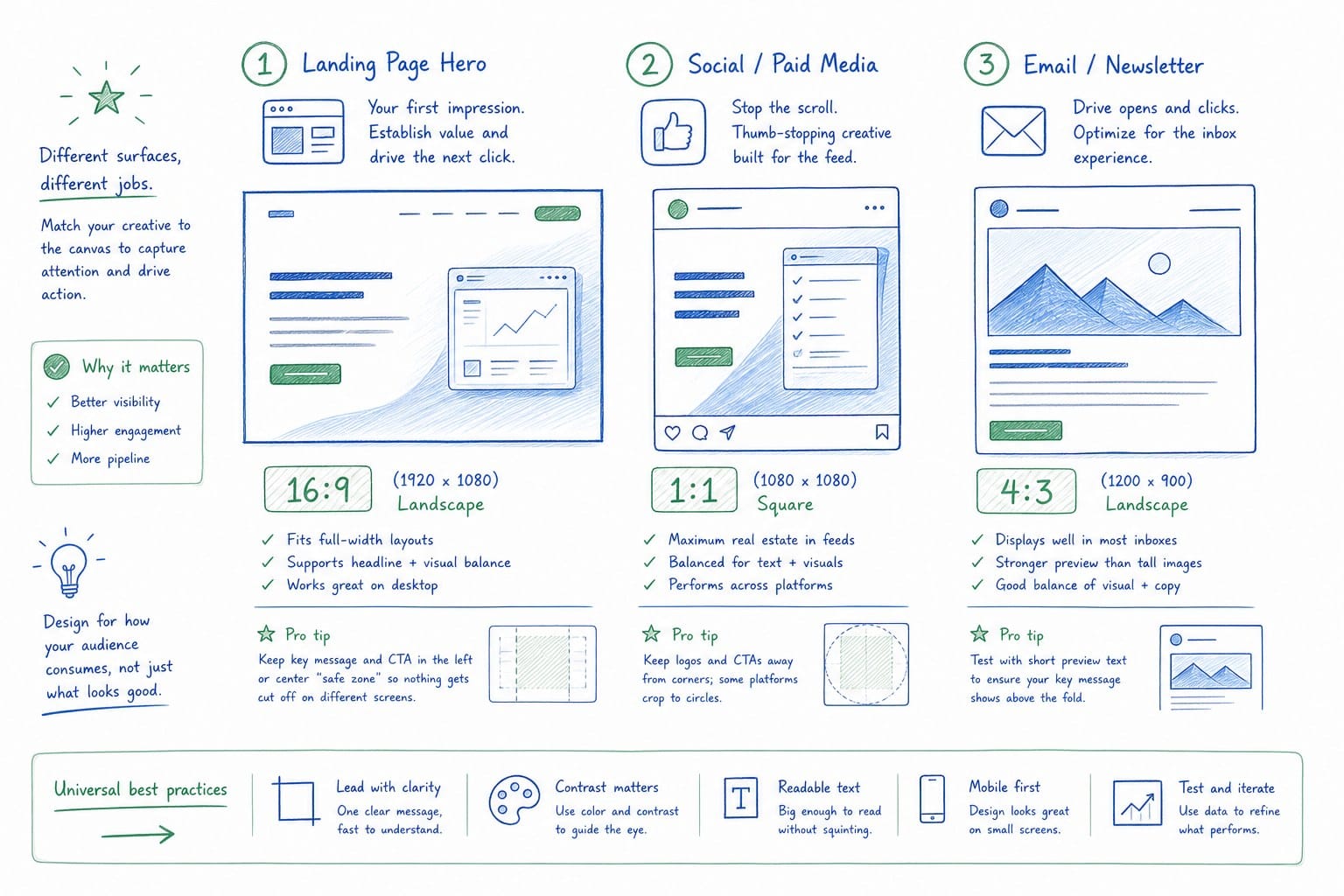
For desktop-first websites, 16:9 is the dominant standard and for good reason. Most desktop monitors display at 16:9 or close to it, so a widescreen video fills the viewport naturally without wasted space or awkward cropping. If your hero section spans the full browser width, you want a video that was built at that ratio from the ground up, not one that was cropped or padded to fit.
However, there is a nuance here that a lot of SaaS teams miss. Many modern website frameworks implement a hero section that is wider than it is tall, sometimes closer to 21:9 or even wider on ultrawide monitors. If your video is strict 16:9 and your hero container is wider, the player will either crop the top and bottom of your video or show black bars above and below. Neither is ideal.
The practical solution is to design your hero video with a safe zone in mind. Keep critical UI elements, text overlays, and product demonstrations centered horizontally and away from the extreme top and bottom of the frame. This gives you flexibility if the player crops to accommodate different viewport widths.
Mobile is a separate consideration. If a meaningful share of your traffic is mobile, your 16:9 hero video will be very small on a phone screen unless you are implementing a mobile-specific player. Some teams solve this by swapping the hero video for a static image on mobile or by implementing a 1:1 or 4:5 version of the video for smaller viewports using CSS media queries. This is a heavier lift technically but pays off in mobile engagement.
For SaaS teams using Product Frames, generating a version of your product video in multiple ratios without manual re-editing is a core part of the workflow. That matters a lot for the hero specifically because your product UI changes after every sprint, and you do not want to redo ratio adaptation manually every time you refresh the video.
LinkedIn video for B2B SaaS
LinkedIn is where a lot of B2B SaaS product video distribution actually happens, and it is where I see the most aspect ratio mistakes. LinkedIn supports multiple ratios but treats them differently in the feed, and understanding this changes how you plan your content.
For standard LinkedIn feed posts with native video uploads, LinkedIn officially supports ratios between 1:2.4 and 2.4:1. In practice, however, the ratios that perform best in the feed are 1:1 and 4:5. Here is why: LinkedIn displays video thumbnails and players inline in the feed. A 16:9 video is relatively short in the feed, meaning it takes up less vertical space and may get less attention before someone scrolls past it. A 1:1 or 4:5 video is taller, which means it occupies more of the viewer's screen real estate without requiring them to tap full screen.
For mobile LinkedIn users, this difference is even more pronounced. On a phone, a 1:1 video fills a large portion of the screen. A 16:9 video in the same feed looks like a small rectangle surrounded by a lot of text.
There is also a thumbnail consideration. LinkedIn autoplays videos without sound in the feed. Your first few frames are essentially a silent motion thumbnail. If your product UI is only visible in a small portion of a 16:9 frame, you are wasting that autoplay attention window. A 1:1 or 4:5 video forces you to crop the content to fill the frame, which usually means zooming in on the most interesting part of the interface rather than showing the whole screen.
For LinkedIn Stories and mobile-first LinkedIn content, 9:16 is the native format. B2B SaaS teams have been slower to adopt vertical video than consumer brands, but the format is increasingly used by SaaS founders and PMMs who are building personal brand content alongside company page content. If you are a founder posting product updates to your personal feed, a 9:16 or 4:5 version of your product video will almost always outperform the same content posted at 16:9.
I wrote more specifically about LinkedIn product video strategy in this article on how to create a LinkedIn product video that drives B2B SaaS pipeline, but the short version is: plan for 1:1 as your LinkedIn default and have a 9:16 version ready if you are doing any mobile-first distribution.
Sales decks and demo videos
Sales decks are interesting because they are one of the most important video placements in B2B SaaS and one of the most technically constrained. Presentation software like PowerPoint, Google Slides, and Keynote all default to 16:9. That means 16:9 video embeds are almost always the right call for sales decks.
But the ratio decision for sales deck videos is really just the starting point. The more important questions are about how the video will be played. Will the AE share their screen during a live call and play it inline in the deck? Will the prospect receive a link to the deck and play it themselves asynchronously? Will the video be downloaded and played outside the deck altogether?
For live sales calls, inline 16:9 video in a 16:9 deck works well because the AE controls playback. The video can be high resolution and relatively large in file size without causing problems because it is playing from the AE's machine.
For async decks sent to prospects, file size and load time matter a lot more. A compressed 16:9 video at 1280x720 is usually the right balance between quality and performance for an embedded deck. If the video is too large, the deck becomes slow and prospects may not wait for it to load.
For sales teams at SaaS companies, there is a specific problem that ratio alone cannot solve but is worth naming here: product videos in sales decks go stale quickly. After a product sprint, the UI shown in the demo video may no longer match the current product. Prospects who see a video during discovery and then get a live demo of a slightly different interface can lose confidence in the product's polish. The answer to this is a workflow that makes it easy to refresh video content after each release, which is exactly what I will discuss next.
Building a multi-ratio video workflow that stays current after every product update
The technical knowledge about which aspect ratio goes where is the easy part. The hard part for most pre-Series B SaaS teams is building a workflow that produces correct-ratio videos for all their surfaces and keeps those videos accurate as the product evolves.
Let me describe what a broken workflow looks like because most teams I talk to are living in some version of it. A founder or PMM records a product walkthrough using a screen recording tool. They export it at 16:9 because that is the default. They use it on the website and in the sales deck. A few weeks later there is a product update that changes the UI, but re-recording and re-editing the video is a half-day project, so they defer it. Meanwhile the LinkedIn post needs a square version and nobody has time to crop and re-export. The result is a homepage hero that is two sprints out of date, a LinkedIn post with pillarboxed video, and a sales deck that does not match the live product.
This is extremely common. It is not a failure of effort. It is a structural problem with how video is treated as a one-time production rather than a living asset.
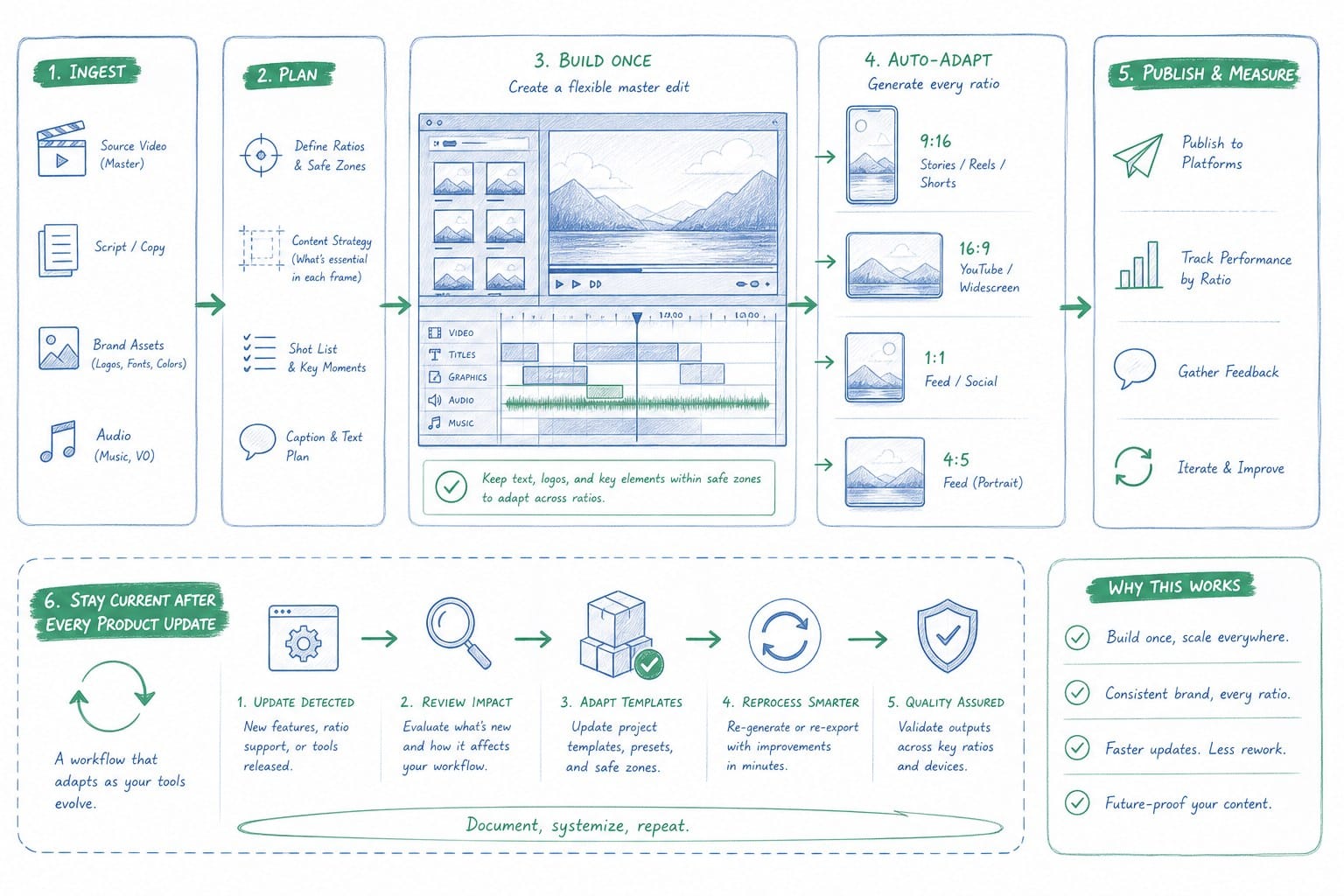
The alternative workflow starts with a different set of assumptions. Video content should be:
Generatable from the product itself, not from a one-time recording session. If your video is derived from your product URL or existing product footage, it can be regenerated whenever the product changes.
Outputtable in multiple ratios without re-recording. The content is the same. The ratio is a rendering parameter, not a production decision.
Editable at the composition level, not the footage level. If you need to update a section, you update the composition and re-render, rather than re-recording raw footage and re-cutting it.
This is the model that Product Frames is built around. By turning a product URL or existing footage into a narrated video composition, the platform lets PMMs, founders, and CS teams regenerate their video content after each product update without starting from scratch. The credit system, where one credit equals one second of finished output, makes it predictable to plan and budget multi-ratio production. If you need a 60-second hero video at 16:9 for the website, a 30-second square version for LinkedIn, and a 90-second 16:9 version for the sales deck, you know exactly what that costs in credits before you generate anything.
For teams who want to understand how the credit model fits into a broader video production budget, this article on what a credit-based video platform means for SaaS teams breaks it down in practical terms.
Here is how I would recommend structuring a multi-ratio workflow for a typical pre-Series B SaaS team:
Step one: define your surfaces before you generate anything. List out every place you plan to use video in the next 90 days. Homepage hero, LinkedIn posts, sales deck, onboarding portal, product announcement emails. For each surface, write down the required aspect ratio and the maximum video length that makes sense for that context. This list becomes your production spec.
Step two: plan your content around the most constrained format. If you are producing the same core content for a 16:9 website hero and a 1:1 LinkedIn post, think about what needs to be visible in the square crop before you finalize the composition. Safe zones and content hierarchy should be decided upfront, not retrofitted.
Step three: generate your master version and your social version as separate outputs. Do not try to crop the 16:9 master into a 1:1. Generate each ratio purposefully so the content fills the frame correctly in each context.
Step four: set a refresh cadence tied to your product release schedule. If your engineering team ships every two weeks, your video content should be reviewed on the same cadence. Flag which videos contain UI that changed in the most recent sprint and regenerate those first.
Step five: store your video assets in a shared location with clear naming conventions that include the ratio and the date of last update. This sounds like a small thing but it eliminates the situation where an AE inserts the wrong version of a demo video into a deck because they grabbed the first file they found.
There is also a strategic dimension to this workflow that is worth mentioning. Founders who take ownership of their product video narrative early, before the product is fully mature and before they have budget for an agency, build a significant advantage in how their product is perceived in market. The ability to show a polished, narrated product video that reflects the current UI is a trust signal that punches well above its weight in early-stage B2B sales conversations. I explored this in more detail in the article on why founders should own their product video narrative before hiring an agency.
For growth and marketing teams specifically, the multi-ratio workflow unlocks a content distribution strategy that most small teams cannot sustain with manual video production. If generating a 1:1 LinkedIn version of your product video is a 10-minute task rather than a half-day production project, your team can post product content to LinkedIn consistently enough to build an audience and generate inbound pipeline. Consistency is the compounding factor in social distribution, and consistency is only possible when the production cost per piece is low enough to be sustainable.
Let me close this section with a note on file formats and compression, since these come up in conversations about aspect ratio and they are related. For web use, MP4 with H.264 encoding is the standard that works across browsers and platforms without issues. WebM is supported in modern browsers and offers better compression, but MP4 is safer for compatibility. For LinkedIn, MP4 is required. For sales decks, MP4 embedded in PowerPoint or Google Slides is the most reliable approach. Some teams use animated GIFs for short clips in decks to avoid playback dependency, but GIFs are much larger files for the same quality and do not support audio, so they are a niche solution rather than a general recommendation.
Resolution for each ratio: for 16:9, 1920x1080 is standard and 1280x720 is acceptable for file-size-sensitive contexts. For 1:1, 1080x1080 is the standard. For 4:5, 1080x1350 is standard. For 9:16, 1080x1920 is standard. These numbers are the LinkedIn-recommended specifications and they translate well to other platforms and to sales deck embeds.
If you are generating video content through a platform rather than recording and editing raw footage, make sure the platform can output at these specific resolutions for each ratio, not just at an arbitrary crop of the master. A proper multi-ratio output at correct resolution dimensions will always look sharper in the feed than a crop-and-scale approach applied post-production.
Ready to take the next step?
If you want to stop re-editing product videos after every sprint and start distributing the right ratio in every surface your buyers see, Product Frames is built for exactly that workflow. You can turn your product URL or existing footage into a narrated, regenerable video composition and output it at the ratio each surface requires, without a production team or a manual editing cycle.