SaaS sales deck demo video: keep demo clips accurate between proposals

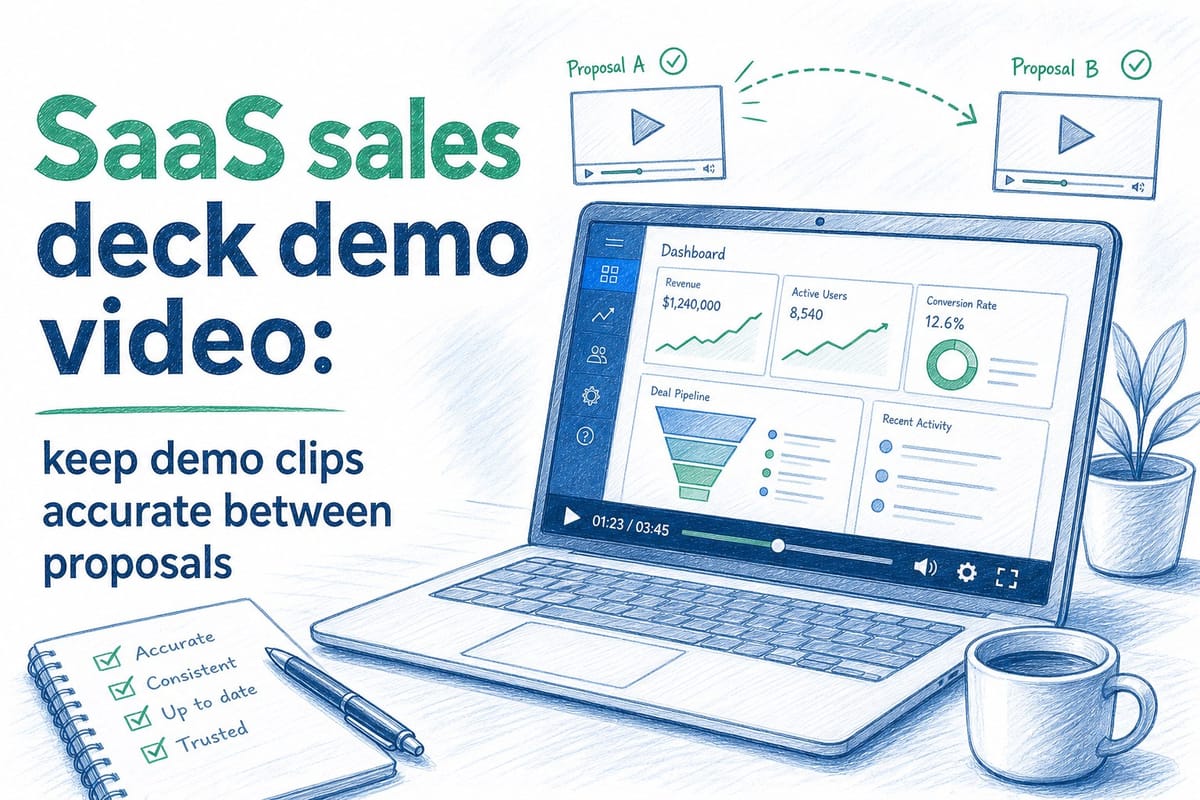
Table of contents
1. Why your SaaS sales deck demo video goes stale before the deal closes
2. What accurate demo clips actually require across a full sales cycle
3. How to build a workflow that keeps every demo clip current without rebuilding from scratch
If you work on sales at a B2B SaaS company, you already know how fast the product changes. A sprint ships a new dashboard. The onboarding flow gets a redesign. A key feature moves to a different menu. None of that feels like a big deal until you open your sales deck and realize the demo clips inside it show a product that no longer exists. That is the core problem with a SaaS sales deck demo video: it goes stale faster than almost any other asset in your go-to-market stack. Prospects notice. Deal velocity slows. And the fix usually means starting a screen recording from scratch, which nobody has time for in the middle of an active pipeline. This article walks through why demo clips inside sales decks fall out of sync so quickly, what that costs your team in real terms, and how to build a workflow that keeps every clip accurate across every proposal and every stage of your sales cycle.
Why your SaaS sales deck demo video goes stale before the deal closes
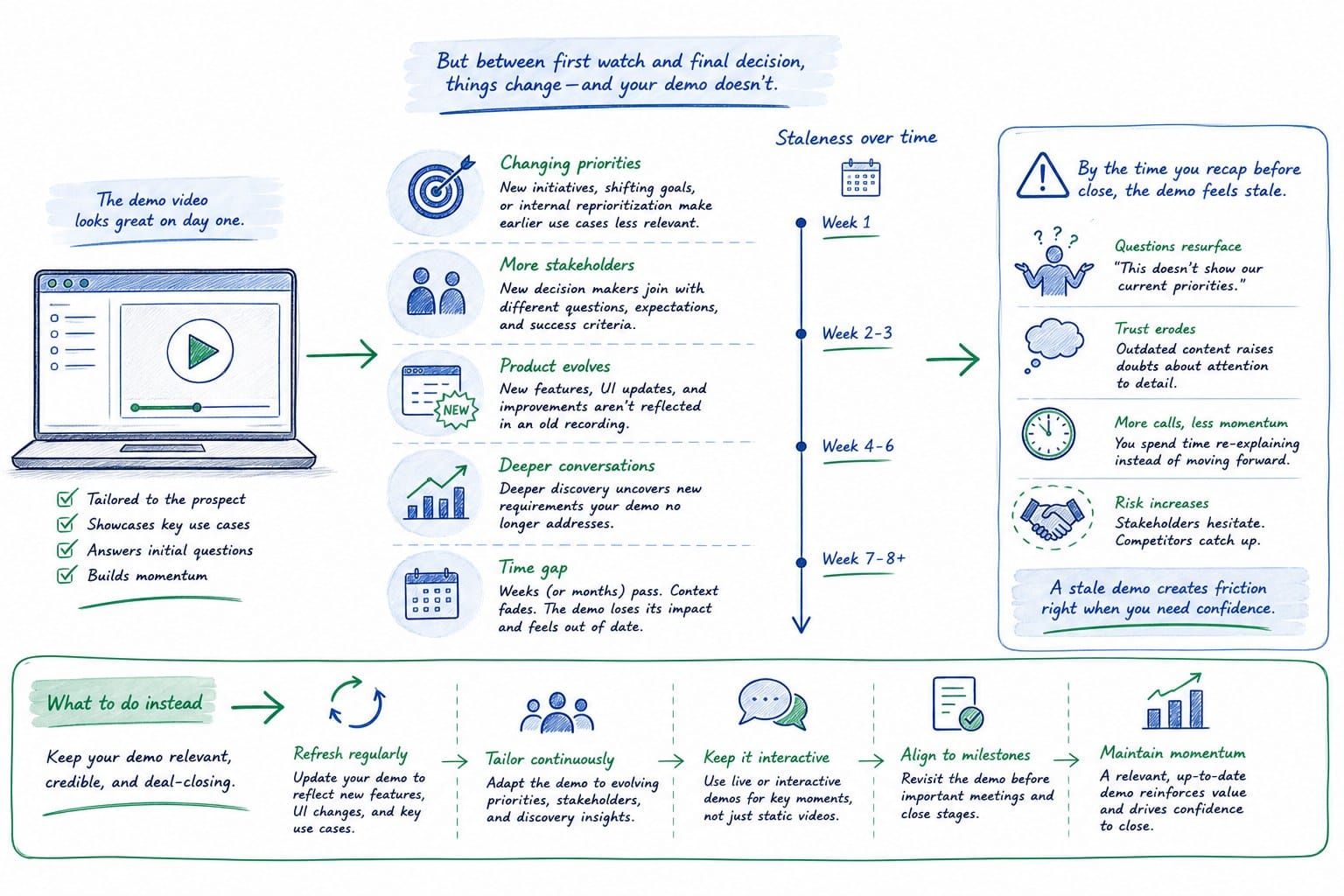
Most B2B SaaS products ship on a continuous delivery model. Feature flags, rolling deploys, and weekly sprints mean the product your prospect saw in the first discovery call may look noticeably different by the time you send a formal proposal two weeks later. That gap creates a real credibility problem.
Think about what actually lives inside a typical SaaS sales deck. You have a few slides explaining the problem, a slide or two on your solution, and then a short demo clip or GIF that shows the product in action. That clip is doing heavy lifting. It is the moment in the deck where a prospect stops reading and starts watching. It is supposed to make the product feel real and concrete. When it shows an old UI, old field labels, or a workflow that no longer matches what they will actually get access to, it raises a quiet but damaging question: how current is this company's information?
The problem compounds across deal stages. Most B2B sales cycles involve multiple touchpoints. You might send an intro deck early, a deeper technical walkthrough mid-cycle, and a formal proposal near the close. Each of those touchpoints might use a different version of your demo clip, or the same clip that was accurate in stage one but is now outdated by stage three. Keeping all of those in sync manually is genuinely hard.
There are a few specific reasons why demo clips fall out of sync faster than other slide content.
First, screen recordings are brittle. A standard screen recording captures a specific moment in a specific product state. The moment the UI changes, the recording is a historical document, not a sales asset. You cannot edit a screen recording the way you can edit text on a slide. You have to go back to the source and record again.
Second, the people who create demo clips are usually not the people who know when the product changed. A founder or PMM creates the original clip. Engineering ships a UI update. Nobody on the sales team gets a notification that the clip is now inaccurate. The clip stays in the deck until a prospect asks a pointed question about it, or worse, until after the deal closes and the customer realizes the product works differently than what they saw.
Third, most teams have no system for versioning sales deck video assets. Slide decks live in Google Slides or PowerPoint. Videos get uploaded to Loom, Wistia, or embedded as GIFs. When a new version of a clip exists, updating every copy of every deck that references it requires someone to manually hunt down every file. In practice, that does not happen. Old clips stay in old decks. Sales reps use whatever is easiest.
Fourth, the clips that live inside decks and the clips that live on your website or in your help center are usually maintained separately. So a team might update the homepage hero video after a product launch but forget to update the sales deck clip that shows the same feature. Now prospects see one version of the product on the website and a different version inside the proposal. That inconsistency erodes trust.
Understanding what is a product film and how does it differ from a demo or explainer video is useful here because not all video formats carry the same maintenance burden. A raw screen recording has no structure you can regenerate. A narrated product film built from editable components can be updated without rebuilding from zero. That distinction matters a lot for sales teams managing clips across multiple active deals.
The cost of stale demo clips is not always visible in your CRM. It shows up as prospects who go quiet after the proposal stage, technical stakeholders who ask detailed UI questions your deck cannot answer accurately, and deals that require extra calls to clarify what the product actually does today. None of those are catastrophic by themselves. Together, they slow down your pipeline in ways that are hard to attribute but easy to feel.
What accurate demo clips actually require across a full sales cycle
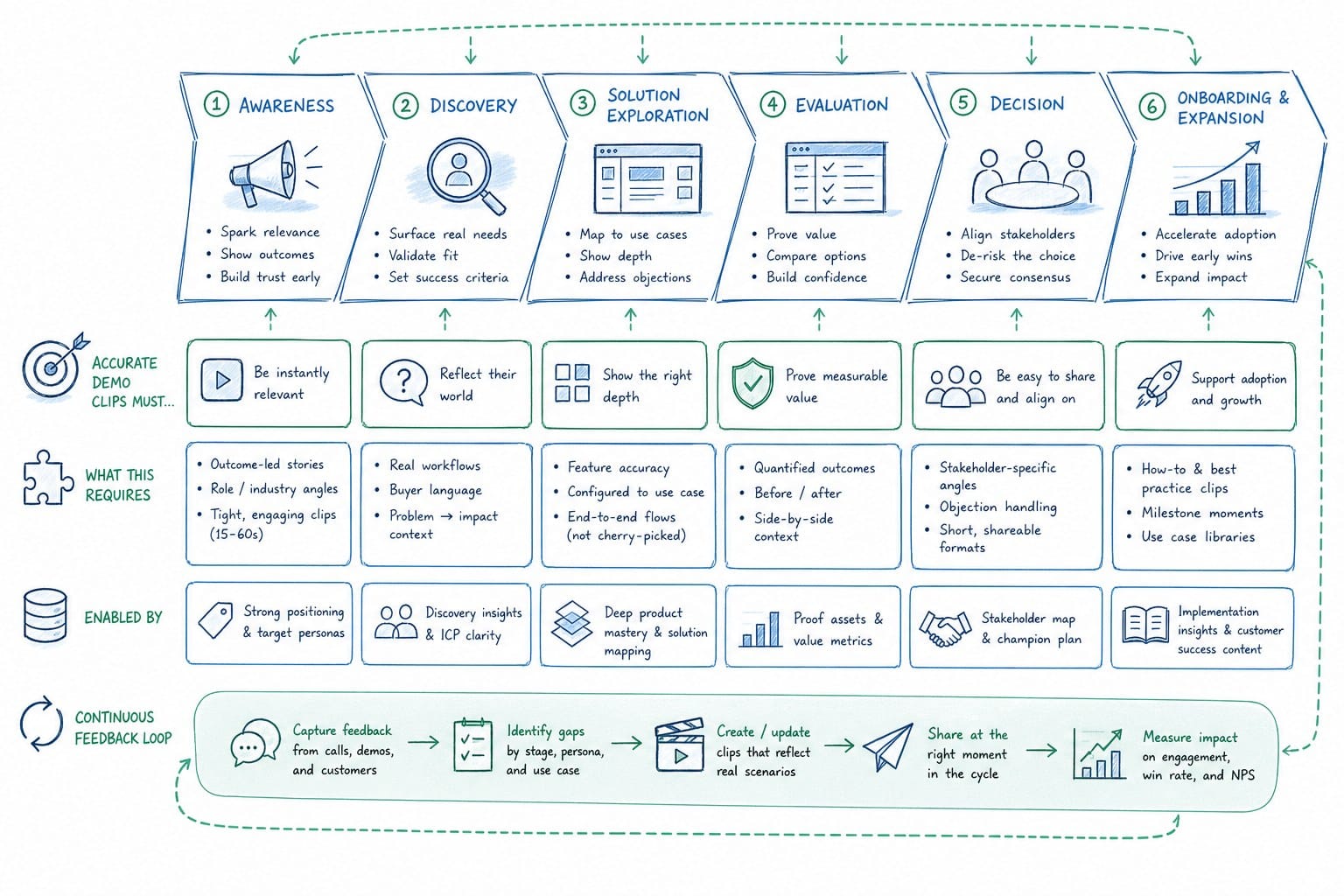
Keeping a SaaS sales deck demo video accurate is not a one-time task. It is a workflow problem. To solve it, you have to think about the full lifecycle of a deal and every point where video content touches that lifecycle.
Let me break down what accuracy actually requires at each stage.
At the top of the funnel, your demo clip in an outbound sequence or intro deck needs to show the product at a high level. It does not need to be deeply technical, but it needs to reflect the current navigation, current feature names, and current visual design. If your product went through a rebrand or a major UI overhaul, this is the clip that most prospects see first. Getting it wrong sets a bad first impression.
In the middle of the funnel, during technical discovery or champion-building calls, your demo clip needs to be more specific. It might show a particular workflow, a specific integration, or a feature that solves the exact problem this prospect raised. These clips are often customized for specific industries or use cases. That customization makes them more valuable and also makes them harder to keep current, because you now have multiple versions of a clip that each need to stay in sync with product changes.
At the bottom of the funnel, inside a formal proposal or business case document, the demo clip needs to be pixel-accurate. This is where procurement teams, legal teams, and senior stakeholders review the deal. If the UI in your clip does not match what they will see when they log in, that is a problem that can delay or kill a deal.
For accuracy to hold across all three stages, a few things need to be true.
You need a single source of truth for your demo clip assets. If clips live in five different places and different reps pull from different sources, you will always have version control problems. The clip that lives inside the proposal deck needs to be the same clip, or at least the same version, as the clip your sales engineer uses in a live call.
You need a process that connects product updates to video updates. When engineering ships a UI change, someone on the GTM team needs to know about it and needs to be able to act on it quickly. The faster you can turn around an updated clip after a product change, the smaller the window of inaccuracy in your sales assets.
You need regeneration, not just re-recording. Re-recording a screen capture every time the product updates is too slow and too resource-intensive for most pre-Series B teams. What you actually need is the ability to regenerate a video from a consistent structure, where the narration, the pacing, and the composition stay the same, but the underlying product footage reflects the current state. This is the difference between a video that requires full production every time and a video that can be refreshed quickly. I explore that distinction in more detail in how to regenerate product videos after a UI update.
You also need clips that work inside a deck without friction. A clip that requires a prospect to click a link and open a new browser tab creates friction and an opportunity for them to get distracted. Ideally, your demo clip is embedded directly in the slide or the proposal document, plays cleanly, and does not require any action from the prospect other than watching.
And you need clips in the right format for where they are used. A clip embedded in a Google Slides deck has different technical requirements than a clip posted to LinkedIn or used as a homepage hero. If your video production process produces one format and one aspect ratio, you will always be doing extra work to adapt it for each context. Sales deck clips are usually horizontal. Social clips are often vertical or square. Tracking which format goes where is its own maintenance problem.
For smaller teams, the realistic constraint is capacity. A PMM at a pre-Series B SaaS company is not going to spend three days re-recording, editing, and exporting a new demo clip every time engineering ships an update. That is not a realistic ask. So the workflow has to be designed around the constraint of limited bandwidth, not ideal conditions. How pre-Series B SaaS teams can create polished product videos on a lean budget covers some of the specific tradeoffs those teams face when trying to produce professional-quality video without a full production team.
The teams that solve this problem best are the ones that treat their demo clip library the same way they treat their copy library or their case study library. They have a clear owner, a clear update process, and a clear place where the current version lives. They do not leave it up to individual sales reps to maintain their own copies.
How to build a workflow that keeps every demo clip current without rebuilding from scratch
Building a repeatable workflow for keeping your SaaS sales deck demo video accurate requires you to solve three problems at the same time: production, versioning, and distribution. Most teams solve one of these and leave the other two to chance. Here is how to approach all three together.
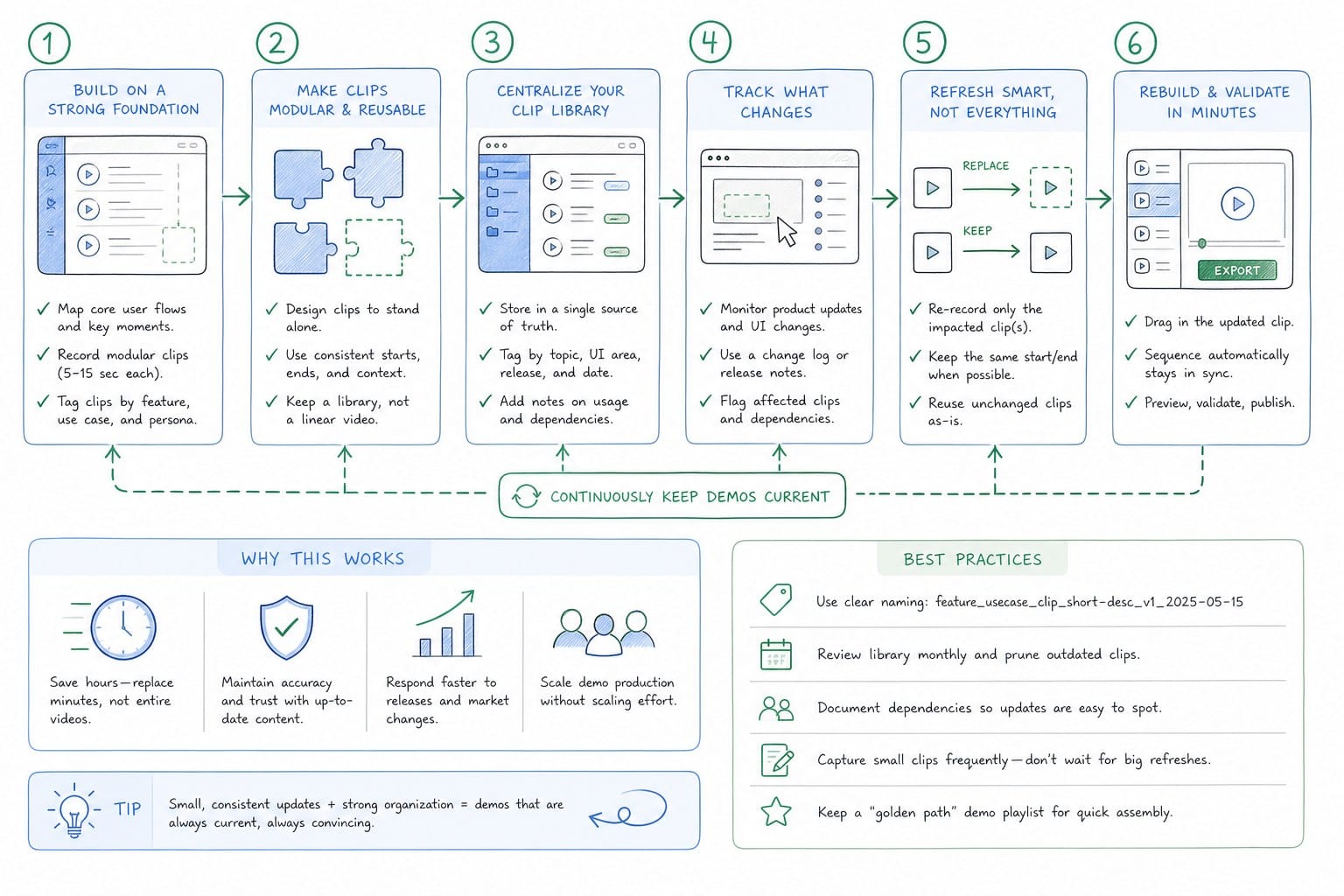
Start with production. The goal is to produce a demo clip that is structured in a way that allows it to be updated quickly. This means thinking about your video not as a single recorded artifact but as a composition. A composition has layers: narration, product footage, captions, and background design. If you record a single screen capture with voiceover baked in, every element is locked together. Changing one thing means re-doing everything. If you build your video as a composition where the narration and the product footage are separate layers, you can update the product footage when the UI changes without re-recording the narration. That is a significant time savings.
AI-powered video generation platforms like Product Frames are built around this idea. You can point the platform at your product URL or upload existing footage, and it generates an editable, narrated video composition. Because the video is built from a structure, not from a single recording, you can regenerate the product footage layer after a UI update without rebuilding the whole clip. This is what makes the approach viable for teams shipping updates on a weekly or biweekly cadence.
The credit system that Product Frames uses is worth understanding in this context. One credit equals one second of finished video output. That means a 60-second demo clip costs 60 credits to generate. When you need to refresh that clip after a product update, you regenerate it, and the cost is proportional to the length of the clip. You are not paying for a full production run every time. You are paying for the specific output you need. For a sales team maintaining three or four different demo clips for different use cases, that model makes frequent updates economically practical in a way that traditional video production is not.
Once you have a production approach that supports quick regeneration, the next problem is versioning. You need to know, at any given moment, which version of each clip is current and where it is being used. This sounds like a documentation problem, and in some ways it is. But the key is making it as lightweight as possible so that it actually gets maintained.
A simple approach is to keep a shared document or Notion page that lists every demo clip your team uses, the date it was last updated, the product version it reflects, and where it is embedded. When a new version of a clip is generated, the owner updates that document. When a sales rep builds a proposal deck, they pull the clip from the link or file listed in that document, not from wherever they last used it. This is not a sophisticated system, but it is a system, and having one is significantly better than having none.
For teams using a tool like Product Frames, the platform itself can serve as the version control layer. Because the video is regenerable from the platform, the current version always lives there. When you need to update a clip, you regenerate it in the platform and export the new version. The platform maintains a record of what you generated and when. You are not managing files across Loom, Google Drive, and Dropbox simultaneously.
The third problem is distribution. A clip that is accurate but hard to access does not help. You need your sales reps to be able to pull the current version of a clip into a proposal deck quickly, without having to ask a PMM to send them the file.
The most practical approach I have seen is to host current clip versions in a shared folder that every sales rep has bookmarked, and to make the naming convention obvious enough that reps can find what they need without searching. For example: demo-clip-dashboard-overview-v3.mp4. When a new version is generated, the old file is archived and the new file takes the same slot in the folder with an updated version number. Reps always pull from that folder, and the folder always contains the current version.
For embedding in decks, the format matters. If your clips are large video files embedded directly in PowerPoint or Google Slides, they can slow the deck down and create playback issues for prospects on slower connections. A better approach for Google Slides is to host the video on a platform that supports clean, lightweight embedding, and embed a link that opens to a clean video player rather than a raw file. For proposals sent as PDFs, a thumbnail image with a clearly labeled link to the video is often more reliable than an embedded file.
It is also worth thinking about aspect ratio at the production stage, not the distribution stage. If you know you will need a horizontal clip for your deck, a vertical clip for a LinkedIn post, and a square clip for an email, produce all three when you generate the original video. Product Frames supports multiple aspect ratios, so you can generate all the formats you need in a single workflow rather than going back to re-export later.
Finally, build a trigger into your team's product update process that prompts a clip review. This does not need to be complicated. A single checkbox in your sprint review doc that asks: does this update affect any current demo clips? If yes, tag the PMM. That one prompt, added to an existing process, can prevent most cases of stale clips from reaching prospects. The problem is not usually that teams do not care about accuracy. It is that nobody is watching for the specific moment when a video asset crosses from current to outdated.
A well-maintained SaaS sales deck demo video is not just an accuracy problem. It is a signal about how your team operates. Prospects are evaluating your product, but they are also evaluating you. When your deck shows a current, polished product experience, and that experience matches what they see when they log in for a trial, it builds confidence. When it does not match, it creates doubt. That doubt is hard to recover from, especially in competitive deals where a prospect has other options.
The good news is that the workflow to prevent this is not complicated. It requires a production approach that supports regeneration, a simple versioning system, and a distribution process that makes the current version easy to access. None of those require a large team or a large budget. They require a decision to treat your demo clip library as a maintained asset rather than a one-time production.
For pre-Series B SaaS teams in particular, where every deal matters and every sales interaction carries weight, that investment in clip accuracy is one of the highest-leverage improvements you can make to your sales process.
Ready to take the next step?
If you are managing a sales deck and want a demo clip that you can refresh after every product update without rebuilding from scratch, Product Frames is built for exactly that. You can generate a narrated, editable video composition from your product URL, regenerate it after any UI change, and export it in the format your deck needs. Visit productframes.com to see how it works.