
Keeping demo videos updated across sprints in B2B SaaS

Table of contents
1. Why demo videos fall behind so fast in a fast-moving SaaS product
2. What stale demo videos actually cost your sales and CS pipeline
3. How to build a sustainable video update workflow that keeps pace with sprints
Shipping fast is the goal for every pre-Series B SaaS team. New features land every two weeks, UI tweaks go out in between, and navigation sometimes changes overnight. That pace is a sign of health. The problem is that your demo videos were recorded against last sprint's interface, and nobody has had time to reshoot them. Keeping demo videos updated in SaaS is one of those tasks that sounds simple but quietly becomes one of the biggest maintenance burdens a product marketing or customer success team carries. This article looks at why the problem compounds across sprints, what it costs when you ignore it, and how modern tooling changes the math entirely.
Why demo videos fall behind so fast in a fast-moving SaaS product
Most SaaS teams ship on a two-week sprint cadence. Some ship even faster. Each deployment is a small victory for the engineering team and a small defeat for whoever owns the product video library.
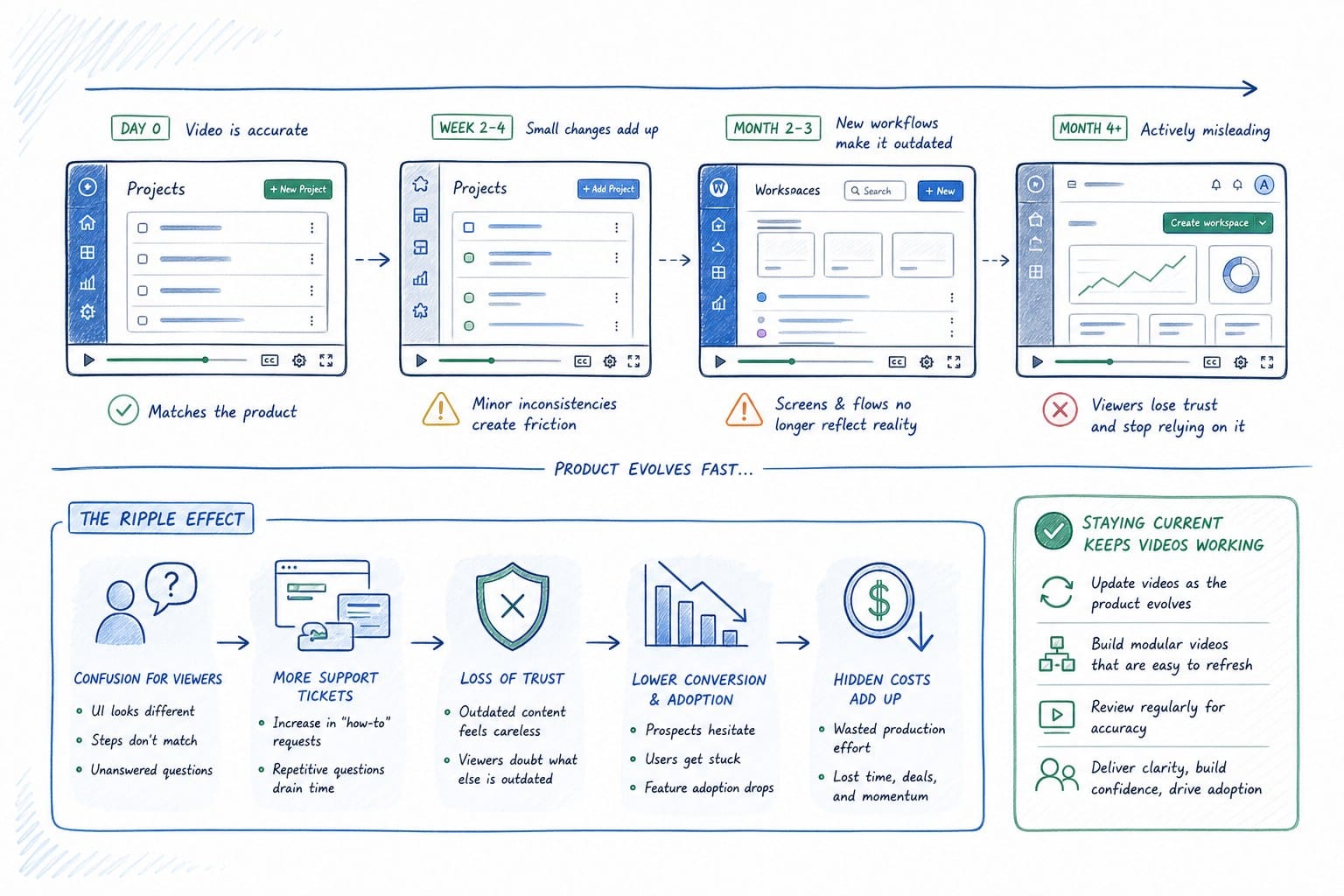
Think about what changes in a typical sprint. A primary navigation item gets renamed. A settings panel moves from a top tab to a side drawer. A core workflow gains a new required step because compliance feedback came in. A dashboard gets a visual refresh. Any one of those changes can make a demo video feel wrong to a prospect who just finished a trial session and noticed the difference.
The video does not have to be dramatically wrong to do damage. It just has to be slightly off. When a prospect watches your walkthrough video and then logs into a trial, they orient themselves using the video as a mental map. If the menu labels do not match, if the buttons sit in different positions, if the color of a key action is different, they feel a small jolt of confusion. That confusion is not catastrophic on its own. But it introduces friction at exactly the moment you want them moving forward.
For founders running their own demos, the problem is slightly different. You know the product well enough to narrate around changes in real time. But the video on your homepage hero, the one that runs while a visitor decides whether to book a call, was recorded three sprints ago. It is doing your first impression for you, and it is doing it with outdated information. I have seen homepage hero videos that still showed a deprecated onboarding flow six months after the product changed. The team knew, but nobody had scheduled a reshoot.
Product marketing managers carry the heaviest version of this burden. A PMM might own a homepage hero, a sales walkthrough deck video, a YouTube channel playlist, a help center overview, and onboarding email attachments. Each of those assets references the UI. Each sprint creates a small debt. After four or five sprints without an update cycle, the entire library is technically stale. Some assets will be more visible than others, so triage happens by instinct rather than by strategy.
The underlying cause is not laziness or poor planning. It is the production cost of a single video update. A standard demo video takes a day or more to record cleanly, another day to edit, and real time to write and refine narration. If your team is running lean, a single reshoot can mean a PMM disappears from strategic work for three or four days. That is a hard trade-off to justify every sprint. So teams delay, and the gap between what the video shows and what the product does keeps growing.
There is also a coordination cost that rarely gets counted. To reshoot, you need someone who knows the product deeply enough to demo it on camera or in a screen recording. You need a script. You need a review cycle with the product team to make sure the new flow is being shown correctly. You need approval from leadership before anything goes on the homepage. All of that takes calendar time on top of production time. And by the time the video is done, there is a reasonable chance another sprint has shipped.
I explored this in more detail in a piece on why your SaaS homepage hero video goes stale after every sprint, and the pattern holds across every team size I looked at. The sprint cadence and the production cycle are structurally mismatched. Fixing the process requires either slowing down shipping, which is not an option, or reducing the production cost of a video update, which is the only lever worth pulling.
What stale demo videos actually cost your sales and CS pipeline
A video that shows an old UI is not just an aesthetic problem. It creates specific, measurable costs in your sales and customer success motion.
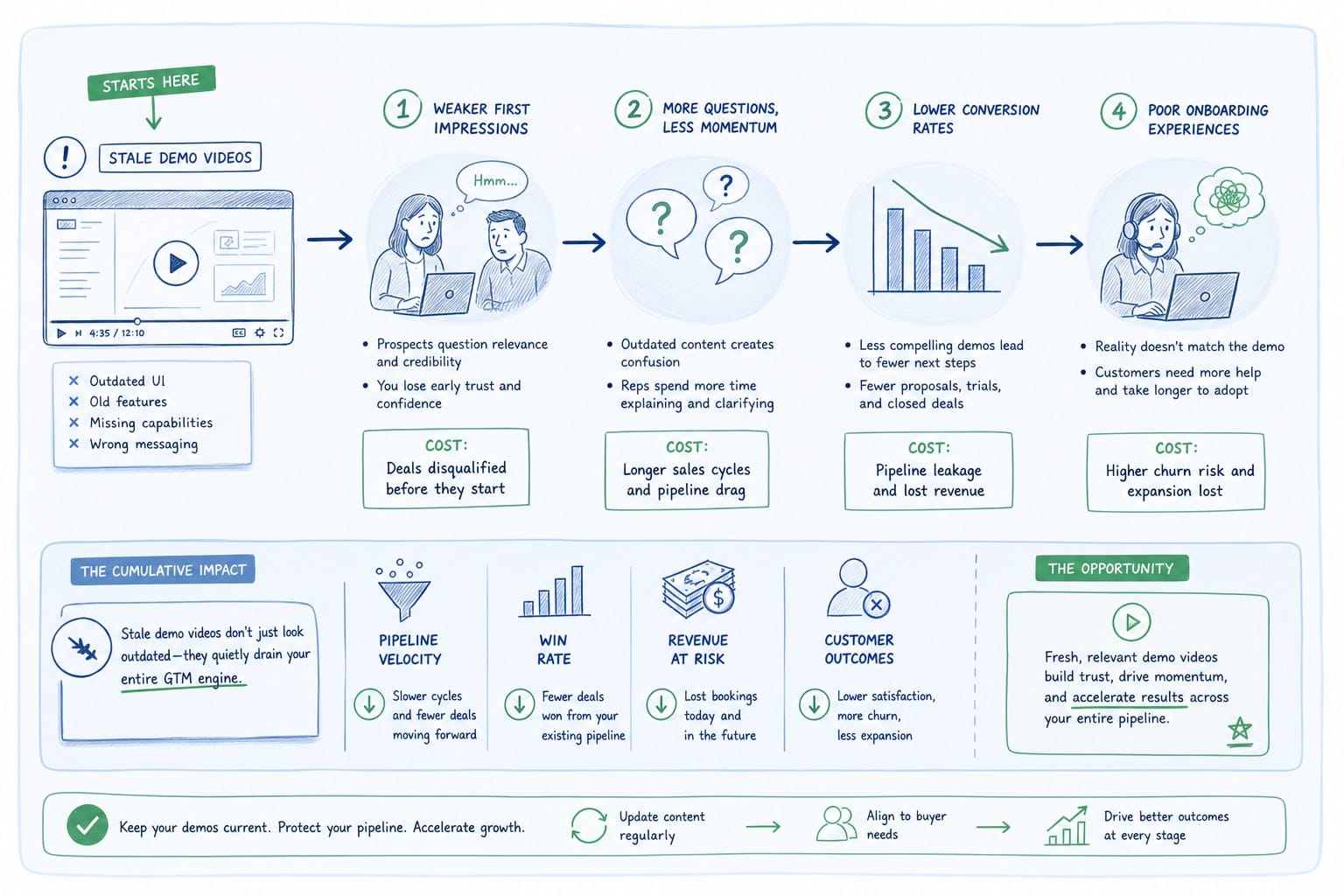
Start with the sales cycle. A prospect watches a sales walkthrough video between your discovery call and your demo call. They are using that video to build a mental model of your product and to prepare questions. If the video shows a workflow that has since changed, they arrive at the demo call with questions anchored to the old flow. Your sales rep spends ten minutes explaining what changed and why. That is not a disaster, but it is not a clean conversation. It introduces doubt about product stability, and it shifts the conversation away from value.
The problem is worse when the video is attached to a proposal that goes to a buying committee. Not everyone in that committee will get a live demo. Some of them will rely entirely on the video. If the video shows outdated functionality, and the product has improved, you are actually underselling yourself. The product is better than what they saw, but they do not know that. You lose deals not because the product is wrong but because the documentation of the product is wrong.
Customer success teams feel this in onboarding. An onboarding video is supposed to reduce time-to-value by giving new users a clear walkthrough before they log in for the first time. When the video and the product do not match, the opposite happens. Users watch the video, open the app, and cannot find what the video just showed them. They submit a support ticket. They schedule a call. The CS team spends time on a problem that should not exist. The cost is real support hours spent on preventable confusion.
I have talked to CS leads who estimated that ten to fifteen percent of their first-week support volume was directly tied to discrepancies between onboarding materials and the current product. That is not a small number. For a team handling fifty new accounts a month, that could mean five to seven accounts per month that start their relationship with your product feeling confused rather than confident.
For growth teams running paid acquisition, the problem hits at the top of the funnel. A homepage hero video that shows an old interface creates a mismatch between ad creative and landing page experience. Users who click through from a LinkedIn ad showing a polished new feature expect to land on a page that reflects that feature. If the hero video is six months old, the page feels inconsistent with the ad. Conversion drops. The growth team notices the drop, runs A/B tests on headline copy, changes the CTA button color, and never identifies the real culprit.
There is also a signal problem. When a prospective customer looks at your homepage video and it shows an interface that feels dated, they make an inference about your team. They infer that you are not actively investing in the product, or that you do not care about first impressions, or that things move slowly at your company. None of those inferences are fair or accurate, but they happen. A homepage video is not just a product tour. It is a proxy signal for company health and momentum.
Keeping demo videos updated in SaaS is therefore not a nice-to-have content operation. It is a pipeline hygiene task. Stale videos create friction at every stage from first impression through onboarding, and most of that friction is invisible until you start measuring it directly.
The solution is not to hire a videographer on retainer. That solves the quality problem but not the speed problem. What teams need is a way to regenerate a video after a sprint ships, without starting from scratch every time. That requires a different kind of tooling than what most teams have been using. I covered how to approach this without a dedicated video team in how to create a product demo video without hiring a video team, which goes deeper on the practical workflow side.
How to build a sustainable video update workflow that keeps pace with sprints
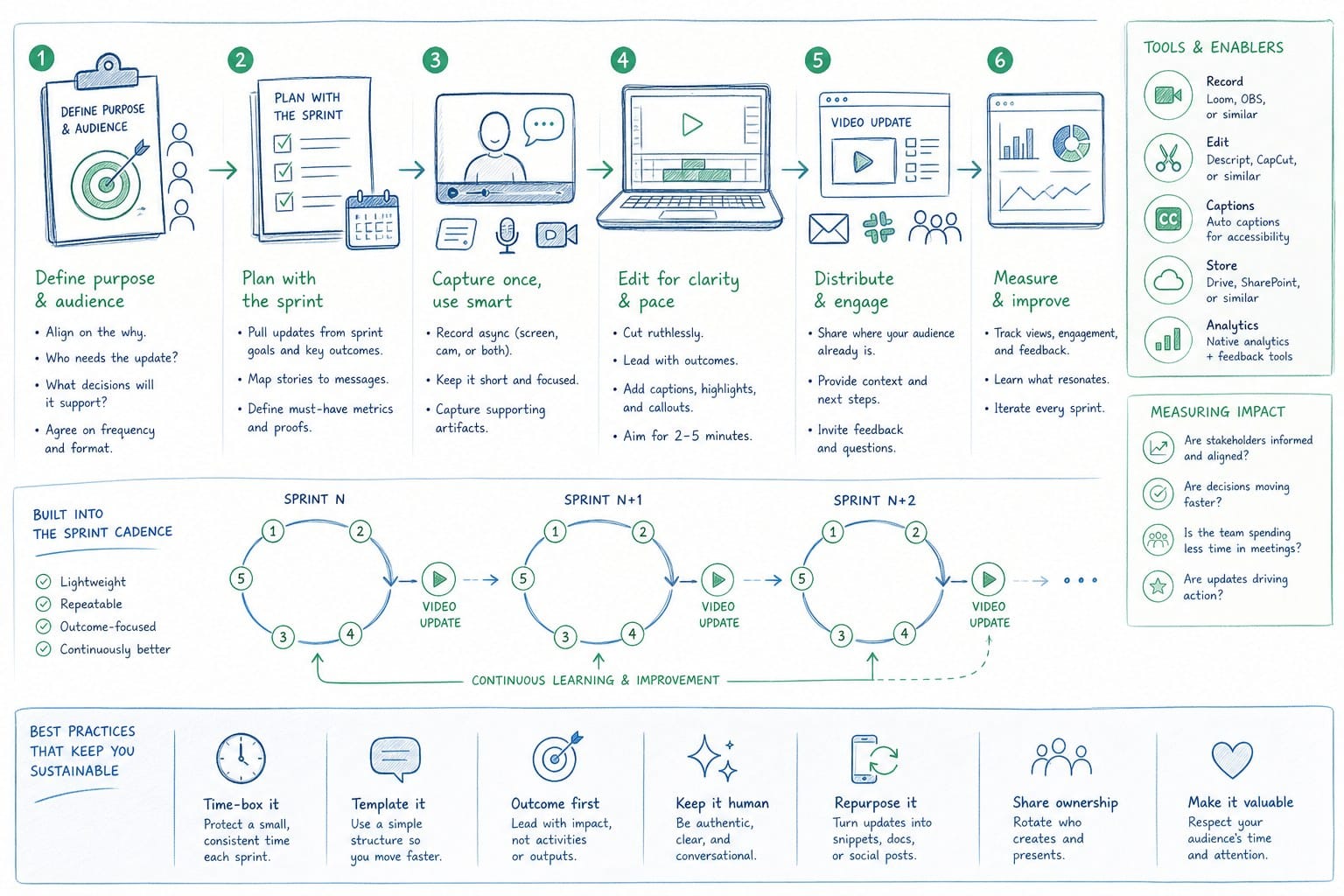
The goal is not to eliminate video production effort entirely. The goal is to reduce the marginal cost of each update so that keeping demo videos current across sprints becomes a routine task rather than a major project.
Start by treating your demo video as a living asset rather than a finished deliverable. This is a framing shift that matters more than it sounds. When a video is treated as finished, updating it feels like starting over. When it is treated as a living asset, updating it is just the next iteration. The same mindset that makes your engineering team comfortable shipping incremental improvements should apply to your video library.
The practical version of this starts with deciding which videos sit in each tier of your library. Tier one videos are your highest-traffic assets: homepage hero, primary sales walkthrough, and main onboarding overview. These need to be current within one sprint of any significant UI change. Tier two videos are supporting assets: feature-specific walkthroughs, integration guides, and secondary onboarding modules. These can tolerate a two to three sprint lag before an update is required. Tier three videos are one-off recordings for specific prospects or use cases. These often go stale immediately and should not be invested in heavily.
Once you have tiered your library, the update trigger becomes cleaner. Every sprint retrospective should include a two-minute check: did anything ship that affects a tier one video? If yes, a video update ticket goes into the next sprint's product marketing backlog. The ticket does not need to be large. It just needs to exist so that updating the video is scheduled work rather than aspirational work.
The bottleneck in most teams is the production step itself. Recording a clean screen capture, writing new narration, editing the clip, adding captions, and exporting in multiple aspect ratios for different channels takes hours that most PMMs and CS leads do not have spare. This is where AI-powered video generation tools change the workflow fundamentally.
Platforms like Product Frames are built specifically for this problem. Instead of recording, editing, and rendering a new video from scratch after every sprint, you point the platform at your product URL or drop in existing footage. The platform generates a narrated, composed video that you can edit and regenerate. When the next sprint ships and a UI element changes, you refresh the source and regenerate. You are not starting over. You are updating.
The credit-based model that Product Frames uses, where one credit equals one second of finished video, makes the cost of an update proportional to the length of the changed segment rather than the cost of the entire production cycle. If a sprint changes one workflow in your product, you update the relevant segment and regenerate it. You do not pay the full cost of re-recording a three-minute video to change thirty seconds of content.
This kind of tooling also addresses the multi-format problem that growth teams deal with. A single product video often needs to exist in a sixteen-by-nine format for the homepage, a nine-by-sixteen format for LinkedIn or Instagram stories, and a square format for some feed placements. Traditional video production requires exporting and reformatting each version manually. AI-powered generation that handles composition automatically means you can output multiple aspect ratios from the same source without a separate editing pass for each one.
For founders who are running their own GTM motion, the workflow becomes: ship the sprint, check the tier one video list, regenerate anything that changed, publish. That is a morning task rather than a week-long project. It keeps the homepage honest and the sales materials accurate without requiring a dedicated video resource.
For PMMs at slightly larger teams, the workflow integrates into the existing sprint cycle. The update task is scoped, assigned, and completed within the sprint that follows the product change. Video currency becomes a metric you can track alongside content coverage and asset freshness scores.
For CS and enablement teams, the key gain is onboarding video accuracy. Every time a core workflow changes, the onboarding video that walks users through that workflow gets regenerated. New users land in a product that matches what they just watched. Support tickets from first-week confusion drop. The CS team spends their time on strategic conversations rather than explaining that the menu moved.
There are a few practical habits that make this workflow stick over time. First, keep a shared log of which sprint changes affected which video assets. This does not need to be elaborate. A simple spreadsheet column in your sprint tracking tool that maps feature changes to video assets is enough. Second, designate one person as the video asset owner for each tier. When an update trigger fires, there is no ambiguity about who picks up the ticket. Third, set a staleness threshold that the team agrees on before you need it. If a tier one video is more than two sprints behind the current product, it gets flagged for immediate update regardless of how visible the change is. The threshold prevents the gradual drift that leads to six-month-old homepage videos.
The broader point is that keeping demo videos updated in SaaS is a systems problem, not a talent problem. Most teams have people capable of maintaining accurate video assets. What they lack is a production system that makes updates cheap enough to do regularly. When the marginal cost of an update drops close to zero, the natural behavior shifts from delaying updates to doing them as a matter of course.
The AI product video generator that turns a product URL into a finished video model is specifically designed to close the gap between sprint cadence and video currency. The output is not a rough cut that still needs a human editor. It is a finished, narrated composition that reflects the current product. That is the missing piece for most pre-Series B teams trying to maintain a credible, accurate video presence across their sales and onboarding motion.
When you get this system working, video stops being a liability that your team apologizes for in demos and starts being an asset that your team relies on. Sales reps send the walkthrough video with confidence. CS leads attach the onboarding video without checking whether it is still accurate. Growth teams run ads that link to a homepage hero that matches the product the prospect will actually use. That is the compound benefit of treating video currency as a product requirement rather than an editorial aspiration.
Ready to take the next step?
If your demo videos are currently one or more sprints behind your product, Product Frames is worth looking at. You can point it at your product URL or existing footage and get a finished, narrated video you can regenerate after every sprint without rebuilding from scratch. Visit productframes.com to see how the workflow fits your team's cadence.