AI product video generator that turns a product URL into a finished video

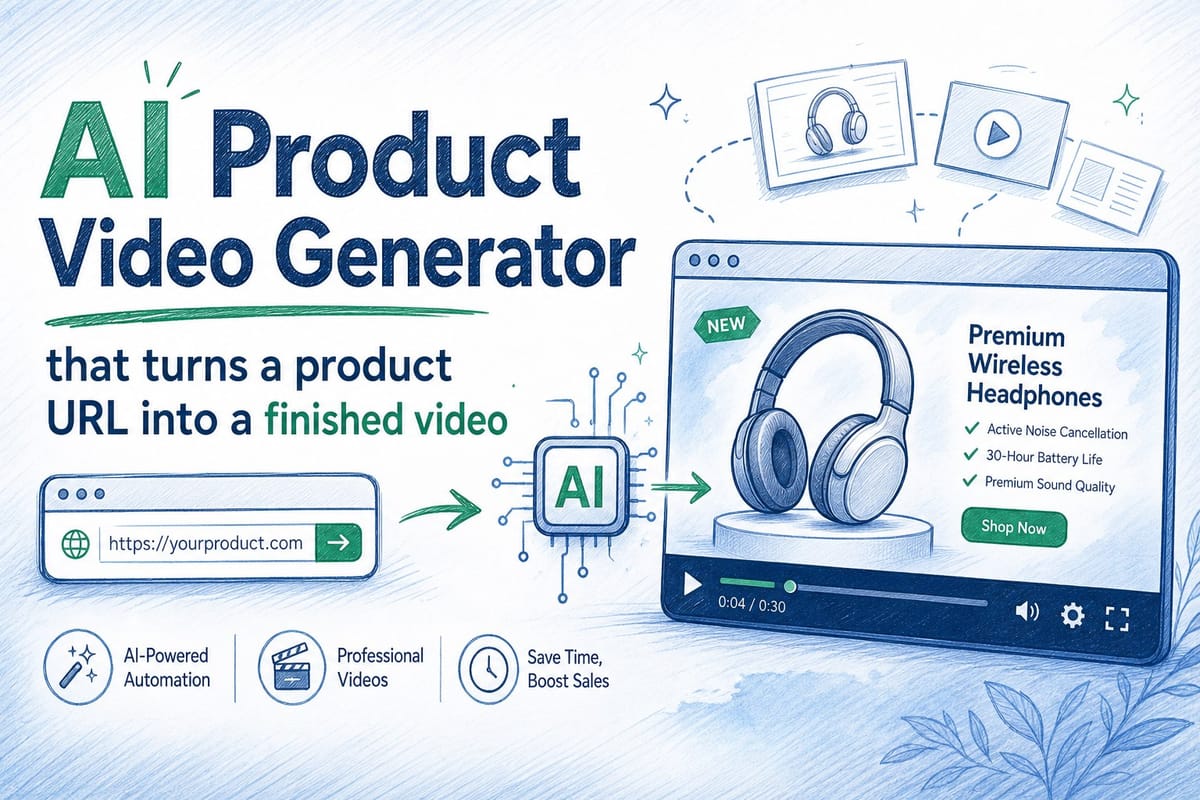
Table of contents
1. What an AI product video generator actually does
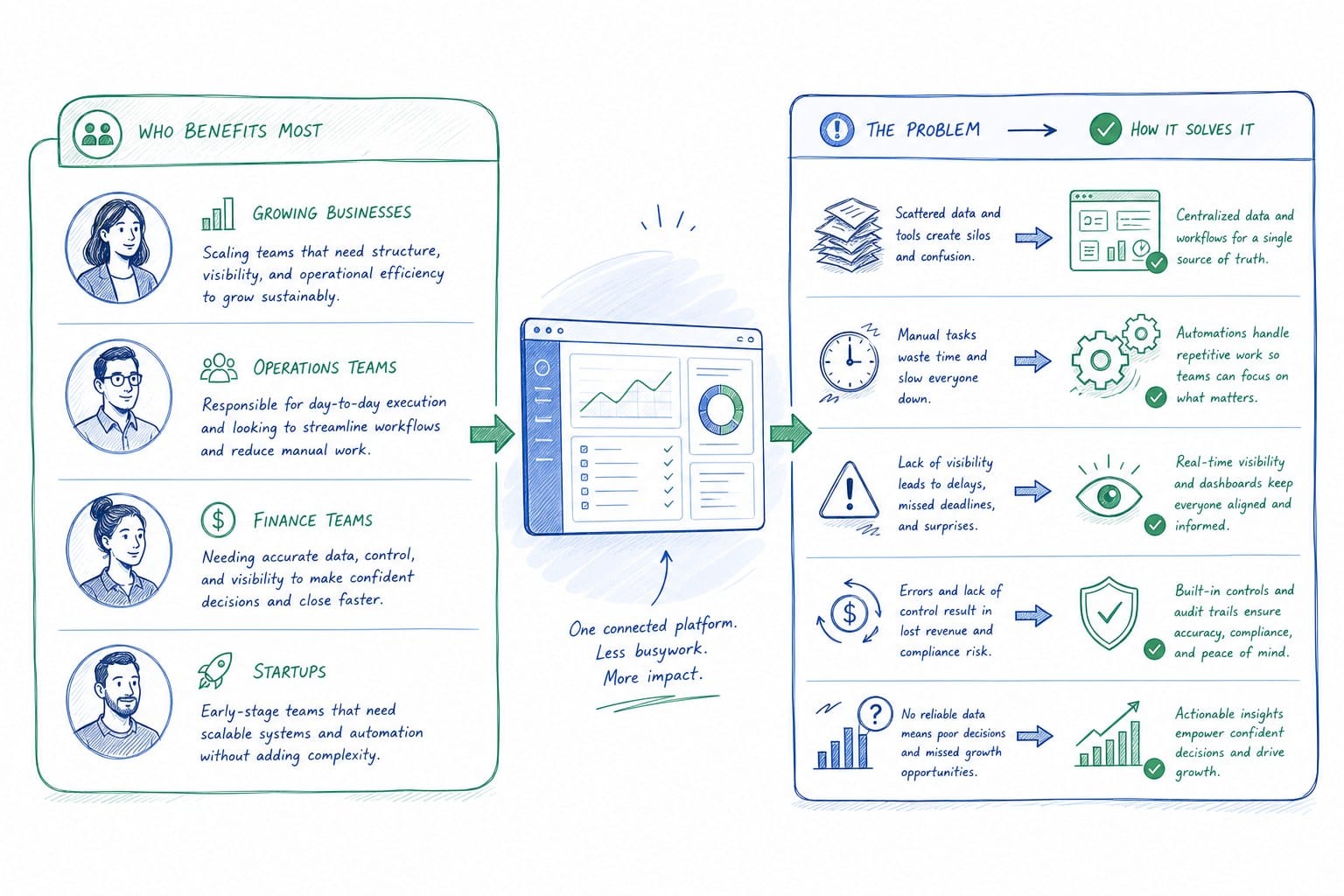
2. Who benefits most and the specific problems it solves
3. How to evaluate and use an AI product video generator effectively
Most B2B SaaS teams know the problem well. You finally ship a great product update, and the homepage hero video still shows the old UI. Your sales rep opens a demo video on a call and the navigation looks nothing like what the prospect is about to see. Your onboarding video refers to a button that moved three sprints ago. Keeping product videos current is genuinely hard work, and for most pre-Series B teams, it means either ignoring the problem or paying a video agency every time something changes. Neither option is good. That is exactly the gap an AI product video generator is built to close. Instead of starting from scratch every time your product evolves, you paste in a URL and get a finished, narrated video you can edit and regenerate whenever you need to. This article walks through how that process works, who it helps most, and what to look for when you are evaluating tools for your team.
What an AI product video generator actually does
The phrase gets used loosely, so it is worth being precise about what a real AI product video generator does compared to a generic screen recorder or a template-based editor.
A screen recorder captures what you do manually. You click through your product, record your screen, and then hand the footage to someone who cuts it together. That process is fine for a one-off walkthrough, but it does not scale. Every time your product changes, someone has to re-record, re-edit, and re-export. For a team shipping every two weeks, that is a recurring tax on people who have other jobs to do.
A template-based editor gives you a canvas and asks you to fill it in. You drag in screenshots, add text overlays, choose a music track, and publish. The output looks polished, but the work is still manual. You are the one making every decision about pacing, narration, and composition.
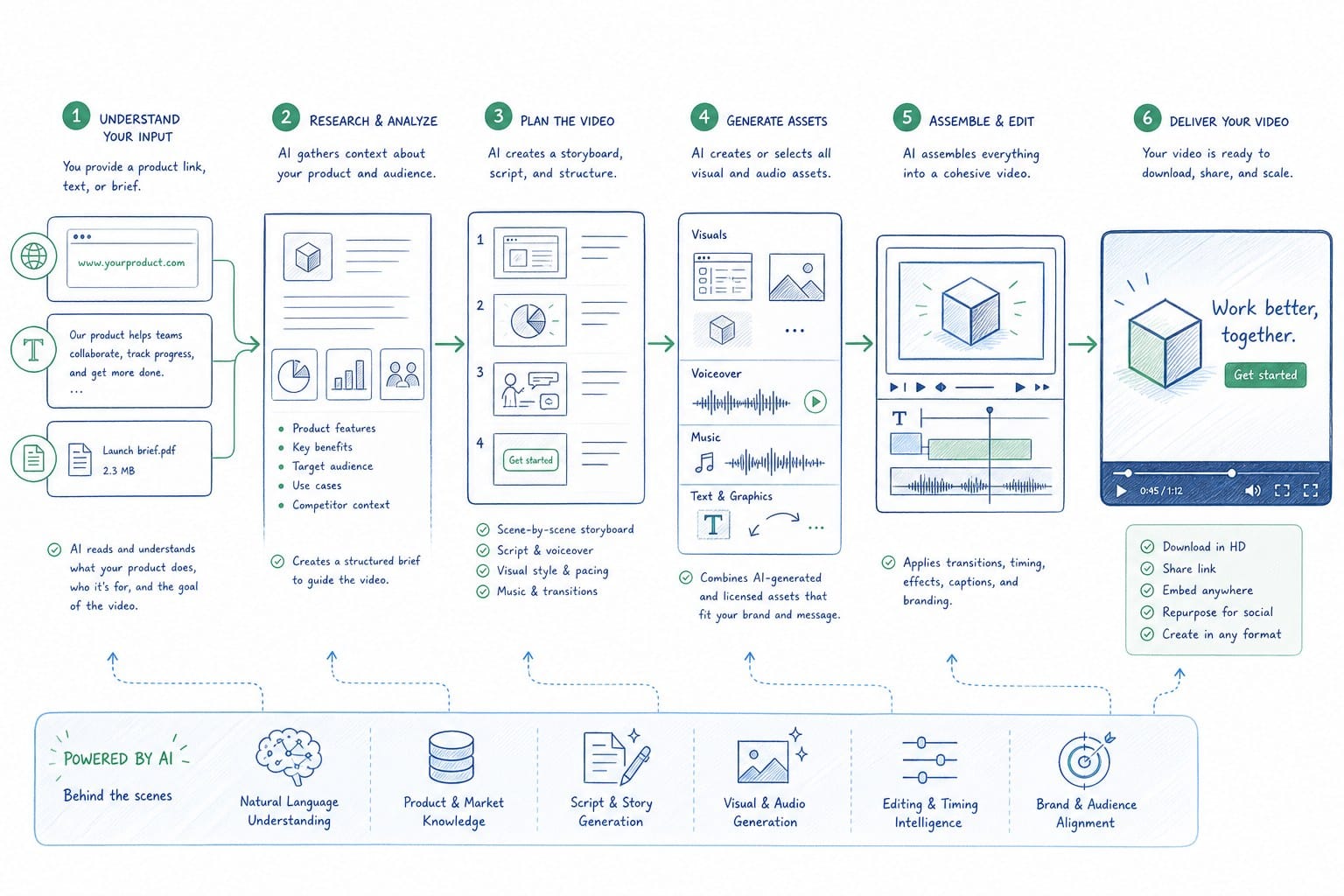
An AI product video generator works differently. You give it a starting point, typically a product URL or existing product footage, and the system does the structural work for you. It reads the product, understands what it is looking at, builds a narrative arc, adds voiceover narration, and outputs a composed video. You can edit the result, adjust the script, change the pacing, or regenerate sections without starting over. When your product changes, you refresh the video rather than rebuilding it.
Product Frames is built around this model. You point it at a product URL, and it produces an editable, narrated video composition. The credit system is straightforward: one credit equals one second of finished video output. That makes cost predictable, which matters when you are producing videos across multiple use cases and need to refresh them regularly.
The regeneration capability is what separates this category from everything else. Most video tools assume your source material is static. A product video generator designed for SaaS assumes your product is always moving, because it is.
For founders and GTM leads, this changes the economics of keeping a homepage hero video current. You do not need to schedule a video shoot every time you ship a meaningful update. You regenerate the relevant section and the video reflects your actual product. For product marketing managers working across sprint cycles, it means sales collateral does not quietly go stale between releases. For customer success teams, it means the onboarding video a new user watches on day one shows the UI they are actually going to use.
It is also worth noting what the AI is doing at a craft level. Good product videos do not just show features. They show outcomes. The narration explains why something matters, not just where to click. When an AI product video generator is doing its job well, the script it produces connects what the product does to what the user needs to accomplish. That is harder than it sounds, and it is one of the things that separates a purpose-built tool from a general-purpose AI video tool that was not designed with SaaS products in mind.
Who benefits most and the specific problems it solves
The teams that get the most value from an AI product video generator tend to share a few characteristics. They are shipping software regularly, they have multiple audiences for their product content, and they do not have a dedicated video production resource. That description fits a lot of pre-Series B B2B SaaS companies.
Let me walk through the specific use cases where this matters most.
Founders building a homepage hero video face a particular challenge. The homepage is usually the first thing a potential customer sees, and the hero video sets expectations for the entire product experience. If that video shows an old UI, it creates friction before the prospect has even signed up for a trial. The problem is that most founders do not have the budget or the time to commission a new video every month. An AI product video generator lets you treat the homepage hero like a living document rather than a fixed asset. You update it when it matters, not when you can afford to.
Product marketing managers at product-led SaaS companies often manage a library of sales walkthrough videos, feature explainers, and release announcements. Keeping all of those current across sprint cycles is a full-time job by itself. When a PMM can regenerate a video instead of re-producing it, they spend their time on positioning and messaging rather than coordinating with contractors. That is a meaningful shift in how the role operates.
For customer success and enablement teams, the accuracy problem is even more immediate. When a new user watches an onboarding video and then opens the product to find that the navigation has changed, it creates confusion and support load. The CS team knows this, but they often do not control the video production process. An AI product video generator gives CS teams the ability to keep their onboarding content accurate without waiting on a design or marketing queue. They can flag a video that is out of date, regenerate the affected section, and publish an update in the same workflow.
Sales teams have a slightly different version of the problem. A demo video that sits in a proposal deck needs to be accurate at the moment the prospect reviews it, which could be days or weeks after the initial call. If your product has shipped updates in that window, the video in the deck might not match what the prospect sees in their trial. That inconsistency erodes trust at exactly the wrong moment. Sales teams that can refresh their deck-ready demo videos quickly have a concrete advantage in longer sales cycles.
Growth and marketing teams face a distribution challenge on top of the accuracy challenge. LinkedIn, website heroes, and other social channels often require different aspect ratios and different lengths. A tool that outputs a finished video in one format and then requires a separate workflow for every other format adds friction that compounds across a content calendar. When an AI product video generator handles multiple aspect ratios as part of the same output workflow, it removes a step that would otherwise require a separate tool or a manual crop.
If you are thinking about how to approach video production for your team without hiring dedicated resources, the post on how to create a product demo video without hiring a video team goes deeper on the production side of that question.
Across all of these use cases, the common thread is that product video content has historically been treated as a campaign asset, something you produce once and then leave alone until you can afford to do it again. The reality for a SaaS product is that your product is your marketing, and your product is always changing. Video content that does not keep pace with the product becomes a liability rather than an asset. An AI product video generator changes the production model so that keeping content current is the default, not the exception.
It is also worth thinking about the internal organizational dynamics here. When video production requires a significant time investment, teams develop informal rules about when it is worth doing. New feature launches get videos. Minor UI updates do not. Bug fixes and performance improvements definitely do not. Over time, this means your video library drifts further and further from your actual product. The cumulative effect is a set of marketing and sales assets that are technically accurate to a version of your product that no longer exists. A lower production cost per video, combined with a regeneration model, means you can set a different threshold. You can keep more content current without making a case for the budget every time.
How to evaluate and use an AI product video generator effectively
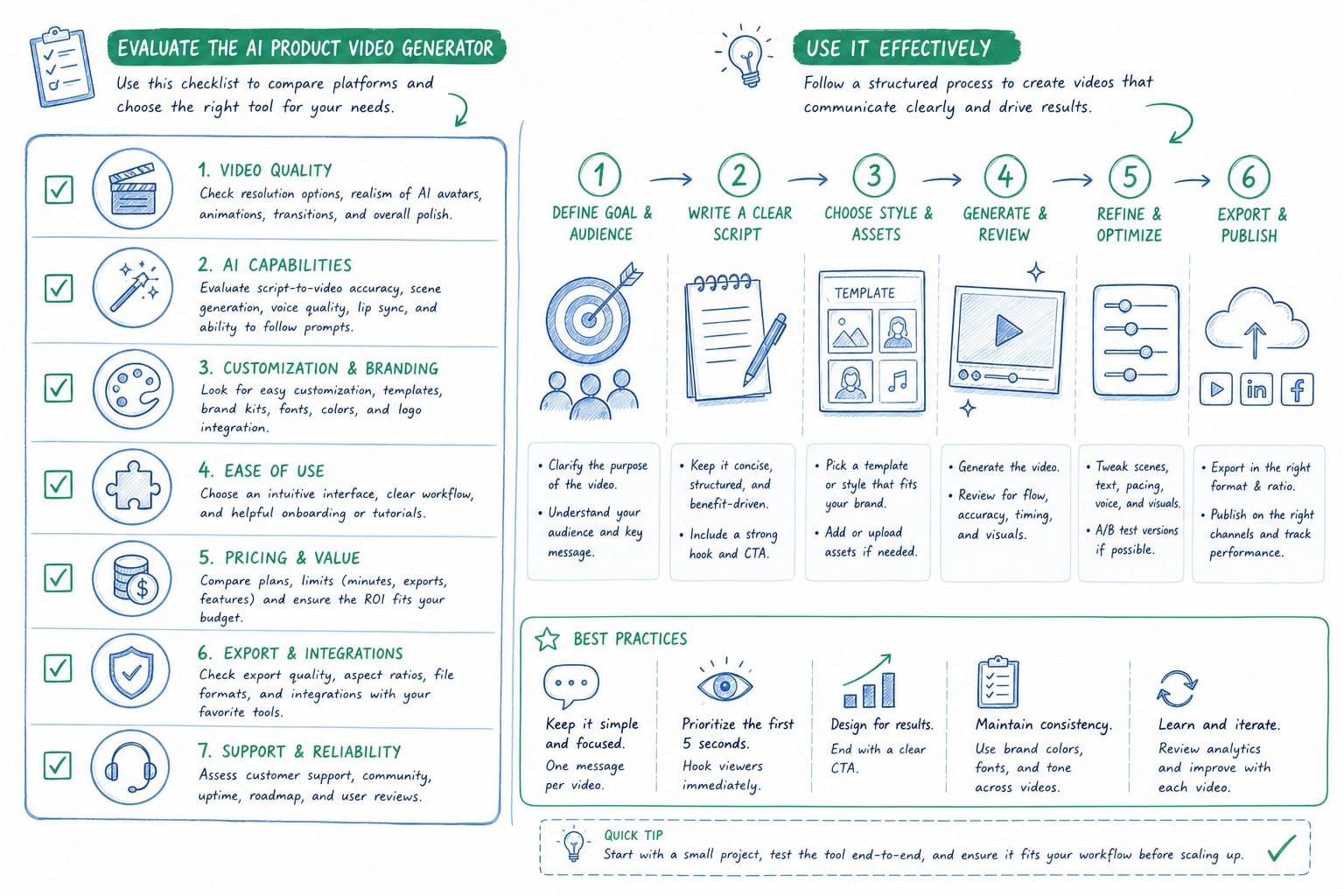
Not all AI video tools are built the same way, and the category label covers a wide range of actual capabilities. When you are evaluating a tool for your team, there are a few specific things worth testing before you commit.
First, look at what the tool uses as its input. Some tools take a URL and actually read the product interface to build the video. Others take a URL as a label but really just ask you to provide screenshots manually. The difference matters because manual screenshot workflows do not solve the update problem. If you have to re-supply the raw materials every time your product changes, you have not actually reduced the production burden.
Second, pay attention to the narration quality and the script logic. A good AI product video generator should produce a script that explains what the product does and why it matters, not just a voiceover that describes what is on screen. Watch the output with the narration on and ask yourself whether it would make sense to someone who has never seen your product before. If the narration is just reading the UI labels back at you, the tool is not doing the hard work.
Third, test the editing and regeneration workflow. The promise of an AI product video generator is that you can refresh content without starting over. Before you decide on a tool, try making a change to one section of a video and see what happens. Does it regenerate just that section, or does it require you to redo the whole thing? Does the edit interface make sense to someone who is not a video editor by training? If the regeneration workflow is complicated, teams will avoid using it, and you will be back to the same old problem of letting videos go stale.
Fourth, think about the output formats you actually need. If your team distributes content on LinkedIn, you need a square or vertical format. If you are embedding in a homepage hero, you need widescreen. If you are putting video in a proposal deck, you might need a shorter version with more controlled pacing. A tool that locks you into one format adds downstream work. A tool that handles multiple aspect ratios in the same workflow removes it.
Fifth, consider the cost model in terms of how you actually use video. Some tools charge per video, which makes sense if you produce a small number of long videos infrequently. A credit-based model that ties cost to the length of finished output, like the one Product Frames uses where one credit equals one second, makes more sense if you are producing multiple shorter videos and refreshing them regularly. You pay for what you actually use rather than for a seat or a tier that may or may not match your output volume.
Once you have chosen a tool and you are using it in production, there are a few habits that make AI-generated video content more effective over time.
Keep a clear inventory of which videos exist, what product version they reflect, and when they were last updated. This sounds obvious, but most teams do not have this. Without it, you will not know which videos need to be refreshed after a release, and the curation problem creeps back in.
Treat product video updates as part of your release checklist rather than a separate campaign. When you ship a feature or update a UI element that appears in an existing video, flag the video for regeneration at the same time you write the release notes. This keeps the burden small and keeps the content current without requiring a dedicated review cycle.
For sales teams, build a habit of checking demo videos before they go into a proposal rather than assuming they are current. A thirty-second review is all it takes to catch a video that shows a UI element that has changed. If it has changed, regenerate the affected section before the deck goes out.
For CS and enablement teams, tie video accuracy reviews to your QA process for product releases. Before a release goes live, someone should check whether any onboarding or help content shows UI that is about to change. Videos that show the pre-release UI should be scheduled for regeneration immediately after the release goes out.
For growth teams, use the multi-format output capability to build a content calendar that reuses the same core video across channels. A two-minute homepage hero video can yield a sixty-second LinkedIn version and a thirty-second social cut without starting from scratch. Batching these exports as part of the same production session keeps your content library consistent and reduces the number of separate production tasks you are managing.
The broader point here is that an AI product video generator is most valuable when it is integrated into the workflows your team already uses, not treated as a separate creative project. The goal is to make accurate product video content the path of least resistance, so that the default behavior is keeping content current rather than letting it drift.
For pre-Series B SaaS teams in particular, the resource constraint is real. You have a small team, you are shipping frequently, and you need your marketing and sales assets to represent your actual product. An AI product video generator does not replace judgment or creativity, but it removes the production bottleneck that makes video content expensive to keep current. That is a meaningful change in what is actually possible for a small team.
Product Frames is built specifically for this use case, with a URL-based input, editable and regenerable output, and a credit model that makes cost predictable at the per-second level. If you are evaluating options for your team, it is worth seeing how the tool handles your actual product rather than a demo environment.
Ready to take the next step?
If your team is ready to stop letting product videos go stale after every release, Product Frames is built for exactly that problem. You can start with your product URL and have a finished, narrated video you can edit and regenerate whenever your product changes. Visit productframes.com to see how it works for your use case.