
Why your SaaS homepage hero video goes stale after every sprint

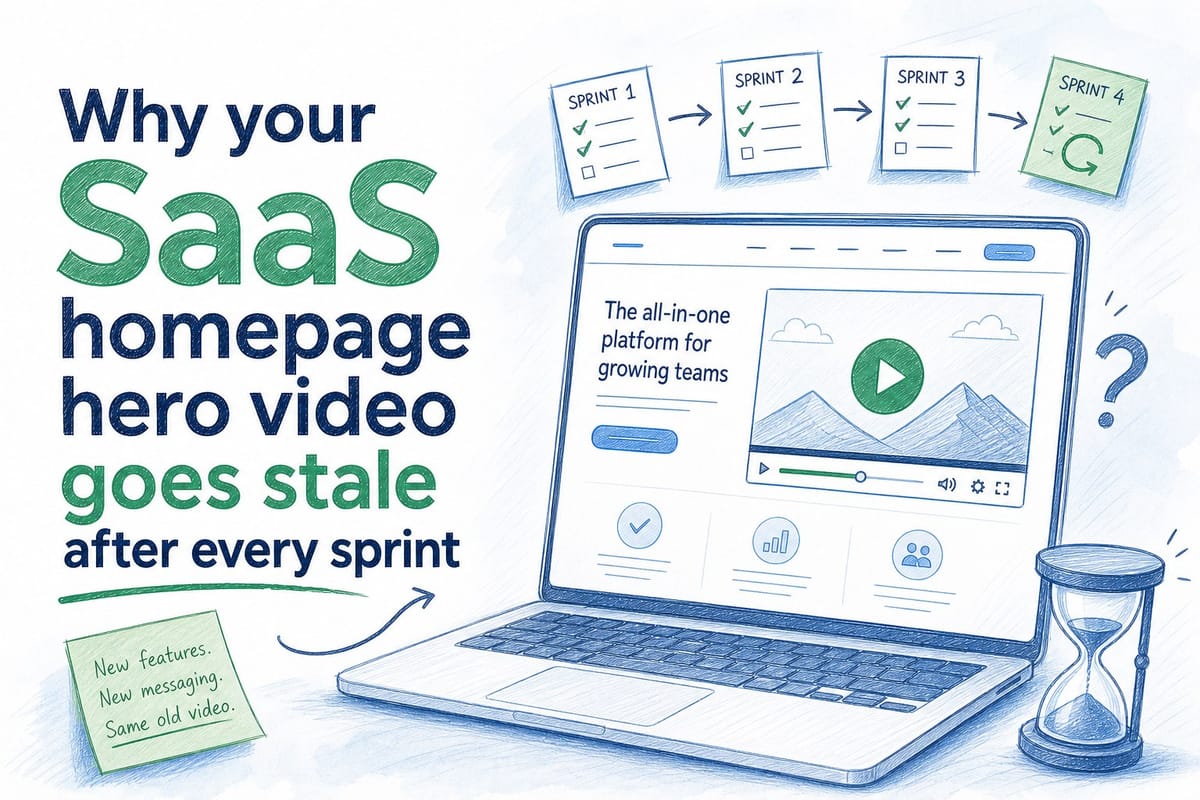
Table of contents
1. Why sprint cycles and video timelines are completely out of sync
2. What stale video actually costs you across the funnel
3. How to build a video workflow that keeps pace with your product
Your SaaS homepage hero video looked great on launch day. The UI matched. The narration made sense. The flow felt tight. Then your team shipped the next sprint, and the dashboard changed. A menu moved. A feature got renamed. The onboarding step you highlighted no longer exists. Now the video on your homepage shows a product that visitors will never actually see when they sign up. That gap between what the video promises and what the product delivers is one of the most common and most costly problems pre-Series B B2B SaaS teams run into. This article explains why a saas homepage hero video goes stale so fast, what that staleness actually costs you, and how teams are starting to fix it without rebuilding from scratch every few weeks.
Why sprint cycles and video timelines are completely out of sync
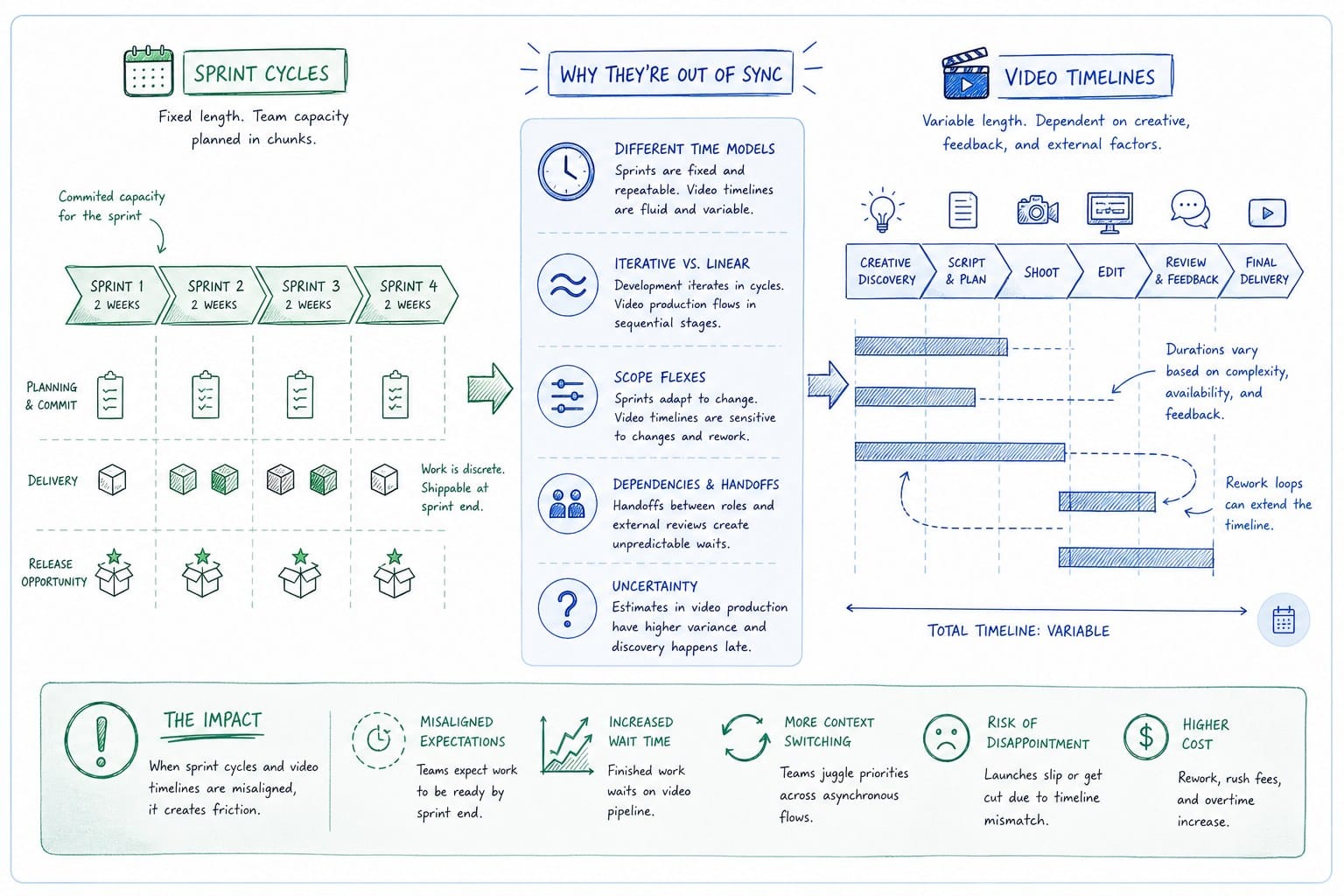
Most SaaS teams ship on a two-week sprint cadence. Some ship faster. Product changes land in production constantly: new navigation patterns, updated dashboards, renamed buttons, repositioned CTAs, tweaked onboarding flows. Each of those changes is small on its own. Collectively, they add up quickly.
Video production does not move at that pace. A traditional product video takes time to script, record, edit, review, and approve. Even with a lean in-house setup, a polished homepage hero video can take anywhere from two to six weeks to produce. By the time it goes live, the sprint that inspired it is two or three cycles behind. And the sprint after that has already changed something else.
This is not a rare edge case. It is the default state for most growing SaaS products. The product team is moving fast because fast shipping is the whole point. The marketing team is trying to keep up, but the tools they have were not built for that pace.
Think about what actually happens on a typical release cycle. A PMM records a walkthrough of the new onboarding experience in week one. By week three, the engineering team has updated the sidebar. By week five, the welcome screen has a new layout. The video that took three weeks to make is already showing an experience that no longer exists. Visitors watch it, sign up, and immediately encounter a product that looks nothing like what they just watched. That friction is small, but it is real, and it adds up.
The problem is structural. Traditional video production is a one-time artifact. You make it, you publish it, and then it sits there until someone has the bandwidth to make a new one. SaaS products are not artifacts. They are living systems. A static video cannot keep up with a dynamic product.
Founders and GTM leads at early-stage companies feel this most acutely because they often have fewer people to absorb the maintenance work. A Series A company might have one PMM and no dedicated video team. That PMM is expected to keep the homepage hero video current, build sales collateral, write positioning copy, and support onboarding content all at the same time. Asking that person to re-record and re-edit a product video every two weeks is not realistic.
Product-led growth companies face an even sharper version of this problem. When your homepage video is part of the core conversion flow, meaning visitors watch it before they decide whether to start a free trial, accuracy matters more than it does in a sales-assisted motion. A confusing mismatch between the video and the real product can cause drop-off at exactly the wrong moment.
The mismatch also creates internal friction. Sales teams use the homepage video in decks and follow-up emails. When a prospect watches a demo video and then asks about a feature that was renamed or a flow that was restructured, the sales rep has to explain the gap. That explanation costs credibility and time. Customer success teams use onboarding videos to reduce time-to-value. When those videos show a UI that no longer matches, support tickets go up.
None of these problems are catastrophic on their own. But they compound. And they all trace back to the same root cause: the video was built to be finished, not to be maintained.
What stale video actually costs you across the funnel
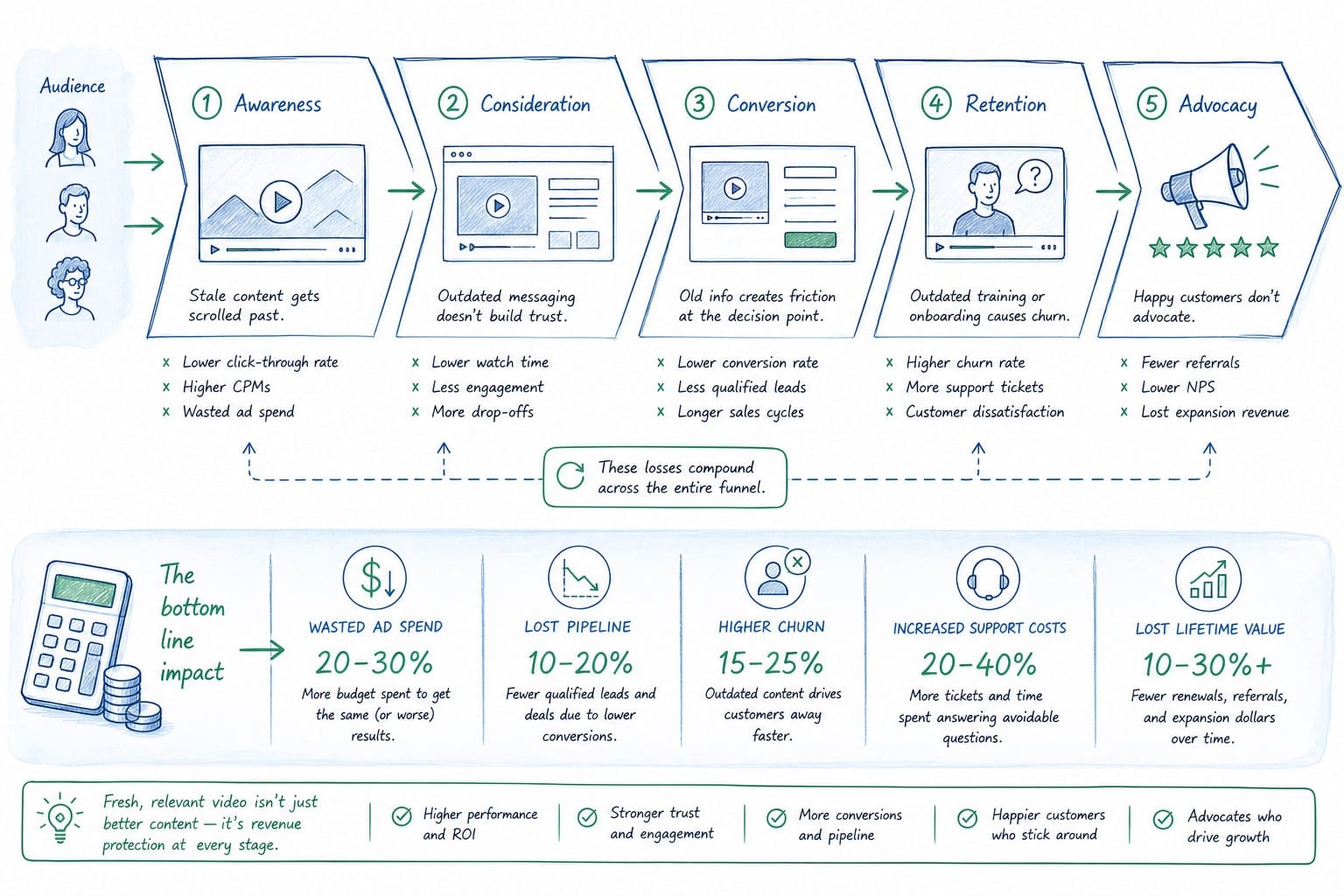
Stale video is easy to overlook because the damage is diffuse. There is no single moment where you can point to a stale homepage hero video and say it cost you a specific deal. The cost is spread across conversion rates, support volume, sales efficiency, and team morale. That makes it easy to deprioritize. It should not be.
Start at the top of the funnel. Your homepage hero video is often the first moving image a visitor sees. It sets the expectation for what your product does and how it feels to use it. If that video shows an interface that looks noticeably different from the current product, you have created a trust problem before the visitor even signs up. They might not be able to articulate why they feel uncertain. They just feel it.
Research on conversion rates consistently shows that product authenticity matters to B2B buyers. They want to see the real product. They are skeptical of polished demos that look too good to be true. When your homepage video shows a slightly outdated UI, it does not just fail to convert. It can actively reduce confidence because the mismatch signals that your team is not on top of things.
Move down the funnel to the trial or freemium experience. A new user watched your homepage video, signed up, and is now inside the product. If the onboarding flow they were shown in the video is structured differently from what they are actually experiencing, they slow down. They look for the button that was in the video. They do not find it. They open a support ticket or they leave. Both outcomes are bad.
Customer success teams spend a meaningful portion of their time answering questions that could have been addressed by accurate onboarding content. When that content is out of date, the support burden goes up. For a small CS team at a pre-Series B company, even a modest increase in ticket volume can strain capacity during a critical growth period.
In the sales motion, stale video creates awkward moments. A PMM updates the homepage hero video after a major product release. The sales team is still using the old version in their outreach because they did not know the new one existed, or because the new one was shared in a Slack message they missed. Now you have multiple versions of the product story circulating at the same time. Some prospects are seeing an outdated flow. Some are seeing the current one. Consistency in the sales story is hard enough to maintain without the video layer adding confusion.
There is also a compounding cost at the team level. When PMMs and growth marketers know that their product videos go stale quickly, they stop investing in them. Why spend two weeks building a polished homepage hero video if it will be outdated in a month? That reasoning is rational, but it leads to a bad outcome: the video stays up even longer because no one wants to put in the effort to replace it. The staleness gets worse over time, not better.
I have talked to founders who launched with a strong homepage video and then left it untouched for six months because rebuilding it was too painful. In that six months, the product had shipped dozens of meaningful changes. The video was essentially showing a legacy product. Visitors who came in through paid search watched it, compared it to competitors with more current-looking demos, and went with the competitor.
The cost of stale video is not always visible in a single dashboard metric. But if you look at your homepage conversion rate trends after major product releases, or your trial-to-activation rates after onboarding UI changes, you will often find soft dips that correlate with the growing gap between your video and your product.
Teams that treat their saas homepage hero video as a living asset rather than a finished artifact see better results across all of these touchpoints. The video is current. The product matches what was shown. Trust is built before the signup. The onboarding flow makes sense. Sales has accurate material. CS fields fewer basic questions. Each of those improvements is modest on its own. Together, they add up to a measurable difference in how the funnel performs.
The challenge is that most video production workflows were not designed to support that kind of ongoing maintenance. Fixing the staleness problem means rethinking how video is made, not just how often it is updated. You can learn more about what that looks like in practice by reading how to create a product demo video without hiring a video team.
How to build a video workflow that keeps pace with your product
The core problem is not that teams are lazy about updating their videos. The core problem is that updating a video the traditional way costs as much time and effort as making a new one. If you have to re-record, re-edit, re-narrate, and re-export every time the product changes, you will not do it on a sprint cadence. Nobody has that kind of capacity.
The fix is not to work harder. The fix is to change the workflow so that updating a video is cheap enough to actually happen.
Here is what that looks like in practice for a pre-Series B SaaS team.
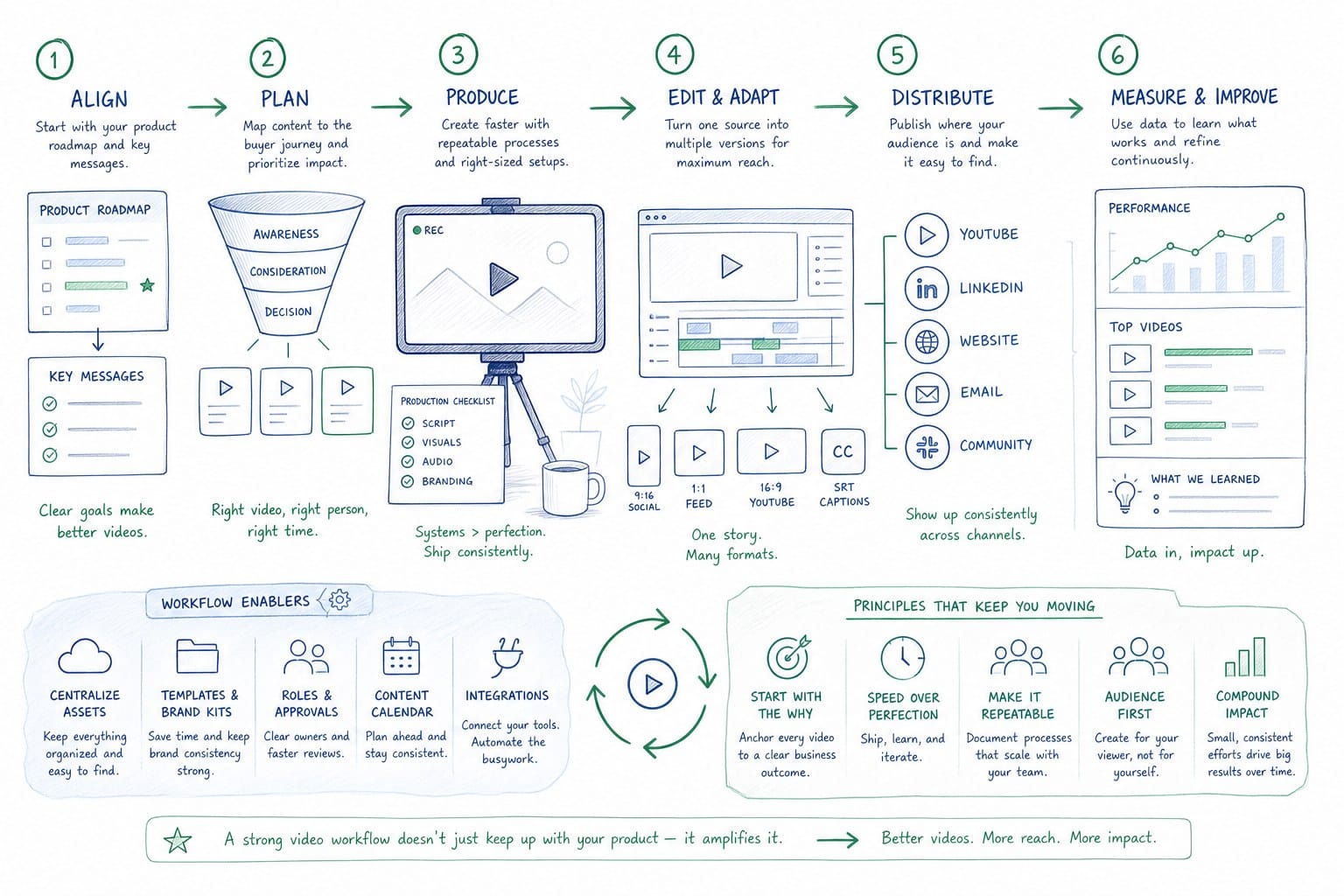
First, treat your homepage hero video as a regenerable asset rather than a finished artifact. That means building it in a system where the components can be swapped out independently. If the narration script, the screen recordings, the UI overlays, and the composition are all separate layers that can be updated without rebuilding everything from scratch, your team can keep the video current without starting over.
Second, tie video refresh to your existing sprint workflow. When a sprint ships, someone on the PMM or growth team should have a clear, lightweight checklist: does this release affect any part of the homepage video? If yes, what specifically changed? That checklist does not need to be long. It just needs to exist. Right now, most teams do not have it, which means video updates happen reactively, months after the product has already moved on.
Third, reduce the production barrier as much as possible. The more technically complex your video production setup is, the less likely your team is to use it when they need to move fast. If updating your homepage hero video requires opening a professional video editing application, syncing a new screen recording, adjusting timing across a dozen clips, and re-exporting for multiple formats, you will skip it. If updating it means pointing a tool at your product URL and regenerating from the current state of the product, you will do it.
This is exactly the problem that AI-powered video generation is starting to solve for SaaS teams. Platforms that can ingest a product URL or existing product footage and produce a narrated, editable video composition change the economics of the whole workflow. Instead of treating a saas homepage hero video as a project that takes weeks and requires a specialist, you treat it as an output that can be refreshed after each release.
Product Frames is built specifically for this use case. It takes a product URL or your existing footage and turns it into a narrated video composition that your team can edit and regenerate as the product changes. The credit system is straightforward: one credit equals one second of finished video output. That means you are not paying for a project or a retainer. You are paying for exactly the output you need, when you need it.
For a PMM managing a product-led SaaS company, that changes how you think about video maintenance. Instead of deferring updates because re-recording feels like a full project, you can regenerate the relevant section of the video after a sprint ships. The homepage hero stays current. The sales deck videos stay accurate. The onboarding videos reflect the actual product UI.
For a founder who is also running GTM, it means you do not have to choose between investing in a polished homepage video and keeping it up to date. You can have both, because the tool is built to support regeneration, not just initial creation.
Growth and marketing teams that need multiple aspect ratios for LinkedIn, social feeds, and the homepage itself also benefit from this model. Instead of exporting a new version of every format every time something changes, a regenerable composition can be reformatted as part of the same refresh workflow.
Customer success and enablement teams have historically been underserved by video tooling. They need accurate onboarding videos, but they rarely have the production resources to keep them updated. A system where video can be regenerated from the current state of the product changes what is possible for a small CS team. They can maintain a library of accurate product walkthroughs without depending on a video editor or a PMM to prioritize their requests.
The underlying shift is from video as a campaign artifact to video as a product asset. Campaign artifacts are built once and measured over a fixed window. Product assets are maintained and kept current because they are part of how the product represents itself to the world. A homepage hero video is a product asset. Your engineering team would never ship a feature and then leave the documentation pointing to the old version indefinitely. The same logic should apply to video.
If you want to understand more about how AI-powered generation handles this technically, the article on AI product video generator that turns a product URL into a finished video walks through the mechanics in detail.
The practical starting point for most teams is simple. Audit your current homepage hero video against your current product. Walk through the product as a first-time visitor would and watch the video at the same time. Note every place where the video shows something that no longer matches. Count those mismatches. If the number is greater than zero, you have a staleness problem. If you cannot remember the last time the video was updated, the number is almost certainly significant.
Then ask how long it would take your team to fix those mismatches with your current tooling. If the answer is more than a day or two of work, your tooling is not suited to your shipping cadence. That is the gap worth closing.
Building a saas homepage hero video that can keep up with your product is not about doing more work. It is about changing the workflow so that less work is required each time the product changes. Teams that make that shift spend less time maintaining stale content and more time moving their funnel forward.
Ready to take the next step?
Product Frames is built for SaaS teams that ship fast and need their homepage video to keep up. You point it at your product URL or upload your existing footage, and it generates a narrated, editable video composition you can refresh after every sprint. No video team required. Visit productframes.com to see how it works and start with your first video today.