How to create a product video from a URL without screen recording

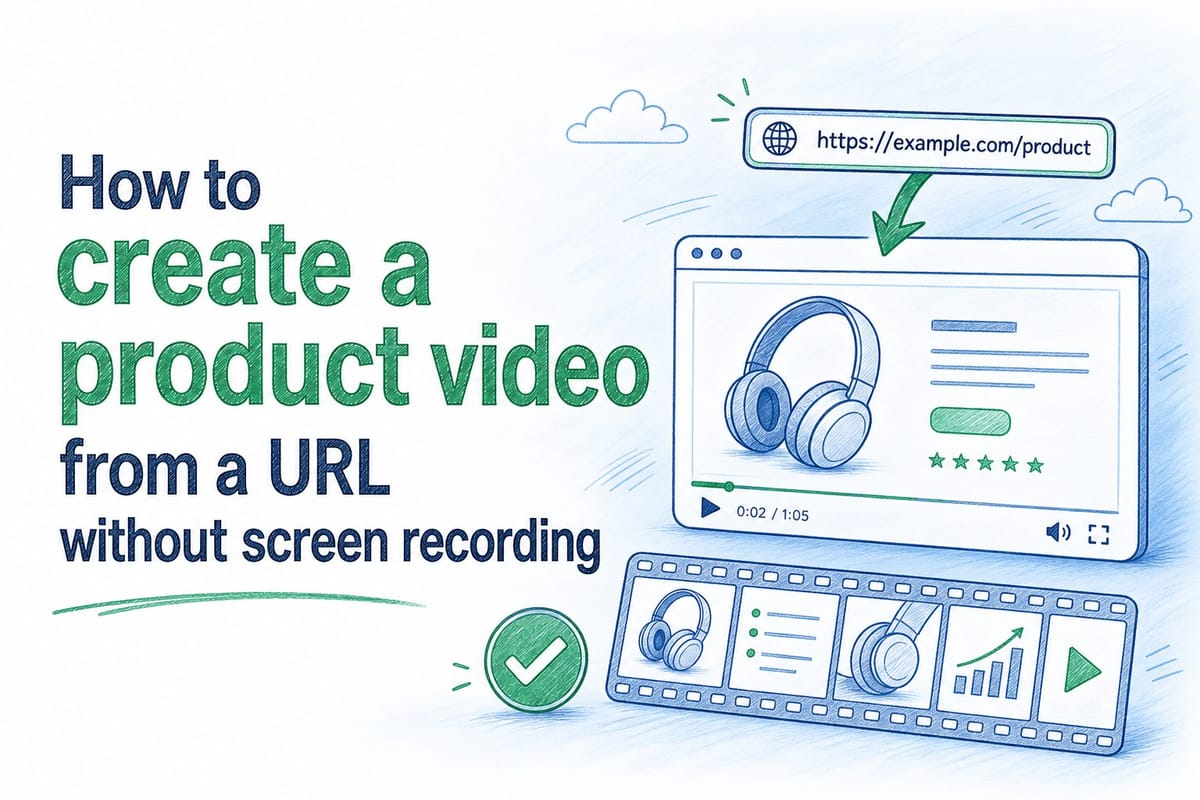
Table of contents
1. Why screen recording is the wrong tool for product videos
2. How creating a product video from a URL actually works
3. Where this approach fits into a real product team workflow
Most product teams I talk to have the same problem. They finally ship a polished product video, post it on their homepage, and then two sprints later the UI looks completely different. Now the video is wrong, and nobody has time to redo it. Screen recording the whole thing again takes hours. Hiring a video agency is expensive and slow. So the video sits there, showing an interface that no longer exists, quietly undermining trust with every visitor who watches it.
There is a better way to create a product video from a URL, and it does not involve recording your screen once and hoping the product never changes. This article walks through exactly how it works, who it is built for, and why it solves the real operational problem behind stale product videos — not just the cosmetic one.
Why screen recording is the wrong tool for product videos
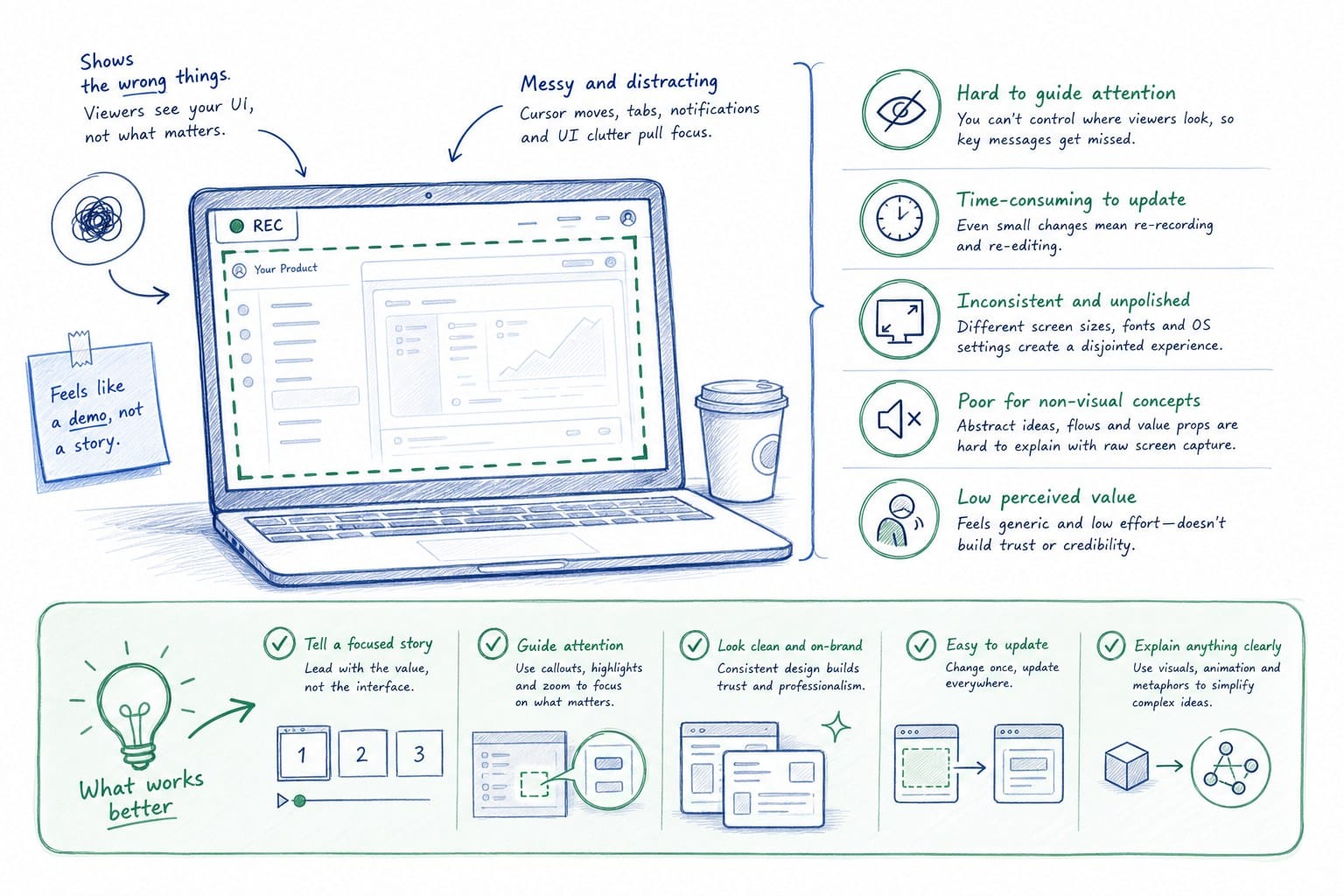
Screen recording feels like the obvious answer. You open Loom or QuickTime, click record, narrate your way through the product, and export the file. It takes maybe 30 minutes the first time. The problem shows up on the second time, and the third, and every time after that.
Every product update that changes a button label, moves a nav item, or redesigns a dashboard means your recording is now inaccurate. If you are on a two-week sprint cycle, that could mean your video is outdated within days of posting it. For a pre-Series B SaaS team where the product is changing constantly and the headcount is small, this is a serious operational problem, not a minor inconvenience.
The quality ceiling is just as real as the staleness problem. The audio picked up by a laptop microphone sounds flat even in a quiet room. The cursor drifts around without purpose. The pacing depends entirely on how fast you happen to be clicking that day. You can clean some of this up in post-production, but then you have added editing time on top of recording time, and you still end up with a file that will need to be completely redone next sprint.
Consider what that actually costs across a quarter. A team shipping every two weeks runs six sprint cycles in three months. If a significant UI change happens in half of those cycles — which is conservative for a product in active development — that is three recording sessions just to keep one video current. Multiply that by the number of videos in your library: homepage hero, sales deck clip, onboarding walkthrough, feature spotlight. The hours add up faster than most teams realize, and that is before accounting for the review and approval cycles that follow each recording.
The format problem compounds this further. A screen recording is a single file at a fixed aspect ratio. If you need a 16:9 version for your homepage, a 1:1 version for LinkedIn, and a 9:16 version for a mobile ad, you are looking at three separate recording sessions or a lot of painful manual cropping. Neither option is fast, and neither one gives you the flexibility to adapt to a new channel without starting over.
There is also a trust cost that is harder to measure but very real. A new user watching an onboarding video that shows a UI from two quarters ago is going to be confused when they log in and the interface looks different. That confusion lands in the support queue. A prospect watching a demo clip that shows a workflow that no longer exists starts asking questions during the sales call about why the product looks different from what they were shown. The sales rep has to walk it back, which is not a great position to be in when you are trying to close.
Product marketing managers know this pain better than anyone. They spend weeks getting a video approved — script review, legal sign-off, executive feedback, final export — and then watch it become inaccurate within a month because the product shipped a redesign. The video stays live because nobody has bandwidth to redo it. The team knows it is wrong. Visitors do not know it is wrong until something does not match, and by then the trust is already dented.
The core issue is that screen recording treats a product video as a one-time deliverable. You record it, you ship it, you move on. But a product video for a growing SaaS company is not a one-time deliverable. It is a living asset that needs to update when the product updates, stay consistent across channels, and reflect the actual experience a new user or prospect is going to have when they log in for the first time.
Screen recording cannot do that without starting from scratch every time. The shift worth making is moving from recording-based workflows to generation-based workflows. Instead of capturing a frozen moment, you generate a video from a live source so it can be regenerated whenever that source changes. That is the structural difference, and it matters more than any specific feature in any specific tool.
How creating a product video from a URL actually works
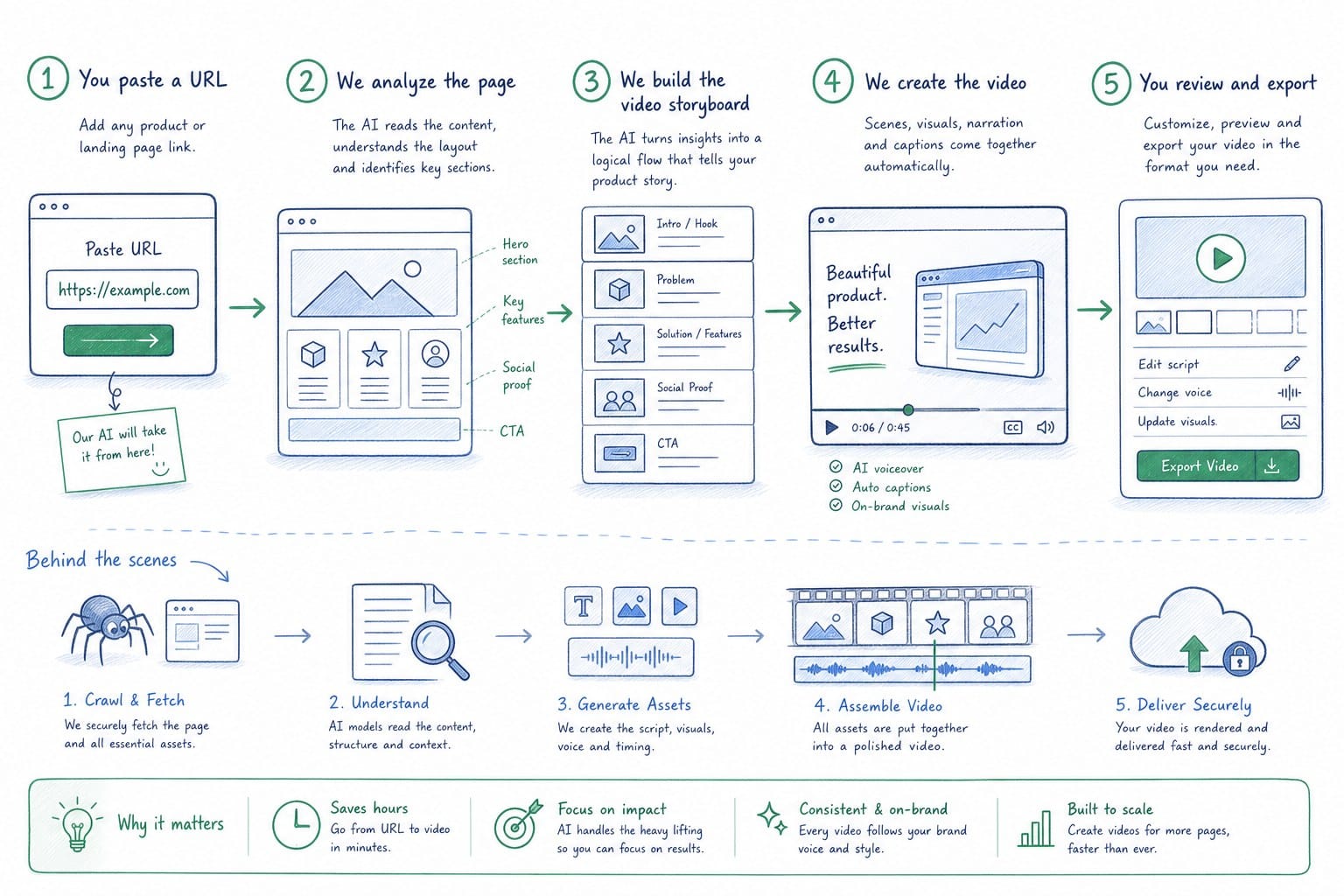
The core idea is straightforward. Instead of recording your screen manually, you give a platform your product URL and it does the work of understanding what your product does, how it looks, and how to present it as a narrated video. The result is a finished composition with professional narration — not a raw screen capture that still needs hours of editing before it is ready to publish.
Product Frames works exactly this way. You provide a product URL, and the platform uses that as the source to generate an editable, narrated video. You do not need a screen recorder. You do not need to write a script from scratch. You do not need to hire a voiceover artist or book recording time. The platform handles the structure, the narration, and the visual composition. What you do is review the output, refine it to match your positioning, and publish it.
The part that changes how teams think about video is the regeneration piece. Because the video is generated from a source rather than recorded manually, you can refresh it after a product update without rebuilding it from the ground up. You keep the same narrative structure and overall arc. The visuals and specific details update to reflect the current state of the product. That is a fundamentally different relationship with video content than most teams have today. Instead of treating each video as a project with a start and an end, you treat it as an asset with a lifecycle that runs parallel to the product.
The credit system on Product Frames ties directly to output length in a way that gives teams predictable cost control. One credit equals one second of finished video. A 60-second homepage hero video costs 60 credits. A 30-second version for a sales deck costs 30 credits. You pay for what you actually produce, not a flat subscription that charges the same amount whether you use it heavily or barely at all. For a team managing a library of videos across multiple use cases, this structure makes the cost of keeping content current much easier to forecast.
Narration quality is one of the things that most visibly separates a professional product video from a screen recording. Flat voiceover kills engagement regardless of how good the visuals are, and most screen recording tools give you whatever your laptop microphone picks up. Generated narration done well sounds like a real production — natural pacing, appropriate emphasis, delivery that fits the content. The words matter, but so does the way they land. A narration that rushes through a complex feature or drags through a simple one loses people even when the script is accurate. There is more on this in a separate piece on AI narration for product videos that sounds like a real film, but the short version is that pacing and tone are not cosmetic details — they are part of whether the video actually communicates.
The editing layer matters just as much as the generation step. Generated does not mean locked. After the platform creates your initial video, you can adjust the narration, update specific sections, reorder content, and change how individual parts are framed. The video is a composition you can modify, not a fixed export you either use as-is or throw away. This is what makes it possible to keep videos current across sprints without a full rebuild each time. When the product ships a new feature, you update the section of the video that covers that part of the workflow. The rest of the video stays intact.
For founders and GTM leads building a homepage hero video, this workflow means getting a professional video live without a production timeline measured in weeks. For product marketing managers running sprint-based updates, it means video content can actually move at the same pace as the product rather than lagging two or three releases behind. For customer success teams managing onboarding libraries, it means the videos a new user watches on their first day show the interface they are actually going to see when they open the app.
The URL-based approach also handles the format problem directly. Because the video is generated rather than recorded at a fixed aspect ratio, producing it in multiple formats is a configuration choice rather than a new recording session. A 16:9 version for your homepage and a 1:1 version for LinkedIn come from the same source. You are not re-recording anything or manually cropping a file that was never designed for a different ratio. The format side of this is worth thinking through before you start, because getting multiple variants from the same source is one of the real efficiency gains of the generation approach. There is more on the mechanics of this in a piece on how to repurpose a product video across formats without re-editing.
One thing worth being direct about: this workflow is not automatic in the sense of requiring zero human judgment. You still need to review the generated output. You still need to confirm that the narration accurately represents your product and your current positioning. You still need to catch anything that does not match the specific way your team describes a feature or frames a benefit. What changes is the amount of manual labor between wanting a video and having one. The heavy lifting shifts from human effort to the platform. Your team focuses on reviewing and refining rather than recording and editing from zero, and that shift is where the real time savings come from.
The quality of the URL you provide also affects the output. A public-facing product page or a live demo environment gives the platform more to work with than a login-gated internal tool. If your product requires authentication to show the actual UI, you may need to supplement the URL with existing screenshots or footage. This is not a dealbreaker, but it is worth thinking through before you start so you have what you need ready.
Where this approach fits into a real product team workflow
Let me walk through concrete scenarios where generating a product video from a URL solves a real problem, rather than describing the technology in the abstract. These are situations that come up repeatedly for product teams at companies with active development cycles and small or overextended marketing functions.
The homepage hero that goes stale
You are a founder or head of growth at a pre-Series B SaaS company. You just launched a new homepage design and you want a video above the fold that shows the product in action. A video production agency would take six to eight weeks and cost several thousand dollars — and by the time the video is delivered, the product will have changed at least once. Recording it yourself with Loom is faster but the quality will not match the level of polish in the homepage you just invested in.
With a URL-based generation workflow, you put in your product URL, get a draft video within a short turnaround, review and edit it, and publish it within a few days rather than a few weeks. When the product updates in the next sprint, you regenerate the relevant sections. The homepage hero stays current without a recurring production cost every time the UI changes. You also avoid the scenario where a potential customer watches your homepage video, signs up for a trial, and immediately notices that the interface looks different from what they just watched.
The sales deck demo clip that creates doubt
Your sales team is using a product walkthrough video inside proposal decks. The video was accurate when it was made three months ago. Since then, the product has shipped two major updates. The video now shows a workflow that does not exist in its current form, and prospects are asking about the discrepancy during calls.
This is a specific problem with a specific cost. When a prospect sees a demo video that does not match the product they are being asked to buy, it creates doubt — not just about the product, but about the team's attention to detail. Sales reps end up spending call time explaining that the video is from a previous version, which is not a position you want to be in when you are trying to build confidence and move toward a close. Keeping demo clips current is one of the cases that gets into more detail in a piece on SaaS sales deck demo video: keep demo clips accurate between proposals.
With a generation-based workflow, your sales team can request an updated clip after each major release without waiting for a video production cycle to spin up. The clip gets regenerated, reviewed, and dropped back into the deck template. The proposal always shows the current product, and the sales rep is never in the position of having to walk back what the video showed.
Onboarding videos that show the wrong interface
Your customer success team has a library of onboarding videos that walk new users through key workflows. Every time the product updates, some of those videos show an outdated UI. Users follow the on-screen instructions and then cannot find the button or menu because it moved in the last release. They submit a support ticket or give up on the workflow entirely.
This is not just a minor friction point. It drives support volume, increases time-to-value, and creates a bad first impression for users who are still forming their opinion of whether the product is worth the investment. CS teams usually know exactly which videos are wrong — they can see the incoming support tickets — but they do not have the bandwidth to re-record an entire library between releases.
A generation-based workflow changes the scope of the problem. Instead of re-recording every video in the library when something changes, you regenerate specific videos that correspond to the features that changed. You are not doing a wholesale re-production. You are doing targeted updates to the assets that need them, at a cost that is proportional to the actual length of the content you are refreshing. Over a full quarter, this is significantly less work and significantly less cost than managing a traditional recording-based library.
Multi-format social and paid distribution
Your growth team wants to run product content on LinkedIn and in paid social campaigns alongside your homepage video. The formats are different: LinkedIn performs better at 1:1, paid ads often use 9:16, your homepage uses 16:9. Producing three separate recordings from three separate sessions is not realistic for a team of one or two people managing multiple channels.
Generating from a URL means the same source can produce multiple format variants without re-recording or manual cropping. Your growth team gets the assets they need for each channel without tripling the production workload. When the product updates, all three variants can be refreshed from the same source rather than individually re-recorded for each channel. This is the kind of efficiency that only exists when video is treated as a generated asset rather than a captured one.
Building the habit of treating video as a living asset
The thread connecting all four scenarios is the same. Screen recording treats video as a one-time project with a defined end. URL-based generation treats video as an ongoing asset that lives alongside the product and updates when the product updates. For teams that ship frequently, that difference is not a minor workflow improvement. It is the difference between having video content that works and having video content that quietly undermines you.
A few practical things to keep in mind when you get started with this approach.
First, the URL you provide shapes the quality of the output. A live, public-facing product page or a demo environment gives the platform the most to work with. If your product is fully login-gated and shows nothing useful to an unauthenticated visitor, plan to supplement the URL with screenshots or existing footage of the actual UI. The more the platform can see of your product, the more accurately it can structure the video around how the product actually works.
Second, plan for iteration on the first video. The initial generated output is a strong starting point, not necessarily the finished product. Budget time to review the narration carefully, confirm that every claim in the script is accurate, adjust the pacing in sections that feel rushed or slow, and make sure the overall messaging reflects your current positioning rather than how you described the product six months ago. The first review cycle is usually the longest. After that, refreshes go faster because you already know what the video is supposed to say and you are mostly checking for accuracy rather than rebuilding the narrative.
Third, think about your update cadence before you start building your video library. If you ship on a weekly or biweekly cadence, you want a regeneration process that takes minutes for a targeted section update, not hours. Generation-based platforms are designed for this kind of speed, but you still need to build the internal habit of reviewing and regenerating after each significant release rather than letting the video drift and accumulating a backlog of inaccuracies.
Fourth, decide early which videos in your library are highest priority to keep current. Not every video needs to be regenerated after every release. A video about your core value proposition might age more slowly than a step-by-step workflow walkthrough that touches parts of the UI that change frequently. Knowing which assets are most sensitive to product changes helps you allocate your regeneration effort where it matters most.
For teams that have never thought of video as a living asset, the mindset shift takes a little time to internalize. The instinct is still to treat a video as something you produce once and then archive. But once you have a process where video updates happen as part of the release workflow — same rhythm as updating the documentation, same rhythm as notifying the sales team — the quality and accuracy of your video content changes permanently. You stop apologizing for stale demos. You stop telling prospects that the video is from last quarter. You have product content that reflects the product as it actually exists today, and that is worth more than a beautifully produced video that is already out of date the week it ships.
Ready to take the next step?
If your product video is already showing a UI that your team shipped past two sprints ago, it is worth seeing how quickly you can get a current one. Product Frames generates narrated product videos from your URL, and you can regenerate them whenever the product changes — without a screen recorder, a production agency, or a week of editing time. Visit productframes.com to see how it works and get your first video started.