How customer success teams keep onboarding videos current after every UI update

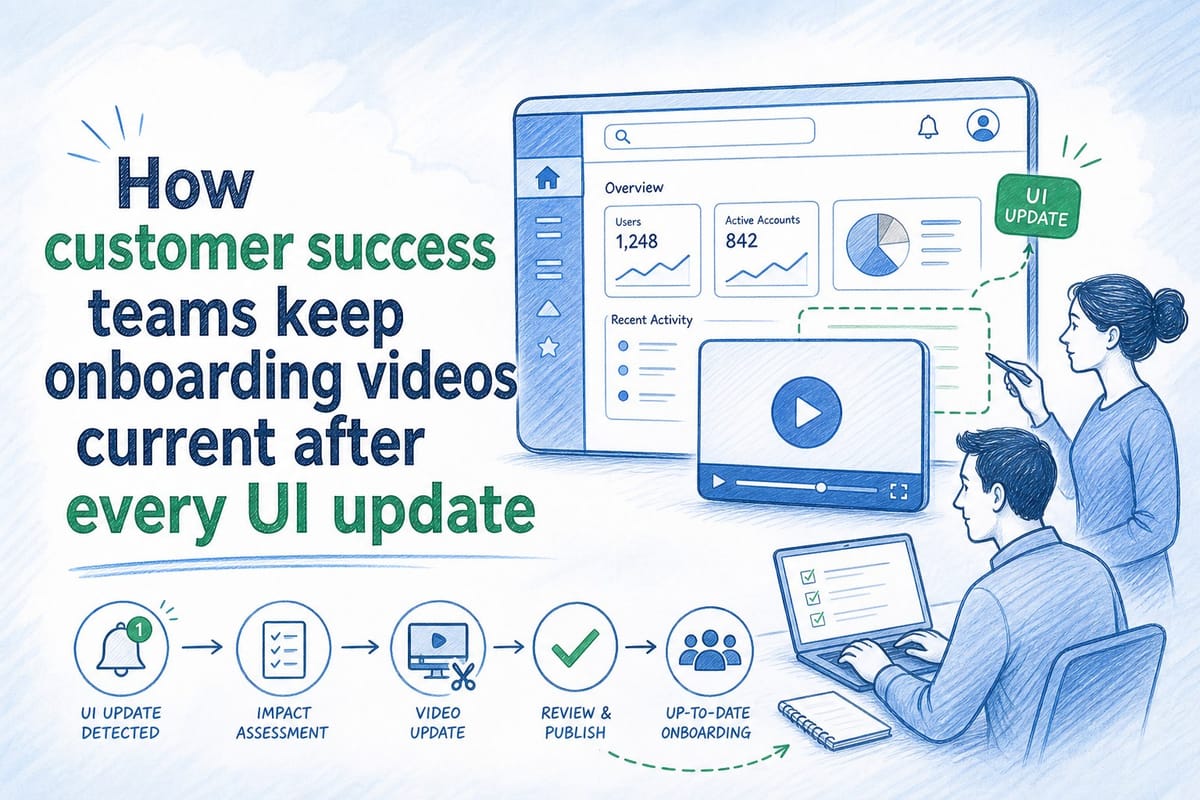
Table of contents
1. Why onboarding videos go stale faster than most teams expect
2. How high-performing CS teams are changing their approach to video maintenance
3. Using AI-powered video generation to make updates fast enough to actually happen
Every time a SaaS product ships a UI update, customer success teams face the same quiet crisis. The onboarding video that took two weeks to record, edit, and approve now shows buttons in the wrong place, a navigation menu that no longer exists, or a workflow that changed three sprints ago. New users follow the video step by step and immediately get confused because what they see in the product does not match what they see on screen. That gap erodes trust fast. It makes customers feel like they signed up for something unfinished, and it puts more pressure on CS reps to jump in and explain what the video got wrong. Keeping a customer success onboarding video current after every UI change is one of the most underrated operational problems in B2B SaaS, and most teams are still solving it the slow, expensive way. This post breaks down why the problem compounds so quickly, how high-performing CS teams are restructuring their approach, and what faster production tooling actually makes possible when the process is right.
Why onboarding videos go stale faster than most teams expect
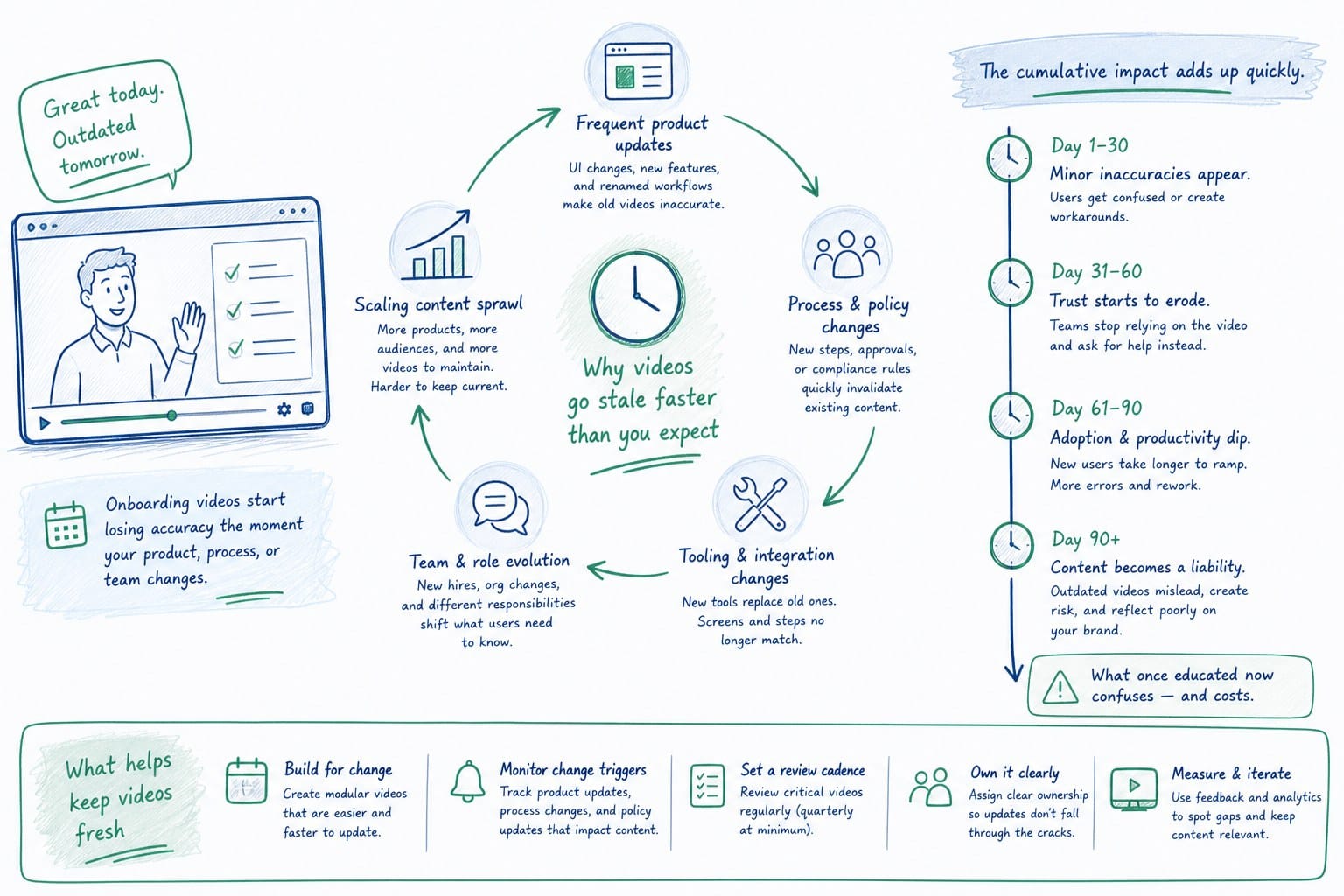
Product teams at pre-Series B SaaS companies ship fast. Two-week sprints are standard. That means the UI can change meaningfully every 14 days. Color changes, relocated buttons, renamed menu items, new onboarding flows, dashboard redesigns. Each change is usually small on its own, but even a small change can make an onboarding video feel wrong to a new user who is following along for the first time.
Here is the math that makes this problem compound quickly. If a product ships meaningful UI changes every two sprints, a CS team that records a video once a quarter is already working from footage that could be two to six weeks out of date on the day it publishes. By the end of the quarter, it can be three months behind. For a new customer trying to activate during their first week, that gap is not a minor annoyance. It is a real barrier to getting value from the product they just paid for.
The traditional production process makes this worse. A typical onboarding video involves a screen recording session, voiceover recording, editing in a video tool, review cycles with the CS lead or PMM, and then upload and distribution across the help center, LMS, and onboarding email sequence. From start to publish, that process can easily take two to three weeks even for a short five-minute video. By the time it is live, the product has often already moved again.
CS teams feel this pressure acutely because they own the outcome. When a new user gets confused because the video does not match the product, the support ticket or Slack message comes back to customer success. Reps spend time on calls re-explaining steps the video should have covered clearly. Onboarding completion rates drop. Time-to-value stretches out. Customers who expected a smooth first week start asking whether the product is actually ready for them.
The CS team usually knows exactly why this is happening, even when they cannot always say it out loud in a QBR: the onboarding content is not current. But naming the problem does not fix the production process that causes it.
A few specific failure patterns show up again and again across CS teams dealing with this problem.
The first is the renamed button trap. A product team changes "Save and continue" to "Next step" in a sign-up flow. It takes a developer ten minutes. But the onboarding video now tells new users to click a button that does not exist under that label. Users pause, backtrack, and wonder whether they are in the wrong part of the product. Some submit a support ticket. Most just feel uncertain.
The second is the relocated navigation trap. A product team moves a core feature from a top navigation bar to a left sidebar as part of a broader UX improvement. It is clearly the right design call. But the onboarding video shows the old navigation. New users spend the first minutes of their session hunting for something they were told would be easy to find.
The third is the removed step trap. A product team eliminates a manual configuration step because they automated it. The onboarding video still walks users through that step. Users get partway through and cannot find the screen they are supposed to see. They assume they did something wrong.
Each of these failure patterns has the same root cause. The video was accurate when it was recorded and became inaccurate because the product moved. The gap is not a content quality problem. It is a production cadence problem.
The challenge is not that CS teams do not care about keeping videos updated. It is that the process for updating them is almost as heavy as the process for creating them from scratch. You cannot just swap one screen for another in most video tools without rebuilding the timing, re-recording voiceover, and re-exporting the whole file. So teams make a rational choice under resource constraints: they update when they absolutely have to, not after every release. And that means the video is almost always at least a little wrong for at least some portion of its audience.
This is the structural problem that makes keeping a customer success onboarding video current so difficult. The content needs to move at the speed of the product, but the production process was designed for a pace where videos are permanent assets, not living documents that need to reflect a product that ships every two weeks.
The teams that recognize this structural mismatch early stop trying to solve it by recording more carefully or editing more efficiently. They solve it by changing what the production process looks like from the ground up. That is a different kind of investment, but it pays back every sprint.
How high-performing CS teams are changing their approach to video maintenance
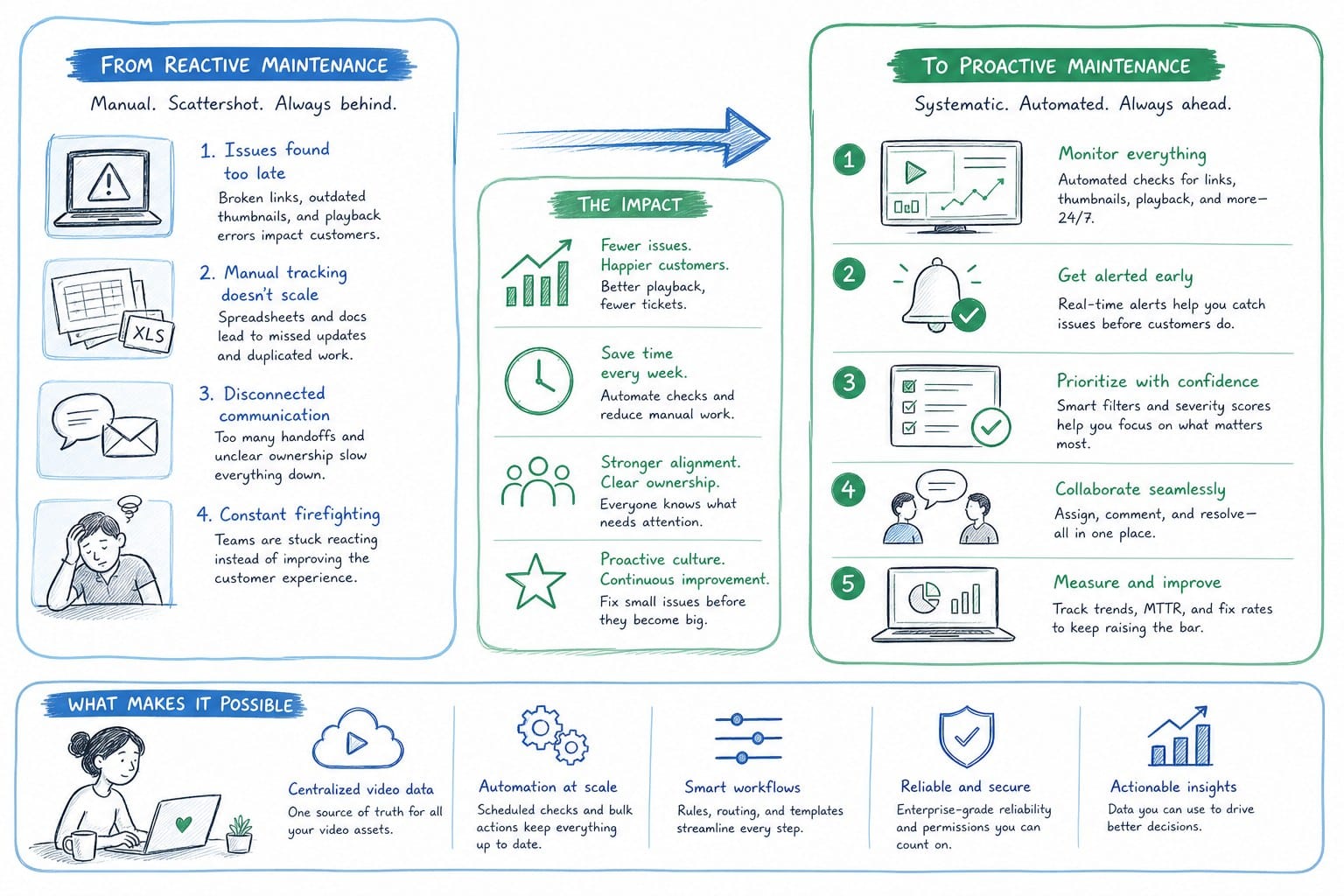
The CS teams that handle this best have stopped treating onboarding videos as finished assets and started treating them as outputs of a repeatable process. That shift in framing changes everything about how they plan, produce, and maintain video content across a product that moves fast.
The first change is decoupling content from production. In the old model, content and production were bundled together. You recorded the content and that recording was the asset. Every update meant re-recording. In the new model, the content, the script, the narration, the product visuals, and the composition are managed as separate layers that can be updated independently. When a UI change affects one screen in a five-step onboarding flow, you update that screen and regenerate only what changed. You do not rebuild the whole video from scratch to fix one button label.
This decoupling sounds like a technical detail, but it has real operational consequences. It means a single person on the CS or enablement team can handle a minor update in an hour instead of routing it through a full production cycle. It means the quality of the update is consistent with the original rather than dependent on whoever is available to re-record that week. And it means the team builds up a body of modular, maintainable content rather than a collection of monolithic recordings that are painful to touch.
The second change is building video updates into the release process before a sprint ships, not after. High-performing CS teams work with their product counterparts to get a heads-up when UI changes are coming that will affect onboarding content. Some teams use a simple shared doc. Others add a column to the sprint tracker labeled something like "onboarding impact" where product managers flag changes before they ship. When a change is flagged, the CS or enablement team queues the video update alongside the development work. The goal is for the updated video to publish at the same time as the new UI, or within 24 hours of it. Users never see the mismatch because the content is ready when the product change lands.
This requires a small amount of coordination overhead, but it is far less expensive than the reactive cycle of fielding confused users, triaging support tickets, and scheduling emergency re-recordings after a release causes visible onboarding confusion. Teams that have made this shift describe it as a forcing function that also improves their relationship with the product team, because product managers appreciate having a CS counterpart who is tracking UI changes and asking good questions before they ship rather than complaining about them afterward.
The third change is reducing approval overhead on routine updates. One reason video updates get delayed is that every new version goes through the same review and approval process as the original production. That made sense when each video represented weeks of production work and carried significant reputational risk. It makes less sense when an update addresses a renamed button or a relocated nav item and takes an hour to produce. Teams that move fast have created a tiered review system. Minor UI updates, anything that does not change the underlying workflow or value proposition, get a quick async sign-off from the CS lead or a designated reviewer. Major workflow changes, new feature introductions, or rebranded experiences still go through a fuller review with PMM and CS leadership. That tiered structure alone can cut update cycle time by 50 percent or more, because the bottleneck for most updates is not production. It is the approval queue.
The fourth change is thinking about distribution architecture from the start. A lot of onboarding video pain comes from the fact that the same video lives in five or six different places simultaneously: the help center, the LMS, the onboarding email sequence, the in-app tooltip, the customer portal, the sales handoff deck. When you update the video file, you have to update it everywhere. Teams that have solved this problem centralize the source file and use embed links or API connections wherever possible, so that updating one authoritative source automatically propagates to every downstream instance. This is not always technically straightforward depending on the tools involved, but even a partial implementation, centralizing two or three of the highest-traffic distribution points, significantly reduces the maintenance burden of keeping content current across the full customer journey.
The fifth change, and the one that ties the others together, is treating the CS or enablement team as a content operations function rather than a video production function. In the old model, the team's job was to produce videos. In the new model, the team's job is to maintain a content system that keeps pace with the product. The videos are an output of that system. The system itself, the process for flagging changes, queuing updates, producing refreshes, and distributing them accurately, is the actual work product. When a CS leader can hand off a new team member and say "here is the system we use to keep onboarding content current," the team has crossed into content operations. Until then, they are running on individual effort and reactive firefighting.
For teams that want to go deeper on how product footage can work across the full customer lifecycle, not just onboarding, the product-led growth video strategy: using product footage across the funnel article lays out a practical framework that CS and PMM teams can adapt to their own content calendars. The core insight there applies directly here: the same footage and composition system that powers an onboarding video can feed demo content, feature announcement videos, and expansion touchpoints, which multiplies the return on every production investment the team makes.
None of the five changes described above require a large team or a large budget to implement. They require a decision to treat video content as a managed asset with a defined maintenance process rather than a one-time deliverable that lives until it becomes too wrong to ignore. That decision is available to any CS team regardless of company size. The teams that make it earlier gain a compounding advantage: every sprint, their onboarding content is a little more accurate than their competitors' content, and that accuracy shows up directly in activation rates, time-to-value, and the volume of avoidable CS touchpoints.
Using AI-powered video generation to make updates fast enough to actually happen
Process improvements help, but they still hit a ceiling if the underlying production tool requires manual re-editing for every change. That is where AI-powered video generation platforms are changing the picture for CS and enablement teams at B2B SaaS companies. The process changes described above create the right conditions for fast updates. The right tooling makes those updates fast enough to realistically happen at the pace the product ships.
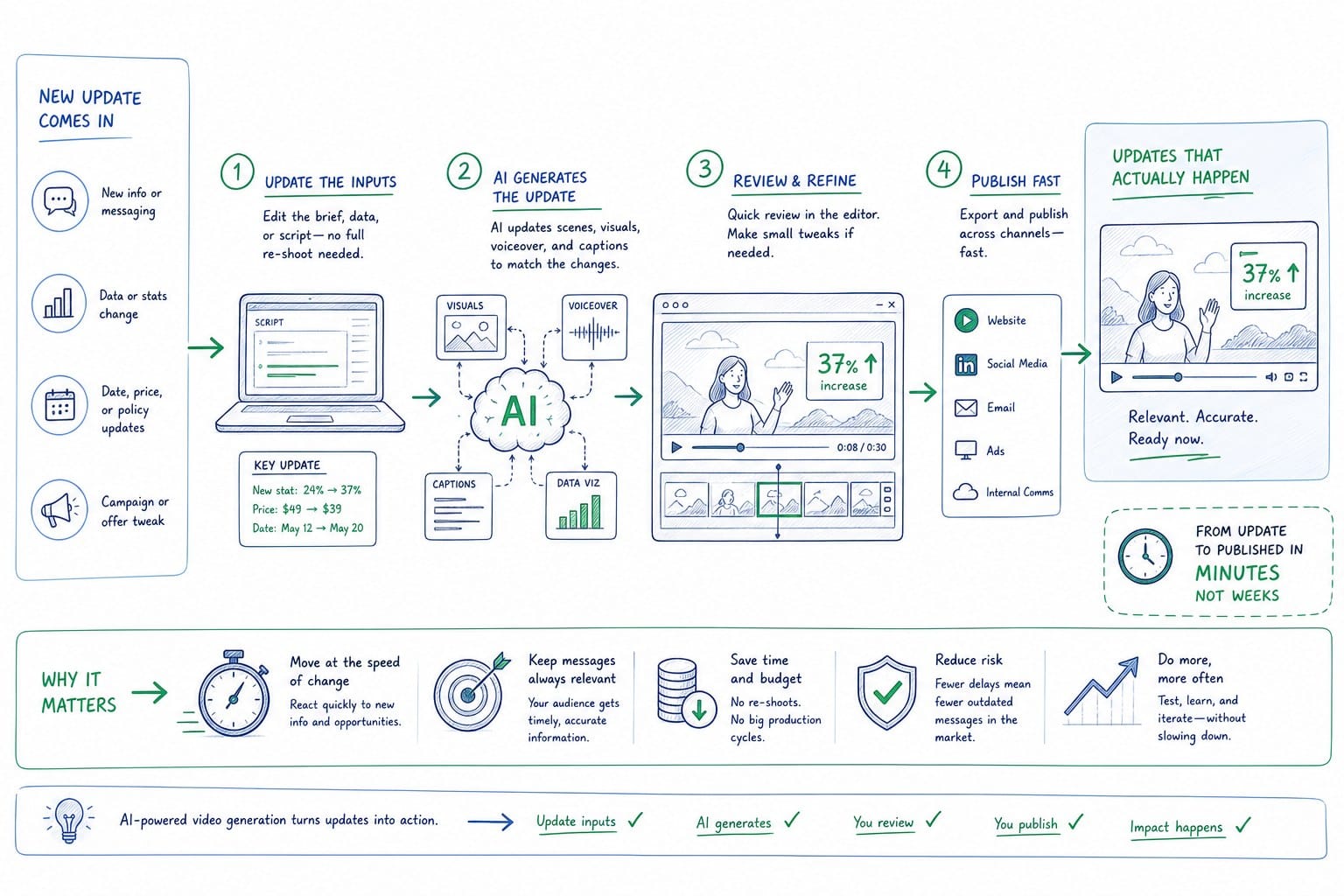
The core idea is straightforward. Instead of starting from a screen recording that captures one specific moment in the UI, you generate video from the product itself, either from a URL or from existing product footage. The platform builds a narrated, composed video that can be regenerated when the product changes. You are not re-editing a recording. You are re-running a generation process against an updated product state. The distinction matters enormously in practice because it means the update work scales with the size of the change rather than with the length of the video.
For a CS team maintaining a library of onboarding videos across a fast-moving product, this changes the economics of updates completely. A video that took three weeks to produce manually can be refreshed in a fraction of that time after a UI change. And because the narration, pacing, and composition are part of the generation system rather than something a human editor has to reconstruct manually, the quality stays consistent across versions. The fifth update of a video looks and sounds as polished as the first. There is no accumulated production debt from repeated patch edits.
Consider a concrete example. A SaaS company redesigns its onboarding wizard, moving the team invitation step from screen three of five to screen two of five and updating the interface labels. In the traditional workflow, the CS team has to locate the original recording, identify the affected timestamps, cut out the old clips, record new screen captures of the updated flow, re-time the voiceover to match the new visuals, re-record any narration that references the old step labels, run a review cycle, and re-export. That is easily a full day of work for a single video, and it has to happen for every video in the library that covers team onboarding.
In an AI-generation workflow, the team updates the source, specifies the changed flow, regenerates the affected segment, reviews a single output, and publishes. The barrier to doing the update is low enough that it actually gets done on the right timeline, which is as close to the UI change as possible, not three weeks later when users have already encountered the mismatch hundreds of times.
Product Frames is built specifically for this use case. It takes a product URL or existing product footage and turns it into an editable, narrated video composition that can be regenerated after every product update. CS teams, founders, and PMMs at pre-Series B SaaS companies use it to maintain onboarding videos, demo videos, and walkthrough content without going back to a video editor every time the product changes. The credit system is built for iterative production: one credit equals one second of finished video output, so teams can scope their updates and control costs precisely as they refresh content sprint by sprint. A team running a 10-sprint year with an average of two minor video updates per sprint has a predictable, manageable content budget rather than unpredictable spikes every time the product redesigns a core flow.
For teams that have mostly worked with traditional screen recording workflows, it helps to understand how AI-native product video generation actually works. The how to create a product video from a URL without screen recording article walks through the mechanics in plain language, including how the platform handles UI elements, navigation flows, and composition without requiring a human to run through the product on camera each time. This is particularly useful for CS teams that have historically relied on a single person who is comfortable on screen, because it removes the dependency on that individual's availability for every update.
Narration is another area where AI generation removes a significant production bottleneck. In a traditional onboarding video update, even a small UI change can require re-recording voiceover if the script references a specific button label or menu name that changed. "Click the Save and continue button" becomes wrong the moment that button is renamed. With AI narration built into the generation process, the script updates when the product details change, and the narration is regenerated in the same pass. There is no separate voiceover session, no session booking, no waiting for a contractor to turn around a new audio file. The AI narration for product videos that sounds like a real film article goes deeper on how narration quality is maintained across regenerations, which is a genuine concern for CS teams who need the video to feel polished and professional even after the sixth or seventh update cycle.
It is worth being direct about what this kind of tooling does not replace. It does not replace the judgment of a CS or enablement leader who understands what new users actually struggle with and which steps in an onboarding flow need more time and attention. It does not replace the work of figuring out whether an onboarding video is covering the right milestones or whether the whole structure needs rethinking based on activation data. It does not replace the relationship-building and personalized guidance that great CS teams provide when they work directly with strategic customers during onboarding. What it replaces is the manual production labor that currently sits between the decision to update a video and the moment when the updated video is in front of a customer. That labor is the bottleneck. Removing it is what makes it realistic to keep onboarding content current at the pace the product actually ships.
For CS teams thinking about how to make this operational shift, the practical starting point is an audit. Map every video in the current onboarding library to the specific product areas it covers. Then pull the last three release notes and identify which videos should have been updated but were not. That gap, between what should have been updated and what actually was, is the visible cost of the current production process. It shows up as confused new users, elevated support ticket volume in the first two weeks of a customer's lifecycle, longer time-to-value, and CS reps spending call time re-explaining steps the video should have handled clearly.
Once that cost is visible and mapped to specific videos and specific product changes, the case for a faster production process becomes easy to make internally. The conversation shifts from "we should invest in better video tooling" to "here are the 11 videos in our library that are currently wrong after last quarter's releases, here is the estimated CS time spent compensating for those gaps, and here is what a faster update process would have cost by comparison."
The teams that move fastest on this are usually not the ones with the largest CS budgets or the most dedicated content staff. They are the ones that recognized earlier that a customer success onboarding video is not a one-time deliverable. It is a repeatable output that needs to reflect a product that changes every two weeks. When the production process matches that reality, keeping onboarding content current after every UI update stops being a recurring crisis that drains CS bandwidth and starts being a managed, predictable part of the release cycle. That shift has a direct effect on the metrics CS leaders are accountable for: activation rates, time-to-value, onboarding completion, and the volume of preventable support contacts in the first 30 days of a customer relationship.
Ready to take the next step?
If your CS team is maintaining onboarding videos across a product that ships on a regular release cycle, Product Frames is built for exactly that workflow. You can take a product URL or existing footage and generate a narrated, editable video composition that can be refreshed after every UI change without manual re-editing. Visit productframes.com to see how the platform works and how the credit system fits a sprint-by-sprint update cadence.