Arcade vs Loom for SaaS product video: a B2B team comparison

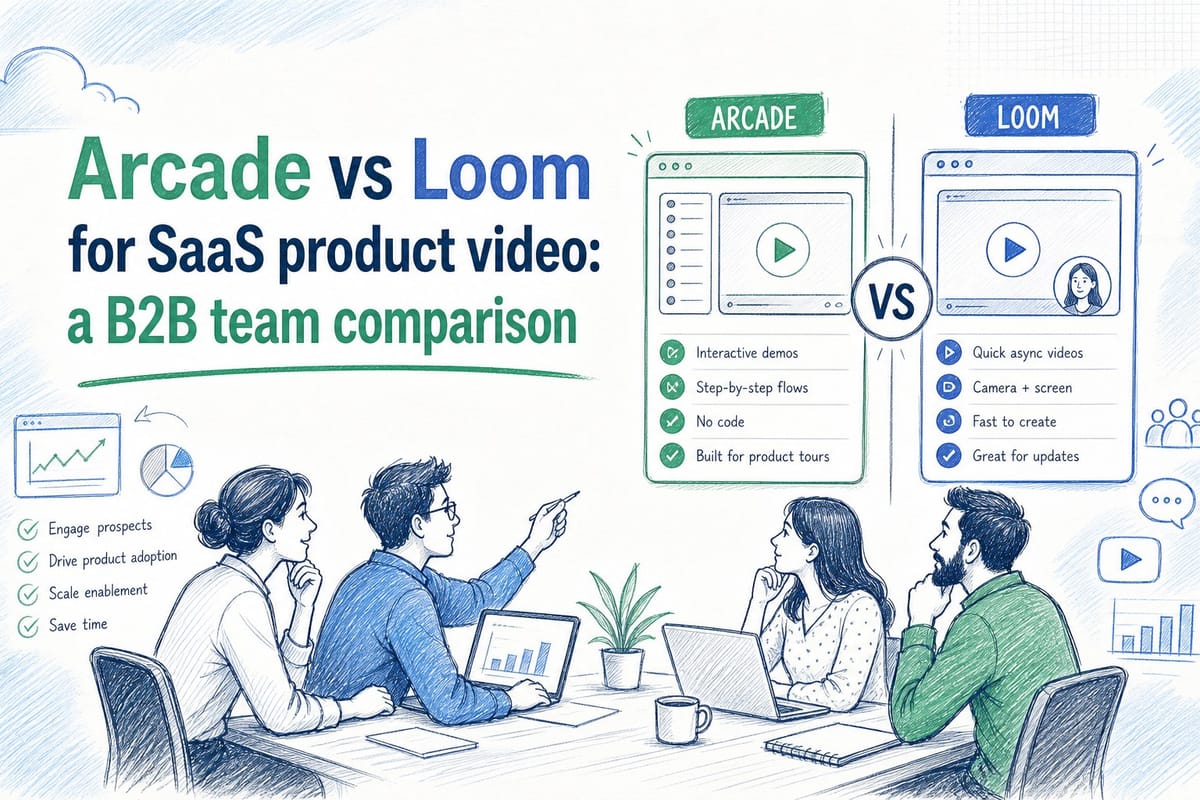
Table of contents
1. What Arcade and Loom are actually built for
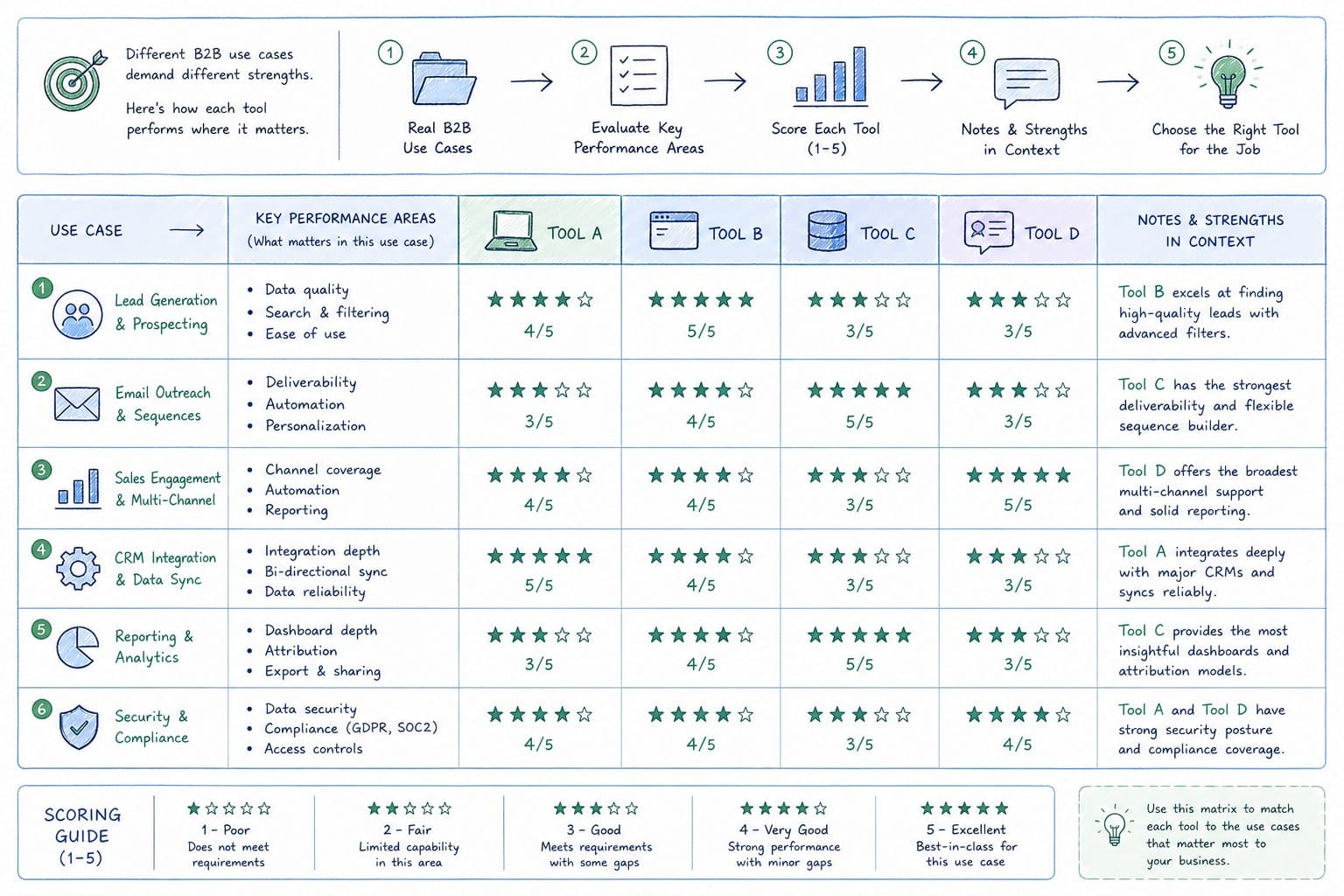
2. How each tool performs across real B2B use cases
3. The maintenance problem neither tool fully solves
If you are evaluating arcade vs loom saas product video options for your B2B team, you are probably already feeling the friction. You recorded a Loom walkthrough last quarter, your UI changed twice since then, and now that video lives on your website looking nothing like the actual product. Or you built a slick Arcade interactive tour, only to realize your sales team cannot drop it cleanly into a deck or a LinkedIn post. Both tools are genuinely useful for specific jobs. But when I look at the full lifecycle of a SaaS product video, from homepage hero to onboarding module to sales follow-up, neither Arcade nor Loom was built for what pre-Series B B2B teams actually need: a narrated, polished product film that stays accurate after every sprint. This article breaks down exactly what each tool does well, where each one falls short for B2B use cases, and what a growing SaaS team should think about when choosing a video workflow that can scale without burning out your PMM or CS team every time the product ships an update.
What Arcade and Loom are actually built for
Before comparing the two, it helps to be honest about what each tool was designed to do, because teams often buy one tool hoping it will do the job of another.
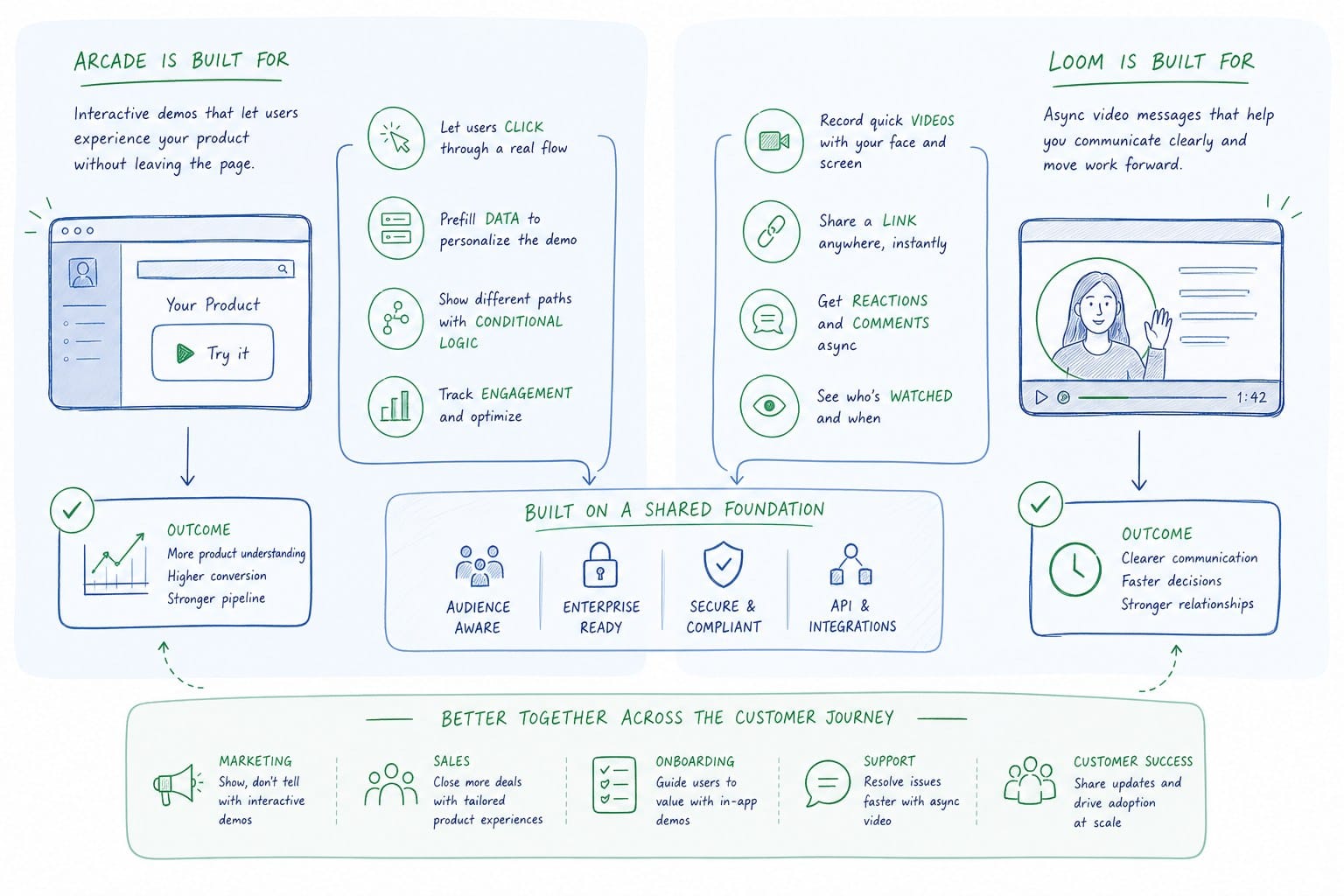
Loom is an async screen recording tool. You open it, hit record, walk through your screen, and share a link. That is the whole loop. It is genuinely fast, which is why it caught on so quickly for internal communication. Engineers use it to explain a bug. Managers use it to give feedback on a design. Sales reps use it for quick personalized follow-up videos after a discovery call. For those jobs, Loom is hard to beat. The recording is immediate, the sharing is frictionless, and the viewer can comment directly on the timeline.
The problem is that Loom was not built for polished external-facing video. When a sales rep records a Loom of your product, the output quality is entirely dependent on that rep's screen resolution, their speaking cadence, whether their browser has twelve tabs open in the background, and how steady their cursor movements are. Every Loom is essentially a one-take performance. There is no structured narrative, no consistent branding, and no way to refresh the video when your product UI changes without re-recording the whole thing from scratch.
Arcade sits in a different category. It is an interactive demo tool, not a traditional video tool. Instead of recording a linear video, Arcade captures a series of product screenshots and lets you layer hotspots, tooltips, and click-through steps on top of them. The result is an interactive tour that a prospect can click through at their own pace. For embedding in a help center or a landing page where you want a self-guided experience, Arcade can work well. The engagement argument is real. A prospect who clicks through steps actively is more engaged than one passively watching a video.
But Arcade's format also creates limitations that matter for B2B teams. Arcade outputs are interactive HTML experiences, not native video files. That means you cannot drop an Arcade tour into a LinkedIn feed, include it in a video section of a sales deck, or use it as a homepage hero video that plays automatically. Arcade also exports GIFs and click-through formats rather than full MP4 video files, which limits where you can actually distribute the content. When your growth team wants to repurpose the same product content across a website hero, a LinkedIn post, and a sales email, Arcade's format requires extra workarounds.
So the honest summary looks like this. Loom is best for fast, informal, one-to-one async communication. Arcade is best for self-guided interactive product tours on web pages where click-through behavior is the goal. Neither was designed for the job that most B2B SaaS teams actually need at growth stage: a professionally narrated, brandable, MP4-format product video that can be refreshed automatically when the product changes.
Understanding this distinction before you evaluate any tool will save your team weeks of frustration. The real question is not which of the two is better in some abstract sense. The question is which one matches the specific job you are trying to do, and whether either of them actually covers the full scope of what a growing SaaS team needs from a product video workflow.
How each tool performs across real B2B use cases
Let me walk through the specific use cases that come up most often for pre-Series B SaaS teams and look at how Arcade and Loom each perform in practice.
Homepage hero video
Your homepage is the highest-traffic real estate you have. A video hero that shows your product in action within the first ten seconds of a visit consistently outperforms static screenshots or generic animation. For this use case, Loom falls short immediately. A raw Loom recording looks like an internal screen share, not a product film. Even with Loom's newer AI editing features, the output is not designed to be a cinematic, brandable homepage experience. It is a screen recording with a face bubble.
Arcade fares a bit better for product showcasing, but because it outputs an interactive format rather than a native video file, embedding it as a true autoplay video hero requires workarounds. Most website builders and CMS platforms expect an MP4 or a hosted video embed, not an interactive HTML widget. And even if you get it embedded, an interactive tour on a homepage expects the visitor to take action immediately, which is a higher ask than a video that simply plays and shows the product.
The homepage hero use case really calls for a polished, narrated MP4 video that loads fast, plays automatically, and communicates your core value proposition in under sixty seconds. That is a fundamentally different artifact than what either Loom or Arcade produces.
Sales walkthrough videos
This is where I see the most inconsistency across B2B teams. Your AE records a Loom before a follow-up call. Another AE records a different Loom with slightly different messaging. A third one forgets to record entirely and just sends a text recap. There is no single source-of-truth walkthrough that the whole team can use.
Arcade can work here if you want to send a prospect a click-through experience they can explore on their own time. But when a prospect receives an Arcade link, they need to be in the right headspace to actively engage with a self-guided tour. In a busy inbox, many prospects will not click through all the steps. A video they can watch passively during lunch or on a phone has lower friction.
For sales teams, the ideal artifact is a narrated video that walks through the product the same way a great AE would, with consistent messaging, that can be dropped into any email client, deck, or proposal tool without reformatting. It also needs to stay accurate when the product changes, because a demo video that shows an old UI during a proposal cycle actively undermines trust.
Onboarding and customer success
This is where the maintenance problem becomes most painful. CS teams at SaaS companies record onboarding walkthroughs, upload them to a help center or learning management system, and then watch them go stale after the next release. A button moves. A settings flow changes. A new feature gets added to the main navigation. Suddenly the onboarding video is telling new users to click something that is no longer where the video says it is.
With Loom, re-recording is manual. Someone on the CS team has to find time in their week to redo the recording, re-upload it, and update every place it is linked. With Arcade, updating an interactive tour requires going back into the tool and re-capturing the affected screens. Both approaches rely on a human noticing the change, prioritizing the update, and doing the work.
For a deeper look at how this plays out in practice, the article on how customer success teams keep onboarding videos current after every UI update is worth reading. The core problem is not the initial recording. It is the ongoing maintenance burden that compounds with every sprint.
Social and LinkedIn distribution
Growth teams at SaaS companies know that native video on LinkedIn performs significantly better than link posts or image posts. A short product clip that plays in the feed and demonstrates value in fifteen to thirty seconds can drive meaningful top-of-funnel traffic. For this use case, Loom is essentially unusable. You cannot easily export a Loom as a clean MP4 formatted for a LinkedIn feed. The output looks like a screen recording because it is one.
Arcade is also unusable for LinkedIn native video. Its interactive HTML format cannot be published as a native video post. You would need to use a separate screen recording tool to capture the Arcade tour as a video, which adds steps and results in a lower-quality output.
For social distribution, you need MP4 video files in multiple aspect ratios: landscape for LinkedIn, square for some feeds, vertical for story-style placements. That need for multi-format output from a single piece of product content is something neither Loom nor Arcade was designed to solve.
Multi-format content from a single product story
This brings up a broader point about how product video actually works in a PLG or GTM motion. You do not want to create a homepage video, a sales walkthrough video, an onboarding video, and a LinkedIn clip as four completely separate projects. You want to capture your product story once and distribute it in multiple formats across the funnel without starting from scratch each time.
For more on how this distribution approach works, the article on product-led growth video strategy: using product footage across the funnel lays out a practical framework. The short version is that treating product video as a one-off production rather than a reusable content system is what makes the maintenance burden feel impossible.
The maintenance problem neither tool fully solves
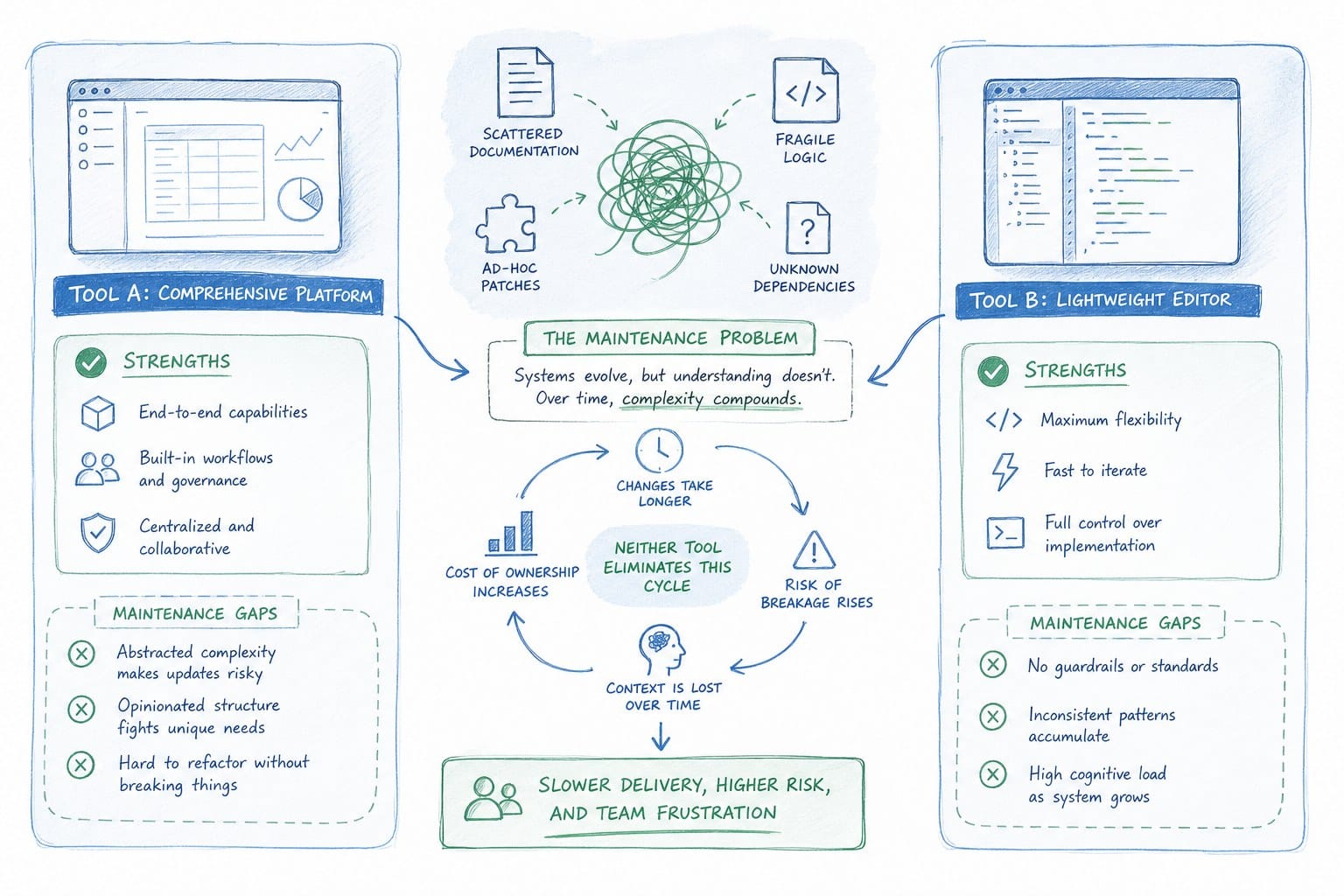
Here is what I think is the most underrated issue in the arcade vs loom saas product video conversation: neither tool was designed with update frequency in mind.
For a pre-Series B SaaS team shipping weekly or biweekly, your product UI is constantly changing. Navigation updates, new feature placements, revised onboarding flows, redesigned dashboards. Any video showing your product has a shelf life. And when that video expires, someone has to decide whether to re-record it, update it, or just leave the stale version in place and hope nobody notices.
In practice, most teams leave the stale version in place. The re-recording gets added to the backlog. Months pass. The gap between what the video shows and what the product actually looks like grows wider. Prospects watch a product demo that does not match the trial experience they are about to have. New users follow onboarding steps that no longer exist. Sales reps send walkthrough videos that show a UI from two redesigns ago.
This is not a hypothetical problem. It is the most common complaint I hear from PMMs at growth-stage SaaS companies. The initial video creation is manageable. The ongoing refresh cycle is what breaks the system.
Loom's approach to this problem is essentially: record again. There is no way to update a Loom recording without replacing it. If your homepage hero video is a Loom and your product UI changes, you are re-recording from scratch. For an internal async message, that is fine. For a polished homepage video or a sales asset, re-recording from scratch every sprint is not a realistic workflow.
Arcade's approach is slightly better in theory because you can re-capture individual screens in an interactive tour without rebuilding the whole thing. But you still need someone to manually identify which screens changed, go back into Arcade, re-capture those screens, and reassemble the flow. That process requires attention, time, and a team member who owns the task. At a small pre-Series B team, that person is usually already handling three other priorities.
The deeper issue is that both tools are capture-first tools. You capture something, you publish it, and then you deal with the maintenance separately. The workflow does not account for the reality that the source of truth for your product is the live product itself, and the video should reflect that source of truth automatically.
This is the gap that a platform like Product Frames was built to address. Instead of treating video creation as a one-time capture event, Product Frames generates narrated product video directly from a product URL or existing product footage. The output is an editable, regenerable video composition. When your product changes, you regenerate the video rather than re-recording it. The credit system, where one credit equals one second of finished video output, gives teams a clear and predictable way to manage refresh cycles without a separate production budget for every update.
For teams wondering whether there is a way to skip the screen recording process entirely, the article on how to create a product video from a URL without screen recording explains how URL-based video generation works and what it produces.
The comparison between Arcade and Loom is real and worth making. But for B2B SaaS teams at growth stage, the honest conclusion is that both tools solve a narrower problem than what most teams are actually facing. Loom solves async communication. Arcade solves interactive self-guided demos. What most pre-Series B teams need is a narrated, polished, distributable product video that stays current without manual re-recording, and that is a different category of tool entirely.
When I think about how founders, PMMs, CS teams, and sales reps actually use product video across the full customer journey, the workflow looks like this. A founder needs a homepage hero that plays automatically and reflects the current product. A PMM needs a sales walkthrough that is consistent across the whole team and does not require re-recording after every sprint. A CS team needs onboarding videos in a help center that match what users actually see in the product. A sales rep needs a deck-ready demo clip that is accurate at proposal time, not at the time it was recorded three months ago.
None of those jobs are best served by a screen recording tool or an interactive tour builder. They are served by a video generation system that is connected to the product itself and can refresh the video when the product changes.
The arcade vs loom saas product video debate is worth having if you are choosing between async internal communication and self-guided interactive demos. But if your goal is a professional product film that works across your homepage, your sales motion, your onboarding, and your social channels, the conversation needs to go beyond both tools to ask what kind of video workflow your team can actually sustain as the product evolves.
Ready to take the next step?
If your team is spending time re-recording product walkthroughs every time the UI changes, Product Frames was built to solve that specific problem. Visit productframes.com to see how URL-based video generation works and how much time your PMM or CS team could reclaim each sprint.